How to Format a Paper for IEEE Using LaTeX (Step-by-Step)
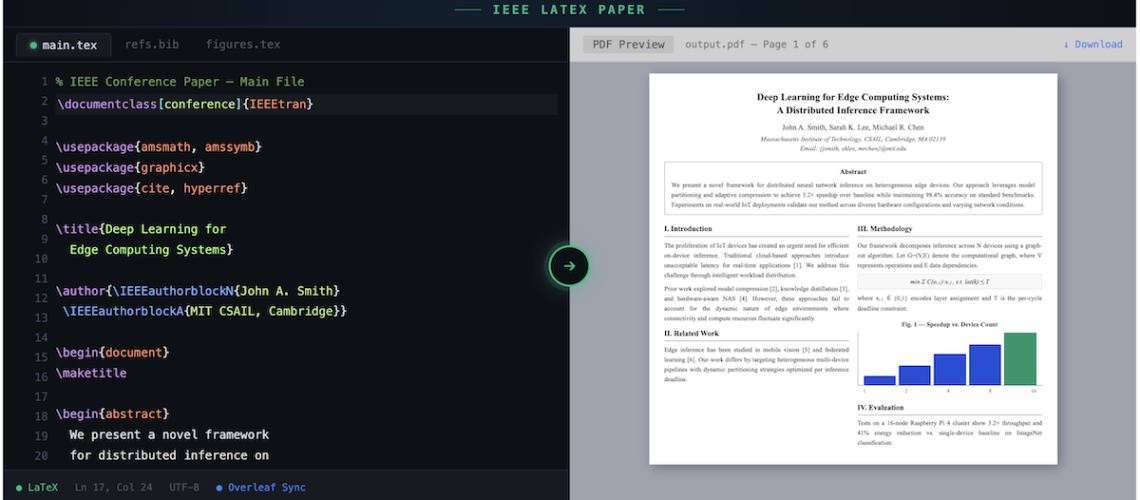
You’ve been told your paper needs to be in IEEE format. You download the template, open it in Overleaf, and immediately see 200 lines of LaTeX code you didn’t write and don’t understand. The two-column layout looks right, but you’re not sure which parts to edit, which to leave alone, and how to get your equations, figures, and bibliography to look the way IEEE wants them.
This guide walks you through formatting an IEEE paper in LaTeX from scratch – from choosing the right IEEEtran template to getting your bibliography in IEEE’s numbered citation style. Every step includes the actual LaTeX code, so you can copy, paste, and compile.
Whether you’re submitting to an IEEE Transactions journal, an IEEE conference, or IEEE Access, the core formatting steps are the same. The differences are in the \documentclass options, and we’ll cover those too.
⚡ Need your IEEE paper formatted for you?
Our Paper Pack service formats your paper to IEEE’s exact template spec – two-column layout, numbered citations, figure placement, and all packages configured. Delivered in 72 hours. Guaranteed to compile.
📑 In This Guide
- 01Choose the Right IEEE LaTeX Template
- 02Set Up the Document Structure
- 03Format Title, Authors, and Abstract
- 04Structure Sections and Headings
- 05Typeset Equations in IEEE Format
- 06Insert Figures and Tables Correctly
- 07Set Up the IEEE Bibliography
- 087 Common IEEE Formatting Mistakes
- 09IEEE LaTeX Submission Checklist
- 10Frequently Asked Questions
Step 1: Choose the Right IEEE LaTeX Template
IEEE uses the IEEEtran document class for virtually all its publications. But there are different configurations depending on whether you’re submitting to a journal or a conference. Getting this wrong is one of the most common reasons papers get desk-rejected before review.
For IEEE Journals (Transactions, Letters, Access)
\documentclass[journal]{IEEEtran}
This produces the standard two-column journal format with the IEEE-standard margins, fonts, and heading styles.
For IEEE Conferences
\documentclass[conference]{IEEEtran}
Conference format has slightly different author block styling and usually no biographies at the end.
For Peer Review Submission
\documentclass[journal,draftcls,onecolumn]{IEEEtran}
Some journals require single-column, double-spaced format for peer review. Check your target journal’s submission guidelines.
Pro tip: Always use the IEEE Template Selector to find the exact template for your specific journal. Some IEEE publications (like IEEE Photonics or Computer Society journals) have modified templates with additional requirements.
Where to Get the Template
- Overleaf: Search “IEEE” in Overleaf’s template gallery. Click “Open as Template” to start a new project instantly. This is the fastest way to begin.
- IEEE Author Center: Download the official template package from the IEEE Author Center. Includes IEEEtran.cls, IEEEtran.bst, and example files.
- CTAN: The IEEEtran package on CTAN is the canonical source and includes the full IEEEtran_HOWTO.pdf documentation.
If you already have a paper written in Word and need it converted to this template, see our guide on converting Word to LaTeX.
Step 2: Set Up the Document Structure
Every IEEE LaTeX paper follows the same skeleton. Here’s the minimal structure with the essential elements:
\documentclass[conference]{IEEEtran}

% === PACKAGES ===
\usepackage{amsmath,amssymb,amsfonts}  % Math
\usepackage{graphicx}                  % Figures
\usepackage{textcomp}                  % Text symbols
\usepackage{xcolor}                    % Colors
\usepackage{cite}                      % IEEE citation style
\usepackage{algorithmic}               % Algorithms (optional)
\usepackage[hidelinks]{hyperref}       % Clickable links (load last)

\begin{document}

\title{Your Paper Title Here}

\author{
  \IEEEauthorblockN{First Author}
  \IEEEauthorblockA{\textit{Department} \\
    \textit{University} \\
    City, Country \\
    email@example.com}
  \and
  \IEEEauthorblockN{Second Author}
  \IEEEauthorblockA{\textit{Department} \\
    \textit{University} \\
    City, Country \\
    email@example.com}
}

\maketitle

\begin{abstract}
Your abstract here. Keep it under 250 words.
\end{abstract}

\begin{IEEEkeywords}
keyword1, keyword2, keyword3
\end{IEEEkeywords}

\section{Introduction}
Your introduction text...

\section{Related Work}
...

\section{Methodology}
...

\section{Results}
...

\section{Conclusion}
...

\bibliographystyle{IEEEtran}
\bibliography{references}

\end{document}
Copy this skeleton, replace the placeholder text, and you have a working IEEE paper. The rest of this guide covers the details of each section.
Step 3: Format the Title, Authors, and Abstract
IEEE has strict conventions for these elements. Getting them wrong is immediately visible to reviewers.
Title
Capitalize the first letter of each major word. Do not use math, special symbols, or citations in the title. LaTeX handles the font size and centering automatically through \maketitle.
Authors and Affiliations
Use \IEEEauthorblockN for author names and \IEEEauthorblockA for affiliation details. For conference papers, IEEE displays authors side by side. For journal papers, the layout adapts automatically. Connect co-authors from the same institution using a shared block, and separate different institutions with \and.
Abstract
The abstract begins with \begin{abstract} and is italicized automatically. IEEE abstracts should be 150–250 words. Do not include citations, equations, or references to figures in the abstract. The word “Abstract” appears automatically – don’t type it yourself.
Keywords
Use the IEEEkeywords environment. IEEE uses lowercase keywords separated by commas. The heading “Index Terms” appears automatically in journal mode; “Keywords” appears in conference mode.
Step 4: Structure Sections and Headings the IEEE Way
IEEE uses Roman numeral numbering for top-level sections and letter numbering for subsections. IEEEtran handles this automatically. Do not manually number your sections.
\section{Introduction} % I. INTRODUCTION
\subsection{Background} % A. Background
\subsubsection{Specific Topic} % 1) Specific Topic
Section titles are automatically UPPERCASED in IEEE journal style. In conference mode, only the first letter is capitalized. Do not override this – the template handles it.
Important: Never use \section*{} (unnumbered sections) for main content. Use them only for Acknowledgments and References, which IEEE requires to be unnumbered.
Step 5: Typeset Equations in IEEE Format
IEEE papers number equations sequentially with Arabic numerals in parentheses, right-aligned. The equation environment handles this automatically:
\begin{equation}
E = mc^2
\label{eq:einstein}
\end{equation}
This produces: E = mc² with (1) right-aligned.
For multi-line equations, use the align environment from amsmath:
\begin{align}
f(x) &= ax^2 + bx + c \label{eq:quad} \\
g(x) &= \frac{df}{dx} = 2ax + b \label{eq:deriv}
\end{align}
Reference equations in text using \eqref{}: “as shown in \eqref{eq:einstein}” produces “as shown in (1).”
Pro tip: IEEE recommends composing in two-column format from the start so you can verify equations fit within the column width. Equations that span both columns require the figure* or equation* environments, but IEEE discourages double-column equations. If an equation is too wide, break it across lines using align.
Step 6: Insert Figures and Tables Correctly
Figures
IEEE requires figures to be high-resolution (at least 300 DPI for raster, vector preferred) and placed at the top or bottom of columns, not inline with text. Use the figure environment:
\begin{figure}[t] % [t] = top of column
\centering
\includegraphics[width=\columnwidth]{figures/result.pdf}
\caption{Comparison of model accuracy across datasets.}
\label{fig:results}
\end{figure}
For figures that span both columns, use figure* instead of figure.
Critical: The \label command must come AFTER \caption, not before. If you place \label before \caption, your cross-references will point to the wrong figure number. This is one of the most common IEEE formatting mistakes.
Tables
IEEE tables use Roman numeral numbering (Table I, Table II). The caption goes ABOVE the table, unlike figures where captions go below:
\begin{table}[t]
\caption{Classification Results}
\label{tab:results}
\centering
\begin{tabular}{lcc}
\hline
Method & Accuracy & F1-Score \\
\hline
Baseline & 0.82 & 0.79 \\
Proposed & \textbf{0.91} & \textbf{0.88} \\
\hline
\end{tabular}
\end{table}
Reference figures and tables in text using \ref{}: “as shown in Fig.~\ref{fig:results}” and “as listed in Table~\ref{tab:results}.” IEEE uses “Fig.” (abbreviated) for figures and full “Table” for tables.
📦 Struggling with IEEE formatting?
The LaTeX Lab formats your paper to IEEE’s exact spec. IEEEtran template configured, figures placed, bibliography in IEEE numbered style, and compilation tested in Overleaf.
From $149. Guaranteed to compile.
Step 7: Set Up the IEEE Bibliography with BibTeX
IEEE uses numbered citations in square brackets [1], [2], [3], ordered by first appearance in the text. The IEEEtran bibliography style handles this automatically. Here’s the setup:
In your main .tex file (at the end, before \end{document})
\bibliographystyle{IEEEtran}
\bibliography{references} % references.bib
In your references.bib file
@article{smith2024,
author = {Smith, John and Doe, Jane},
title = {A Novel Approach to Signal Processing},
journal = {IEEE Trans. Signal Process.},
volume = {72},
number = {3},
pages = {1024--1035},
year = {2024}
}

@inproceedings{chen2023,
author = {Chen, Wei and Zhang, Li},
title = {Deep Learning for Channel Estimation},
booktitle = {Proc. IEEE Intl. Conf. Commun.},
year = {2023},
pages = {1--6}
}
Cite references in text using \cite{smith2024}. For multiple citations: \cite{smith2024, chen2023} produces [1], [2].
Critical formatting rules: IEEE abbreviates journal names (e.g., “IEEE Trans. Signal Process.” not the full name). Use the IEEEabrv.bib abbreviations file included with the template. Capitalize only the first word in paper titles. For conference papers, use “Proc.” before the conference name.
Pro tip: BibTeX entries exported from IEEE Xplore, Google Scholar, or Mendeley are rarely in correct IEEE format. You’ll need to manually check journal abbreviations, author name format, and page ranges.
7 Common IEEE LaTeX Formatting Mistakes That Get Papers Rejected
- Using the wrong \documentclass option. Conference vs journal format matters. A journal paper submitted in conference format will look wrong immediately. Always check which format your publication requires.
- Altering margins, fonts, or column widths. IEEE’s instructions are explicit: “All margins, column widths, line spaces, and text fonts are prescribed; please do not alter them.” The IEEEtran class handles everything. Do not use the geometry package or manually set margins.
- Putting \label before \caption. This causes figure and table numbering to break. Always write \caption{…} first, then \label{…} on the next line.
- Using \bibliographystyle{plain} instead of \bibliographystyle{IEEEtran}. The plain style produces alphabetically-sorted references with a different citation format. IEEE requires numbered citations ordered by first appearance.
- Not abbreviating journal names in references. IEEE requires abbreviated journal titles. “IEEE Transactions on Signal Processing” must appear as “IEEE Trans. Signal Process.” in the bibliography.
- Using incorrect figure formats. IEEE frowns on bitmapped formats for diagrams and charts. Use PDF or EPS for vector graphics, PNG only for photographs. Never submit JPG diagrams – they produce jagged lines at print resolution.
- Forgetting to remove template guidance text. The IEEE conference template contains red text that says “remove all template text from your conference paper prior to submission.” Reviewers see this more often than you’d think. (For more compilation issues, see our common LaTeX errors guide)
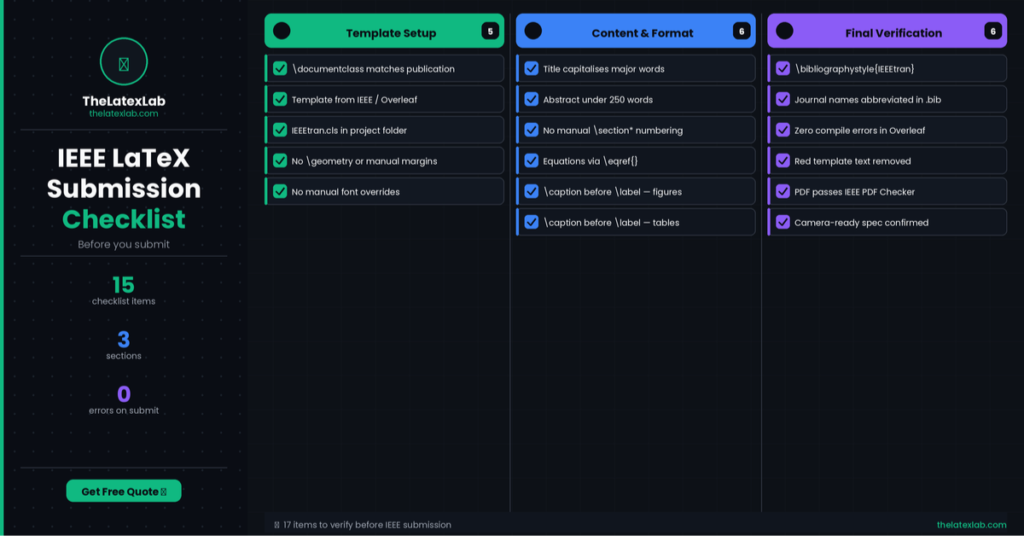
IEEE LaTeX Submission Checklist
- Before uploading to the IEEE submission portal, verify every item:
- \documentclass matches your target publication (journal or conference)
- Title follows IEEE capitalization rules (capitalize major words)
- Abstract is under 250 words with no citations or equation references
- All sections are numbered automatically (no manual numbering)
- Every equation is numbered and referenced using \eqref{}
- Every figure has a caption below it with \label after \caption
- Every table has a caption above it with \label after \caption
- \bibliographystyle{IEEEtran} is used (not plain, unsrt, or abbrv)
- Journal names in .bib file are properly abbreviated
- The paper compiles with zero errors in Overleaf or your local distribution
- All template guidance text (red text in conference template) is removed
- PDF passes the IEEE PDF Checker
🚀 Ready to submit your IEEE paper?
Upload your Word file or draft LaTeX and tell us which IEEE publication you’re targeting.
We’ll format it to the exact IEEEtran spec and verify compilation.
Two-column layout · Numbered citations · Figure placement · Template compliance verified
72 hour delivery · From $149 · IEEE Transactions, Conferences & Access
Frequently Asked Questions
What LaTeX template does IEEE use?
IEEE uses the IEEEtran document class (IEEEtran.cls) for journals and conferences. Use \documentclass[journal]{IEEEtran} for journal papers or \documentclass[conference]{IEEEtran} for conference papers. Always get the latest template from the IEEE Template Selector or Overleaf’s IEEE template gallery.
How do I format an IEEE paper in Overleaf?
Go to Overleaf, search for “IEEE” in the template gallery, and click “Open as Template.” Choose the journal or conference version. Replace the placeholder text with your content, add your figures and .bib file, and compile. Overleaf includes IEEEtran.cls and IEEEtran.bst by default, so no additional installation is needed.
What citation style does IEEE use in LaTeX?
IEEE uses numbered citations in square brackets [1], [2], [3], ordered by first appearance in text. Use \bibliographystyle{IEEEtran} and the cite package (\usepackage{cite}) to get the correct format. Do not use natbib or biblatex for IEEE submissions unless the journal specifically requires it.
Why does my IEEE paper look wrong in LaTeX?
The most common causes are: using the wrong \documentclass option (conference vs journal), manually overriding margins or fonts, using a non-IEEE bibliography style, or not loading the required packages. Start from an official IEEE template rather than trying to configure formatting manually.
How do I format figures and tables for IEEE in LaTeX?
Figures use \begin{figure}[t] with \caption below the image and \label after \caption. Tables use \begin{table}[t] with \caption above the table content. Use vector formats (PDF, EPS) for diagrams. Reference figures as “Fig.~\ref{}” and tables as “Table~\ref{}.” IEEE numbers tables with Roman numerals (Table I, II, III).
