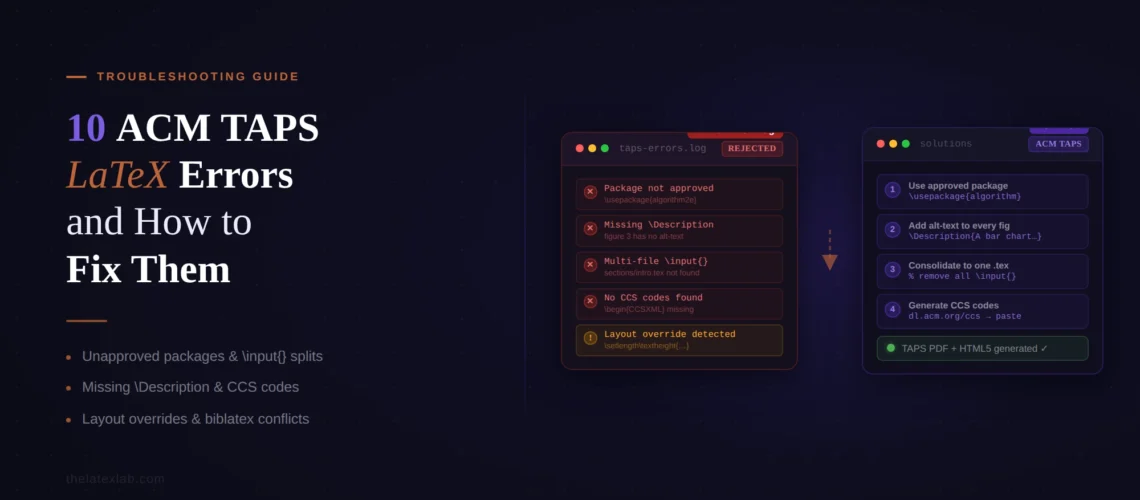
The most common ACM TAPS LaTeX error is a validation failure you cannot debug locally because TAPS enforces rules that go beyond what LaTeX requires to produce a PDF. Your paper compiled cleanly in Overleaf. You zipped it up, uploaded it to the TAPS author dashboard, and received a validation error within hours. The error log mentions missing rights commands, a disallowed package, or a format option that TAPS does not recognize as camera-ready. None of this was visible when you compiled locally.
This post covers the 10 specific TAPS validation errors we see across ACM conferences, with the exact error, the root cause, and the fix. ACM’s production pipeline is fundamentally different from Elsevier, Springer, or IEEE because TAPS generates both PDF and HTML5 from your source, which means errors that are invisible in a PDF can break the HTML output and get flagged by production editors.
Quick answer: Why did TAPS reject your ACM LaTeX paper?
TAPS rejected your submission because it failed validation before PDF and HTML5 generation could begin. The most common causes:
- The rights management commands from your eRights form are missing or incomplete
- You used a LaTeX package not on ACM’s approved whitelist
- You submitted in manuscript (review) format instead of sigconf or your conference’s required format
- CCS concepts are missing from full-length papers
- Your ZIP contains multiple .tex files with \documentclass
TAPS support takes 4-6 business days to respond. Every fix below can be done yourself in minutes once you know the cause.
1. Rights Management Commands Are Missing
What you see: TAPS validation error: “missing rights command(s) – one or more of the LaTeX commands given to you when you completed the rights form are not included in the LaTeX source file.”
Why it happens: After your paper is accepted and you complete the ACM eRights form, ACM sends you an email containing a block of LaTeX commands: \copyrightyear{}, \acmYear{}, \setcopyright{}, \acmConference{}, \acmBooktitle{}, \acmDOI{}, \acmISBN{}, and \acmPrice{}. All of these must be present in your .tex file before \begin{document}. If any are missing, TAPS cannot generate the proper copyright notice and bibliographic metadata for the ACM Digital Library.
The fix: Find the email from rightsreview@acm.org that you received after completing the eRights form. Copy the entire block of LaTeX commands from that email into your .tex file’s preamble, after \documentclass[sigconf]{acmart} and before \begin{document}. Do not modify the values. If you did not receive this email, check your spam folder or contact your proceedings chair to have it resent.
2. You Used a Package Not on the Whitelist
What you see: TAPS validation error: “invalid LaTeX packages – you are using a LaTeX package that is not on the list of approved packages.”
Why it happens: TAPS maintains a strict whitelist of approved LaTeX packages. If your preamble loads any package not on this list, TAPS rejects the entire submission. The whitelist exists because TAPS needs to generate HTML5 alongside PDF, and not all LaTeX packages can be reliably converted to HTML. Common packages that are not on the whitelist include custom font packages, specialized table formatting packages, and color definition files.
The fix: Check every \usepackage{} line in your preamble against ACM’s approved package list. Remove or replace any package not on the list. Common substitutions: if you are using a disallowed color package, switch to the standard xcolor (which is approved). If you are using a custom listing package, switch to listings (approved). If you cannot find a replacement for a critical package, email acmtexsupport@aptaracorp.com to request it be added. Also note that several packages are already loaded by acmart internally. Do not load them again in your preamble: natbib, hyperref, graphicx, xcolor, and geometry are among the packages acmart handles itself.
TAPS validation failures have a 4-6 day support turnaround.
We fix TAPS errors the same day. Upload your .tex file and the TAPS error log, and we deliver a validated package ready for resubmission.
3. You Submitted the Review Format as Camera-Ready
What you see: TAPS generates output that is single-column with line numbers, which is clearly not the final published format. Or TAPS rejects the submission because the format option does not match what the proceedings expect.
Why it happens: During peer review, ACM requires \documentclass[manuscript]{acmart}, which produces a single-column, double-spaced format with line numbers. After acceptance, you need to switch to the camera-ready format: \documentclass[sigconf]{acmart} for most conferences, [sigplan] for SIGPLAN events, [acmsmall] for most journals, or [acmtog] for TOG. Authors frequently forget to change this option, or they change it but do not also remove the manuscript, review, or anonymous options that should only be present during submission.
The fix: Change your \documentclass line to the camera-ready format your conference specifies. Remove manuscript, review, anonymous, and authordraft options. For most ACM conferences, the correct line is \documentclass[sigconf]{acmart}. After switching, recompile and review your paper carefully. The layout change from single-column to two-column will shift figure placement, table widths, and page count. This is often more than a one-line fix.
4. CCS Concepts Are Missing
What you see: TAPS validation warning or production editor feedback that CCS concepts are required. The first page of your paper has no classification descriptors below the abstract.
Why it happens: ACM requires Computing Classification System (CCS) concepts in every full-length paper. These are not free-text keywords. They are structured taxonomy descriptors generated from the ACM CCS tool and inserted into your .tex file as \ccsdesc[importance]{category~subcategory~term} commands. The syntax is specific and unintuitive, and many authors skip it or get the nesting wrong.
The fix: Go to the ACM CCS tool at dl.acm.org/ccs. Select the concepts that describe your paper’s topic. Click “Generate CCS Codes” and copy the LaTeX code it produces. Paste this code into your .tex file’s preamble after your \begin{abstract}...\end{abstract} block and before \maketitle. Also add \keywords{} with your author-selected keywords on the line after the CCS block. Papers of 2 pages or fewer may omit CCS concepts.
5. Your ZIP Contains Multiple \documentclass Files
What you see: TAPS validation error stating that multiple files contain a \documentclass command.
Why it happens: When you download the acmart template, it comes with several sample files (sample-sigconf.tex, sample-sigplan.tex, etc.), each containing its own \documentclass line. If you included these sample files in your ZIP upload, or if you have a secondary .tex file from a previous draft, TAPS cannot determine which file is your main document.
The fix: Before zipping, remove every .tex file from your source folder except the one that is your actual paper. Delete all sample-*.tex files, any backup .tex files, and any auxiliary .tex files that contain a \documentclass command. If your paper uses \input{} to include content from other .tex files, those included files must not contain \documentclass. Only the main .tex file should have it.
ACM has the most complex submission pipeline of any CS publisher.
We handle the full TAPS workflow: rights commands, CCS concepts, package whitelist verification, format switching, and HTML rendering checks. Upload your paper and the eRights email.
6. Wrong Bibliography Style
What you see: References are formatted incorrectly in the TAPS-generated PDF, or TAPS flags a bibliography style error. Citations may appear in a non-ACM format.
Why it happens: ACM requires ACM-Reference-Format.bst as the bibliography style for all publications. If you are using a custom .bst file, plain.bst, or any other style, TAPS will either reject the submission or produce incorrectly formatted references. Some conferences (notably SIGGRAPH and SIGGRAPH Asia) use author-year citations instead of numbered citations, which requires adding \citestyle{acmauthoryear} to your preamble.
The fix: Set your bibliography style with \bibliographystyle{ACM-Reference-Format} and make sure the ACM-Reference-Format.bst file is included in your ZIP. The acmart template package includes this file. For numbered citations (the default for most ACM conferences), no additional configuration is needed. For author-year citations (SIGGRAPH), add \citestyle{acmauthoryear} to your preamble. Do not manually set \bibliographystyle{} to anything other than ACM-Reference-Format.
7. \vspace Abuse Gets Flagged
What you see: Production editors return your paper with notes about improper use of \vspace, or the HTML version has unexpected gaps or missing spacing.
Why it happens: The acmart documentation explicitly states: “Do not abuse this command.” TAPS and production editors flag \vspace commands used to manipulate page layout, squeeze content into page limits, or override the default spacing acmart provides. Unlike IEEE or Springer, where spacing hacks might slip through, ACM’s dual-output pipeline (PDF + HTML) makes these visible: a \vspace{-5pt} that tightens your PDF layout produces broken spacing in the HTML version.
The fix: Remove all \vspace commands except those required by wrapfigure or wraptable environments. If your paper exceeds the page limit, cut content rather than compressing spacing. ACM’s template is intentionally designed with specific spacing, and modifications are not allowed. The same applies to \setlength commands that alter margins, column separation, or paragraph spacing. TAPS will accept the submission but the production team will return it for correction.
8. Figure Paths With ./ Prefix Break TAPS
What you see: TAPS cannot find your figures, or the generated PDF shows missing figure placeholders, even though the images are in your ZIP.
Why it happens: TAPS processes files in its own directory structure. The ./ prefix in figure paths (like \includegraphics[width=\linewidth]{./figures/dog.pdf}) can cause TAPS to look in the wrong location. This is a subtle issue because the ./ prefix works perfectly in Overleaf and local compilations.
The fix: Remove the ./ prefix from all figure paths. Change \includegraphics{./figures/dog.pdf} to \includegraphics{figures/dog.pdf}. If your figures are in a subfolder, use the relative path without the leading dot-slash. If your figures are in the same directory as your .tex file, use just the filename.
9. Your Paper Looks Fine in PDF but Breaks in HTML
This is unique to ACM and does not apply to any other publisher in the troubleshooting series. TAPS generates HTML5 alongside PDF, and production editors review the HTML version. Errors that are completely invisible in the PDF can produce broken output in HTML.
Common HTML-specific issues:
\hspace{10px} or similar pixel-unit spacing in equations produces literal “px” text in the HTML output. Replace with \quad, \qquad, or \hspace{1em}.
CJK characters inside \Description{} commands (used for figure accessibility alt-text) cause TAPS HTML generation to fail. If your figure descriptions contain non-Latin characters, wrap the description in CJK environments or simplify the text.
Custom enumitem options on lists (like [topsep=5pt, itemsep=0mm, leftmargin=30pt]) can produce broken list rendering in HTML. Wrap lists with custom formatting in \aptLtoX blocks so that the HTML version gets a clean default list while the PDF version keeps your formatting.
\phantomsection commands cause TAPS to break. If you need \phantomsection, wrap it: \aptLtoX[graphic=no, type=html]{}{\phantomsection}.
For general LaTeX compilation errors not specific to ACM, see our guide to common LaTeX compilation errors. If you are also submitting to IEEE or Springer, our IEEE template guide and Springer template guide cover those publishers’ submission systems. The community-maintained TAPS troubleshooting gist on GitHub also documents many edge cases.
10. Author and Affiliation Coding Is Wrong
What you see: Author names, affiliations, or emails render incorrectly in the TAPS-generated PDF or HTML. Authors appear on wrong lines, affiliations are merged, or email addresses are missing.
Why it happens: acmart requires each author to be coded individually with separate \author{}, \affiliation{}, and \email{} commands. Grouping multiple authors in a single \author{} command or sharing one \affiliation{} block across authors produces incorrect output. Each affiliation must include \institution{}, \city{}, and \country{} subfields. The author information in TAPS must also match what you entered on the eRights form exactly. Any mismatch in names, order, or affiliations will be flagged.
The fix: Code each author as a separate block:
\author{First Author}
\affiliation{\institution{University Name}\city{City}\country{Country}}
\email{first@example.com}
Repeat this pattern for every author. Do not combine authors. Verify that the author names and order match the eRights form exactly. TAPS transfers rights information from the form, and mismatches between the form and your .tex file will delay publication.
Pre-Submission Checklist
Run through this before uploading your ZIP to TAPS.
Format: Camera-ready format option (sigconf, sigplan, acmsmall, acmtog). No manuscript, review, anonymous, or authordraft options remaining.
Rights: All rights management commands from the eRights email inserted in the preamble. Author names and order match the eRights form exactly.
Packages: Every \usepackage{} checked against ACM’s approved whitelist. No packages already loaded internally by acmart (natbib, hyperref, graphicx, xcolor, geometry).
CCS: CCS concepts generated from the ACM CCS tool and inserted in the correct location. Keywords provided.
Bibliography: Using ACM-Reference-Format.bst. For SIGGRAPH, \citestyle{acmauthoryear} in preamble.
ZIP structure: Only one .tex file with \documentclass. No sample files, no backup .tex files. Source folder contains all figures, .bib, and .bst files.
Figures: No ./ prefix in paths. All images at sufficient resolution for both PDF and HTML rendering.
Authors: Each author coded individually with \author{}, \affiliation{}, and \email{}. Affiliations include \institution{}, \city{}, \country{}.
HTML checks: No \hspace with pixel units. No \phantomsection outside aptLtoX wrappers. No \vspace except with wrapfigure/wraptable.
