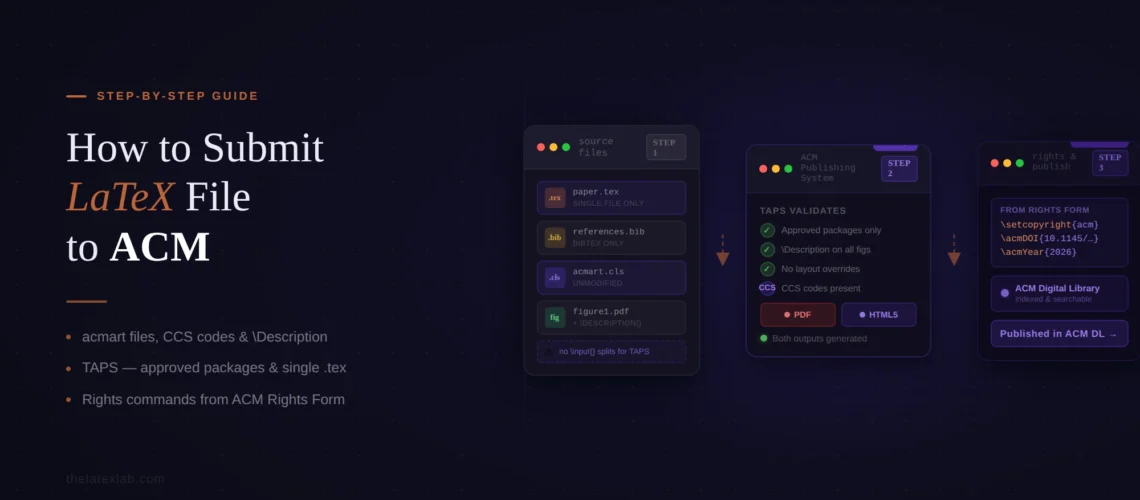
ACM conference submissions have a two-phase workflow that catches nearly every first-time author off guard. Phase one is submitting your paper for review, which uses the conference’s submission system (HotCRP, OpenReview, or similar) and requires a single-column “manuscript” format PDF. Phase two happens after acceptance: you complete an ACM rights form, insert specific LaTeX commands ACM emails you, prepare a camera-ready version, and submit your source files to TAPS (The ACM Publishing System), which generates both a PDF and an HTML5 version of your paper for the ACM Digital Library. If you have searched for how to submit LaTeX to ACM conference or tried to debug an ACM LaTeX submission error in TAPS, you already know that ACM’s documentation is scattered across a dozen pages with different instructions for each phase.
We handle ACM conference submissions regularly at TheLaTeXLab, from initial review formatting through camera-ready TAPS delivery. This guide covers both phases in order: setting up the acmart template, generating CCS codes, preparing the review submission, completing the rights form, packaging files for TAPS, and fixing the errors that cause the most TAPS rejections.
Quick answer: How to submit LaTeX to ACM conference
- Use the acmart document class with the
sigconftemplate style (most conferences) orsigplan - For review: use
\documentclass[manuscript]{acmart}to generate single-column format, submit PDF through the conference system - After acceptance: complete the ACM eRights form and insert the LaTeX commands ACM emails you
- Remove the
manuscriptoption, add CCS concepts and keywords, generate your camera-ready PDF - Package your source files in a ZIP with a
source/folder and upload to TAPS - Review the TAPS-generated PDF and HTML5 output, fix any issues, and approve
The most common TAPS rejection is using a LaTeX package not on ACM’s approved list. The second most common is missing or incorrect rights management commands. Both are preventable.
The Two-Phase Process to Submit Latex to ACM Conference
Understanding that ACM conference submission is a two-phase process saves hours of confusion. Each phase has different requirements, different systems, and different formatting rules.
Phase 1: Review submission. You submit a PDF of your paper to the conference’s own submission system. Most ACM conferences use HotCRP, OpenReview, EasyChair, or a similar platform. For this phase, your paper must be in single-column “manuscript” format, generated by adding the manuscript option to your \documentclass command: \documentclass[manuscript]{acmart}. This format is intentionally plain. It is one column, double-spaced, and does not include the final ACM formatting. The review version does not need rights management commands, CCS codes, or the ACM reference format block. Many conferences require anonymized submissions for double-blind review. In that case, add the anonymous option: \documentclass[manuscript,anonymous]{acmart}.
Phase 2: Camera-ready submission (after acceptance). Once your paper is accepted, you complete the ACM eRights form, receive LaTeX commands via email, insert them into your source file, remove the manuscript option so your paper renders in the final two-column format, add CCS concepts and keywords, and submit your complete source files to TAPS. TAPS compiles your source and generates both a PDF and an HTML5 version for the ACM Digital Library. You review both outputs, fix any issues, and approve for publication.
The key mistake authors make is preparing their camera-ready version before completing the rights form. The rights form generates specific LaTeX commands (\setcopyright, \acmDOI, \acmConference, etc.) that you must insert into your source file. Without these commands, your paper will be missing the rights text, the DOI, and the conference information that appear on the first page of every ACM publication.
Setting Up the acmart Template
ACM uses a single consolidated template called acmart for all journals and conference proceedings. The current version is v2.16. You can download it from ACM’s proceedings template page, install it via your TeX distribution (the “acmart” package is included in TeX Live and MiKTeX), or use the pre-loaded template on Overleaf.
The template style you use depends on your conference. Most proceedings authors use sigconf:
% For review submission (single column)
\documentclass[manuscript,sigconf]{acmart}

% For camera-ready (two column, final format)
\documentclass[sigconf]{acmart}
SIGPLAN conferences use a different style:
\documentclass[sigplan]{acmart}If you are unsure which style to use, check your conference’s call for papers or ask the program chairs. Using the wrong style will not cause compilation errors, but the formatting will be wrong and the production editor will return your paper.
The acmart template uses the libertine font set, which must be installed on your system. If libertine is missing, you will get font-not-found errors during compilation. On TeX Live, it is included in the full installation. On MiKTeX, it is typically downloaded on first use. In Overleaf, it is pre-installed.
Important restrictions on the template: fonts cannot be substituted, margin adjustments are not allowed, and you must not override the template’s layout definitions. ACM’s production system (TAPS) will process your source with an unmodified version of the acmart class. Any custom layout modifications will be stripped or cause errors. Specifically, do not use \vspace except around wrapfigure/wraptable environments, do not redefine standard LaTeX commands, and do not adjust page geometry.
Our insight: We see about 1 in 4 ACM conference submissions come to us with layout overrides that TAPS will reject. The most common are \vspace{-10pt} hacks to squeeze content onto fewer pages and \setlength{\textwidth} adjustments. These compile locally without errors, but TAPS strips them and the paper reformats, often pushing content onto additional pages. If your paper is too long, cut content rather than adjusting spacing.
We configure the acmart template for any ACM conference or journal, with the correct style, CCS codes, and rights commands.
From manuscript to TAPS-ready source files, compiled and validated against ACM’s package whitelist. Delivered in 72 hours.
CCS Concepts, Keywords, and the Rights Form
These three elements are required on every ACM publication and are the most commonly missing components in camera-ready submissions.
ACM Computing Classification System (CCS) concepts
ACM requires every paper to include CCS classification codes. These are used for indexing in the ACM Digital Library. To generate the codes, go to the ACM CCS tool, browse through the classification tree, select the concepts that match your paper (typically 2 to 4, with at least one at “High” relevance), and click “Generate CCS Codes.” The tool produces a block of LaTeX code that includes both XML metadata (inside a CCSXML environment) and display commands (\ccsdesc). Copy the entire block and paste it into your .tex file before \maketitle.
The CCS codes must include the XML metadata block. Some authors copy only the \ccsdesc commands and skip the XML. This generates the visible CCS display on the paper but loses the metadata, which ACM needs for the Digital Library. Always copy the full output from the CCS tool.
Keywords
Add keywords using the \keywords command before \maketitle. These are separate from CCS concepts and should be specific terms relevant to your paper. Do not duplicate CCS concept terms in your keywords list.
The ACM eRights form
After your paper is accepted, you will receive an email from rightsreview@acm.org with a link to complete the ACM eRights form. Make sure emails from this address go to your inbox. After completing the form, you receive a second email containing specific LaTeX commands that must be inserted into your source file. These commands include:
\setcopyright{acmlicensed}   % or another rights option
\copyrightyear{2026}
\acmYear{2026}
\acmDOI{10.1145/XXXXXXX.XXXXXXX}
\acmConference[CONF '26]{Full Conference Name}{June 1--4, 2026}{City, Country}
\acmBooktitle{Proceedings of CONF '26}
\acmISBN{978-1-4503-XXXX-X/26/06}
\acmPrice{15.00}
Replace the sample values in the template with the exact values from your rights confirmation email. These commands generate the rights statement text on the first page, the “ACM Reference Format” block, and the conference information in the page headers. Getting these wrong (or leaving the template’s sample values in place) will cause TAPS to reject your submission or, worse, publish your paper with incorrect rights information.
Our insight: The most common rights form mistake we see is authors leaving the sample \acmDOI{XXXXXXX.XXXXXXX} and sample \acmConference values from the template in their source file instead of replacing them with the values from their rights confirmation email. TAPS does not always catch this during validation. The error only becomes visible in the generated PDF, where the first page shows placeholder text instead of the real DOI and conference name. Always check the first page of the TAPS-generated PDF against your rights confirmation email.
Packaging Your Files for TAPS
TAPS requires a specific ZIP file structure. Getting this wrong is a common source of validation errors.
Your ZIP file should be named <Proceeding-Acronym>-<Paper-ID>.zip (e.g., CHI2026-1234.zip). Inside, create the following structure:
CHI2026-1234.zip
├── source/
│   ├── main.tex
│   ├── references.bib
│   ├── acmart.cls        (if not relying on TAPS's installed version)
│   ├── figure1.pdf
│   ├── figure2.png
│   └── (any custom .sty or .bbl files)
├── pdf/                   (optional)
│   └── main.pdf
└── supplements/           (optional, for supplemental material)
    └── appendix.pdf
The source/ folder is mandatory and must contain all files needed to compile your paper. The pdf/ folder is optional and contains a compiled PDF for reference. The supplements/ folder is for supplemental material that will be available online but not included in the PDF.
Key rules for the TAPS package:
Only one .tex file should contain the \documentclass{acmart} command. If you have multiple .tex files (using \input{}), only the main file should have this command. If TAPS finds multiple files with \documentclass, it shows a validation error.
Filenames should only contain upper- and lower-case letters, numbers, dashes, and underscores. No spaces, periods (other than extensions), or special characters.
Figures can be in the source/ folder directly or in a subfolder within it, as long as the paths in your .tex file match. Unlike Springer’s Editorial Manager, TAPS does support subfolders within the source directory. However, remove the ./ prefix from paths: use \includegraphics{figures/fig1.pdf}, not \includegraphics{./figures/fig1.pdf}.
Do not include .aux, .log, .out, .synctex, or other auxiliary files generated during compilation. Include only source files, figures, and any custom packages.
Do not include the acmart.cls file if you want TAPS to use its current installed version. However, if you need a specific version, you can include it in the source/ folder.
The Approved LaTeX Packages Restriction
This is the restriction that causes the most frustration for ACM authors. TAPS maintains a strict list of approved LaTeX packages. If your paper uses a package not on the list, TAPS will reject the submission.
The approved list is published at ACM’s accepted LaTeX packages page and includes most standard packages (amsmath, graphicx, hyperref, booktabs, algorithm2e, listings, tikz, etc.). However, some commonly used packages are not on the list, and authors discover this only at the TAPS stage, after the review deadline has passed.
The reason for the restriction is that TAPS generates both PDF and HTML5 output from your source. Some LaTeX packages produce output that cannot be reliably converted to HTML. ACM is actively reviewing and adding packages. If you need a package that is not on the list, you can email acmtexsupport@aptaracorp.com with the subject “TAPS LaTeX Package evaluation” to request its addition.
Packages already included in the acmart class file should not be re-included in your preamble. The acmart documentation lists which packages it loads internally. Adding them again can cause option conflicts.
Our insight: The package whitelist is where most of our ACM debugging time goes. In a recent batch of 12 ACM camera-ready papers we processed, 5 used at least one package not on the approved list. The most common offenders were custom acronym packages, specialized drawing packages beyond TikZ, and formatting packages that authors had used in earlier drafts. Our pre-submission workflow now includes an automated check against the whitelist before we touch the content. If you are writing an ACM paper, check the whitelist before you start writing, not after acceptance.
We validate every ACM submission against the TAPS package whitelist before delivery.
acmart template, CCS codes, rights commands, package compliance, and TAPS-ready ZIP packaging. No surprises at the camera-ready stage.
Common ACM TAPS Errors and Fixes
When TAPS encounters a problem with your source files, it logs the error on your author dashboard. You can download the error log by clicking the “LOG download” button. Here are the errors we see most frequently.
Package not on the approved list
Error: TAPS rejects the submission because a LaTeX package is not whitelisted.
Fix: Remove the package and find an alternative from the approved list, or email acmtexsupport@aptaracorp.com to request the package be added. If the package is only used for a minor formatting effect, the simplest fix is to remove it entirely.
Multiple files with \documentclass
Error: “Validation error: multiple files contain \documentclass command.”
Fix: Only one .tex file in your source/ folder should contain the \documentclass command. If you use \input{} to include sections, make sure none of those included files have their own \documentclass. This sometimes happens when authors include a standalone appendix or supplementary .tex file in the source folder.
Missing or incorrect rights commands
Error: The generated PDF shows sample rights text, placeholder DOI, or “Conference’17” instead of the real conference information.
Fix: Replace all sample values from the template with the exact values from your ACM eRights confirmation email. The commands to check are \setcopyright, \copyrightyear, \acmYear, \acmDOI, \acmConference, \acmBooktitle, \acmISBN, and \acmPrice.
The “manuscript” option still present
Error: TAPS generates a single-column output instead of the expected two-column proceedings format.
Fix: Remove the manuscript option from \documentclass. The manuscript option is for review only. Your camera-ready should use \documentclass[sigconf]{acmart} without the manuscript parameter.
Figure path issues
Error: Figures not found during TAPS compilation.
Fix: Remove the ./ prefix from all \includegraphics paths. TAPS can handle subfolders within the source directory, but not the ./ current-directory prefix. Change \includegraphics{./figures/fig1.pdf} to \includegraphics{figures/fig1.pdf}.
BibTeX references not compiling
Error: References show as [?] in the generated PDF.
Fix: ACM requires BibTeX for references and does not permit \bibitem (hardcoded references). Make sure your .bib file is in the source/ folder and referenced correctly in your .tex file. Use full author names in your .bib entries, not abbreviations. For ACM’s reference format, use the default numbered citation style unless your conference specifically uses SIGPLAN or SIGGRAPH author-year format (in which case add \citestyle{acmauthoryear} before \begin{document}).
HTML5 output has rendering errors
Error: The PDF looks correct, but the HTML5 version has broken equations, misplaced text, or artifacts.
Fix: Avoid using \hspace{10px} or similar absolute spacing in equations. Use \quad, \qquad, or \, instead. TAPS converts LaTeX to HTML, and absolute pixel values do not translate correctly. Also add empty optional arguments to captions: use \caption[]{Your caption text} instead of \caption{Your caption text} to avoid HTML rendering issues with special characters in captions. Always skim the HTML5 output, not just the PDF.
Our insight: The HTML5 review step is where most authors get tripped up because they only check the PDF. TAPS generates both formats, and the production editor reviews both. We had a paper where the PDF was perfect but the HTML5 version had random “px” characters appearing in three equations because the author used \hspace{15px}. The fix took 30 seconds per equation (replacing with \quad), but finding the issue required scrolling through the entire HTML output. We now systematically check every equation and table in the HTML version before approving. If you are coming from the Springer or Elsevier ecosystem and unfamiliar with HTML output review, our guide on submitting to Springer Editorial Manager covers a different but related set of formatting pitfalls.
We handle the entire ACM camera-ready workflow, from rights form to TAPS approval.
acmart configuration, CCS codes, rights commands, package whitelist compliance, ZIP packaging, and both PDF and HTML5 output review. Delivered camera-ready.
Pre-Submission Checklist to Submit Latex to ACM Conferences
This checklist covers both the review submission and the camera-ready TAPS submission.
For review submission
1. Using \documentclass[manuscript,sigconf]{acmart} (or sigplan if required).
2. The anonymous option is added if the conference uses double-blind review.
3. No author-identifying information in the manuscript (for anonymous submissions).
4. Page count is within the conference’s limit. Check the word-to-page correspondence since the manuscript format is single-column.
5. PDF compiles without errors and all figures are present.
For camera-ready (TAPS) submission
6. The manuscript option has been removed from \documentclass.
7. The ACM eRights form has been completed and the LaTeX commands from the confirmation email have been inserted into the source file.
8. All sample/placeholder values (\acmDOI, \acmConference, etc.) have been replaced with the real values from the rights email.
9. CCS concepts have been generated using the ACM CCS tool and the full block (both XML and \ccsdesc commands) is in the source file.
10. Keywords have been added using \keywords.
11. All LaTeX packages are on the ACM approved list.
12. No template modifications: no \vspace hacks, no margin changes, no font substitutions, no \setlength overrides.
13. References use BibTeX (not \bibitem) with full author names.
14. The ZIP file follows the TAPS structure: source/ folder with all source files and figures, optional pdf/ folder.
15. Only one .tex file contains \documentclass.
16. Filenames contain only letters, numbers, dashes, and underscores.
17. No ./ prefix in \includegraphics paths.
18. No auxiliary files (.aux, .log, .out, .synctex) in the ZIP.
19. After TAPS processing: both PDF and HTML5 outputs have been reviewed for errors.
