IEEE submissions trip up researchers more than any other publisher’s system. Not because the LaTeX is harder – the IEEEtran template is well-documented and straightforward. The problem is everything that happens between “my paper compiles” and “my paper is actually submitted.” Conferences and journals use different submission systems. Conferences require PDF eXpress certification that journals don’t. Some systems want PDF only, others want PDF plus source files. File naming rules differ between EDAS, CMT, EasyChair, and ScholarOne. If you’ve searched for how to submit LaTeX file to IEEE conference or how to fix an IEEE LaTeX submission error, you’ve already discovered that IEEE’s own documentation is scattered across dozens of pages with no single walkthrough.
We have prepared LaTeX files for 500+ IEEE submissions at TheLatexLab – conferences and journals across Transactions, Access, Letters, and dozens of conference proceedings. This guide covers the full workflow for both, including the parts that catch first-time submitters off guard.
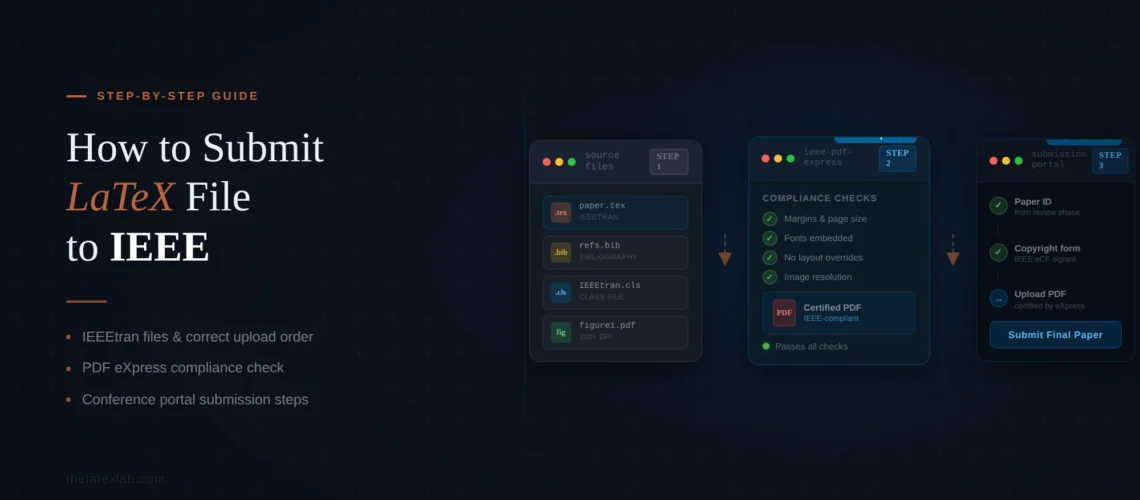
Quick answer: How to submit a LaTeX file to IEEE
- Use the correct IEEEtran document class (
IEEEtranfor journals,conferenceoption for conferences) - Compile your PDF with all fonts embedded (use pdflatex)
- For conferences: certify your PDF through IEEE PDF eXpress using your conference ID
- Upload the certified PDF (and source files if required) to the conference’s submission system (EDAS, CMT, or EasyChair)
- For journals: upload PDF plus LaTeX source files to ScholarOne Manuscripts
- Complete the IEEE eCopyright form
The most common rejection reason is unembedded fonts in the PDF. The second most common is using the wrong template variant (conference template for a journal or vice versa). Both are preventable.
Conference vs. Journal Submissions: What’s Different
IEEE conferences and IEEE journals have fundamentally different submission workflows. Getting this wrong wastes hours.
IEEE conferences use one of several third-party submission systems – EDAS, Microsoft CMT, EasyChair, HotCRP, or occasionally a custom portal. The exact system varies by conference. For camera-ready (final accepted) papers, most IEEE conferences require your PDF to be certified through IEEE PDF eXpress before upload. The initial review submission usually just needs a PDF. Source files (.tex, .bib, figures) are sometimes required at the camera-ready stage.
IEEE journals (Transactions, Letters, Access, etc.) use ScholarOne Manuscripts (formerly Manuscript Central) as their submission system. Journals typically require both a PDF and source files (.tex plus all supporting files) at the initial submission stage. There is no PDF eXpress requirement for journals – ScholarOne has its own PDF generation. Some journals like IEEE Access explicitly require both a Word/LaTeX source file and a PDF, and the content must match exactly.
Template differences: The IEEEtran class supports both. For conferences, you use \documentclass[conference]{IEEEtran}. For journals, you use \documentclass[journal]{IEEEtran} (or a specific option like technote for correspondence papers). Using the conference template for a journal submission (or vice versa) will get your paper returned immediately. The two produce visually different output – conference papers are typically two-column with a different header, while journal papers include author bios, ORCID requirements, and different margin specifications.
Our insight: The confusion is amplified because many researchers submit conference papers first, then extend them for a journal. When they do, they often forget to change the document class option from conference to journal. The paper compiles fine either way – IEEEtran doesn’t throw an error for using the wrong option – but the formatting is visibly different, and editors reject it immediately. Always check your \documentclass line before submitting.
Getting the IEEEtran Template Right
IEEEtran is one of the most widely used LaTeX document classes. It handles two-column formatting, IEEE-specific heading styles, author blocks, and bibliography formatting automatically. But there are setup details that matter for successful submission.
Get the current version. The IEEEtran class is included in TeX Live and available on CTAN. It’s also available through the IEEE Template Selector at template-selector.ieee.org (choose your publication type, then download the LaTeX template). Make sure you’re using a recent version – older versions may produce formatting that doesn’t match current IEEE specifications.
Use IEEEtran.bst for bibliography. IEEE has its own bibliography style file (IEEEtran.bst) that formats references according to IEEE citation standards. Use \bibliographystyle{IEEEtran} in your document. Don’t use plain, unsrt, or other generic styles – they produce reference formatting that doesn’t meet IEEE requirements.
Author block formatting. IEEE requires specific author information formatting. For conferences, use \IEEEauthorblockN{} for author names and \IEEEauthorblockA{} for affiliations. For journals, use the \author{} command with \IEEEauthorblockN and \IEEEauthorblockA blocks, plus add \thanks{} for footnotes. IEEE now requires ORCID identifiers for all authors in journal submissions.
Double-anonymous review. Some IEEE conferences use double-anonymous (double-blind) review. For initial submission, remove all author information: use \author{\IEEEauthorblockN{Anonymous Authors}} and remove any self-identifying references or acknowledgments. Add them back for the camera-ready version after acceptance.
Page limits. IEEE conference papers are typically 6 pages with up to 2 additional pages at extra charge ($100-$150 per page). Journal papers vary – IEEE Access allows up to 20+ pages, while Transactions Letters are limited to 4-5 pages. Exceeding the page limit is a guaranteed rejection.
TheLatexLab delivers every IEEE paper PDF eXpress-ready with all fonts embedded.
We test against IEEE’s compliance requirements before delivery. Conference or journal, IEEEtran configured correctly, bibliography in IEEE format. Zero submission errors.
Generating a Compliant PDF
The PDF you submit must meet IEEE’s technical requirements. The most important requirement: all fonts must be embedded.
Use pdflatex. Compiling with pdflatex embeds all fonts automatically in most configurations. If you compile with latex > dvips > ps2pdf, fonts may not be embedded correctly. This is the single most common cause of PDF eXpress failures.
To verify fonts are embedded, open your PDF in Adobe Acrobat (or Acrobat Reader), go to File > Properties > Fonts tab, and check that every font listed shows “(Embedded)” or “(Embedded Subset).” If any font shows without the embedded indicator, it will fail PDF eXpress.
The figure problem. Even if pdflatex embeds text fonts correctly, figures included via \includegraphics{} can contain unembedded fonts. This happens when your figures are PDF files exported from other tools (Matlab, Matplotlib, Visio, PowerPoint) that didn’t embed fonts during export. PDF eXpress will flag these. The fix is to re-export your figures with fonts embedded, or convert them to a format that doesn’t use fonts (PNG at 300+ DPI).
If fonts aren’t embedding, use the Ghostscript workaround:
ps2pdf -dCompatibilityLevel=1.4 -dEmbedAllFonts=true -dPDFSETTINGS=/prepress input.pdf output.pdfThis re-processes the PDF and forces all fonts to embed. It resolves the problem in most cases.
Paper size. IEEE uses US Letter size (8.5 x 11 inches) for most publications. If your LaTeX is configured for A4 paper (common outside the US), the page dimensions will be wrong and PDF eXpress may reject it. Set \documentclass[letterpaper,conference]{IEEEtran} or add \usepackage[letterpaper]{geometry} if needed. You can download the latest official templates from the IEEE Template Selector, which has both letter and A4 variants.
Our insight: Overleaf compiles with pdflatex by default and embeds all text fonts. But Overleaf doesn’t fix unembedded fonts inside your included figure files. If your paper fails PDF eXpress on font embedding and you compiled in Overleaf, the problem is almost certainly in your figure PDFs, not in the body text. Re-export every figure from its source application with font embedding enabled, or convert figures to PNG.
IEEE PDF eXpress: How It Works and How to Pass
PDF eXpress is IEEE’s compliance checker for conference papers headed to IEEE Xplore. It verifies font embedding, PDF version, and other technical requirements. Most IEEE conferences require camera-ready papers to be “certified” through PDF eXpress before final submission.
How to use PDF eXpress:
1. Get your conference ID. The conference organizers provide a Conference ID (a numeric code like “66047X”). You can’t use PDF eXpress without it. It’s usually in the camera-ready instructions email or on the conference’s submission page.
2. Create an account. Go to ieee-pdf-express.org, select “Create Account,” and enter the Conference ID, your email, and a password. If you’ve used PDF eXpress for a previous conference, use the same email and password – your account persists across conferences.
3. Upload your file. You have two options: upload a PDF for checking (pass/fail verification), or upload source files (.tex plus all supporting files in a ZIP) for conversion (PDF eXpress compiles and generates the PDF for you). For LaTeX users, uploading a pre-compiled PDF is usually better because you control the compilation.
4. Wait for the result. PDF eXpress emails you the result – either a “passed” confirmation with the certified PDF attached, or a “failed” notification with an error report. This usually takes minutes, but can take up to an hour during deadline rushes.
5. Download the certified PDF. If your PDF passed, download the certified version from PDF eXpress. Upload this specific file (not your original) to the conference submission system. Some conferences can tell whether you uploaded a certified file or not.
What PDF eXpress checks:
- All fonts are embedded or subset
- PDF version is 1.4 (Acrobat 5) or later (but not created with certain newer Acrobat versions)
- No bookmarks or hyperlinks (some conferences allow these, some don’t)
- No security settings or passwords
- No crop marks, registration marks, or watermarks
- No embedded files or attachments
- Created by PDF distiller, not scanning
Our insight: PDF eXpress has two modes that confuse people. “PDF eXpress” checks your PDF. “PDF eXpress Plus” both checks and also handles the eCopyright form in the same interface. The conference decides which mode to use. If you’re directed to PDF eXpress Plus, you’ll sign the copyright form there rather than through EDAS or the conference system. Check your conference’s instructions carefully.
137+ IEEE papers formatted, compiled, and PDF eXpress-certified without a single rejection.
We handle IEEEtran setup, font embedding, figure compliance, and bibliography formatting. Conference or journal. Delivered in 72 hours.
Uploading to EDAS, CMT, EasyChair, and ScholarOne
IEEE doesn’t have one submission system. You need to know which one your venue uses.
EDAS (conferences)
EDAS is used by many IEEE Communications Society and Signal Processing conferences. For camera-ready submission, you upload the PDF eXpress-certified PDF, complete the eCopyright form through EDAS, and enter your registration confirmation number. EDAS requires the author list in the system to exactly match the author list in your PDF – mismatches will block upload.
Common EDAS error: your registration number must sometimes be prefixed with a conference-specific code (like “25CCN” for CCNC 2025). Check the conference instructions for the exact format.
Microsoft CMT (conferences)
CMT (Conference Management Toolkit) is used by many IEEE Computer Society conferences. Upload is straightforward – PDF plus optional supplementary files. CMT requires you to declare conflicts of interest by entering conflict domains for all co-authors. The author metadata in CMT must exactly match your paper.
EasyChair (conferences)
EasyChair is the simplest system. Upload your PDF. Some conferences also require source files as a separate upload. EasyChair doesn’t enforce author list matching as strictly as EDAS.
ScholarOne Manuscripts (journals)
All IEEE Transactions, Letters, and Access use ScholarOne. The journal submission process is different from conferences:
- You upload both a PDF and your LaTeX source files (.tex, .bib, figures, .bst, .cls)
- The source files can be uploaded as a ZIP archive
- ScholarOne generates its own proof PDF from your files – review it carefully
- You must enter author ORCID identifiers for all authors
- The eCopyright form is completed within ScholarOne after acceptance
- There is no PDF eXpress step for journal submissions
For IEEE Access specifically, the source file and PDF content must match exactly. IEEE Access checks for this.
Common IEEE LaTeX Submission Errors and Fixes
These are the errors we see most frequently across all IEEE submission systems.
Font not embedded
Error in PDF eXpress: “Font Helvetica is not embedded (205x)” or similar.
Cause: A font in your document (usually inside a figure PDF, not in the body text) is referenced but not embedded. pdflatex embeds body text fonts automatically, but included PDF figures may contain their own unembedded fonts.
Fix: Re-export figures with fonts embedded. Or run the Ghostscript command mentioned in the PDF generation section. Or upload your LaTeX source files to PDF eXpress and let it compile the PDF for you (the “conversion” option).
Document contains bookmarks
Cause: The hyperref package generates PDF bookmarks by default. Some IEEE conferences don’t allow these.
Fix: Remove the hyperref package, or add the option \usepackage[bookmarks=false]{hyperref}. If you need hyperref for \url{} commands in your bibliography, use the url package instead.
Wrong page size
Cause: Your LaTeX is configured for A4 paper instead of US Letter.
Fix: Add letterpaper to your document class options: \documentclass[conference,letterpaper]{IEEEtran}.
Author list mismatch
Error in EDAS/CMT: “Author information does not match” or upload blocked.
Cause: The authors listed in your PDF don’t match the author metadata entered in the submission system. Even small differences – middle initials, accented characters, name order – can trigger this.
Fix: Make sure author names in your .tex file exactly match what you entered in the submission system, including order, spelling, and formatting.
Page limit exceeded
Cause: Your paper is longer than the conference allows (typically 6 pages for regular papers, 4 for short papers).
Fix: Cut content, reduce figure sizes, use \IEEEoverridecommandlockouts if needed for tight spacing adjustments. If your conference allows additional pages at extra cost, check whether you need to pay before or after upload.
Bibliography shows [?] marks
Cause: BibTeX wasn’t run, or the .bib file isn’t being found.
Fix: Run the full compilation sequence: pdflatex > bibtex > pdflatex > pdflatex. Make sure your .bib file is in the same directory and the \bibliography{} command doesn’t include the .bib extension or a folder path. If you’re missing the IEEEtran.bst file, download it from CTAN’s IEEEtran package page.
Our insight: The error that causes the most last-minute panic is the font embedding problem from figures. A researcher compiles locally, everything looks fine, they upload to PDF eXpress the night before the deadline, and it fails on “Font Helvetica not embedded.” The fonts come from a Matlab or Matplotlib figure that was saved as PDF without embedding. The fix takes 5 minutes per figure (re-export as PNG or re-export PDF with embedded fonts), but discovering this at 11 PM before a midnight deadline is stressful. Run your PDF through PDF eXpress at least 48 hours before the deadline, not the night of.
Pre-Submission Checklist to Submit LaTex File to IEEE
Run through this before uploading to any IEEE venue.
1. Correct document class option. [conference] for conferences, [journal] for Transactions/Letters/Access. Check the \documentclass line.
2. Page limit. Compile and check the page count. Include all content – text, figures, tables, references, author bios (journals only).
3. Font embedding. Open the PDF in Adobe Acrobat, go to File > Properties > Fonts. Every font must show “(Embedded)” or “(Embedded Subset).”
4. Paper size. US Letter (8.5 x 11 in) unless your conference explicitly specifies A4.
5. Author information. For initial double-anonymous submission: author info removed. For camera-ready: all authors listed with affiliations and ORCIDs (journals).
6. Bibliography format. Using \bibliographystyle{IEEEtran}. No [?] marks. Reference formatting matches IEEE style (numbered, in order of first citation).
7. Figures are readable. All text in figures is legible at printed size. No figures are pixelated. Captions are present for all figures and tables.
8. No bookmarks or hyperlinks (for conferences that prohibit them). Remove or disable the hyperref package.
9. PDF eXpress certification (conferences only). Upload to PDF eXpress at least 48 hours before the deadline. Download the certified PDF for submission.
10. Copyright form. Know where to complete it – through EDAS, CMT, ScholarOne, or PDF eXpress Plus, depending on your venue.
Need your paper formatted and submission-ready for an IEEE deadline? We handle the entire process.
From Word or raw LaTeX to a PDF eXpress-certified, submission-ready file. IEEEtran template, correct bibliography style, all fonts embedded. Rush 24-hour delivery available.