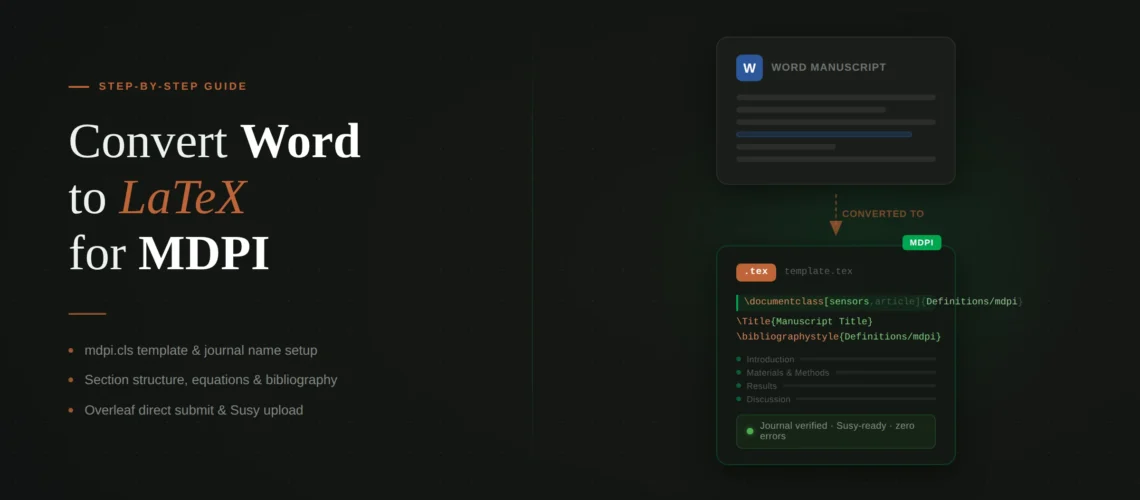
If you need to convert Word to LaTeX for MDPI journal, the process has a few quirks you will not find with other publishers. MDPI uses its own custom class file (mdpi.cls) that lives inside a Definitions subfolder, requires your journal’s short name as a document class option (case-sensitive), and enforces a specific section structure that your Word paper probably does not follow. On the other hand, MDPI’s template is heavily commented with inline instructions, and their Overleaf integration lets you submit directly from the editor. This guide covers the specific steps for converting your manuscript document from Word to LaTeX for MDPI – what is different from other publishers, where first-time users get stuck, and how to avoid the most common MDPI submission errors.
Quick Decision Box
Template: Download from mdpi.com/authors/latex or open the MDPI template on Overleaf. The class file is inside a Definitions/ subfolder – do not move it.
Key requirement: Your journal’s short name (e.g., sensors, mathematics, applsci) must be the first option in \documentclass. It is case-sensitive.
Section structure: MDPI expects a fixed order: Introduction, Materials and Methods, Results, Discussion. If your Word paper uses a different structure, you may need to reorganize.
Fastest option: A professional Word to LaTeX conversion service delivers MDPI-ready files in 72 hours with the correct template, journal name, and citation style applied.
What makes MDPI’s LaTeX template different
If you have used IEEE, Springer, or Elsevier templates before, MDPI’s setup will feel unfamiliar. Here are the key differences:
The Definitions subfolder. Most LaTeX templates put the .cls file in the same directory as your .tex file. MDPI puts its class file, logos, and bibliography styles inside a subfolder called Definitions/. Your document class declaration points to this subfolder: \documentclass[sensors,article,submit,pdftex,moreauthors]{Definitions/mdpi}. Do not move mdpi.cls out of the Definitions folder or rename the folder – the template will break.
Journal name as a class option. The first option in your \documentclass must be your target journal’s short name. This is not a formatting preference – the class file uses it to load the correct journal logo, ISSN, and formatting specifications. The name is case-sensitive: sensors works, Sensors does not. If you misspell the name or use a journal that has not been added to the class file yet, you get the error “Submitted to Journal Not Specified” in the footer of your compiled PDF.
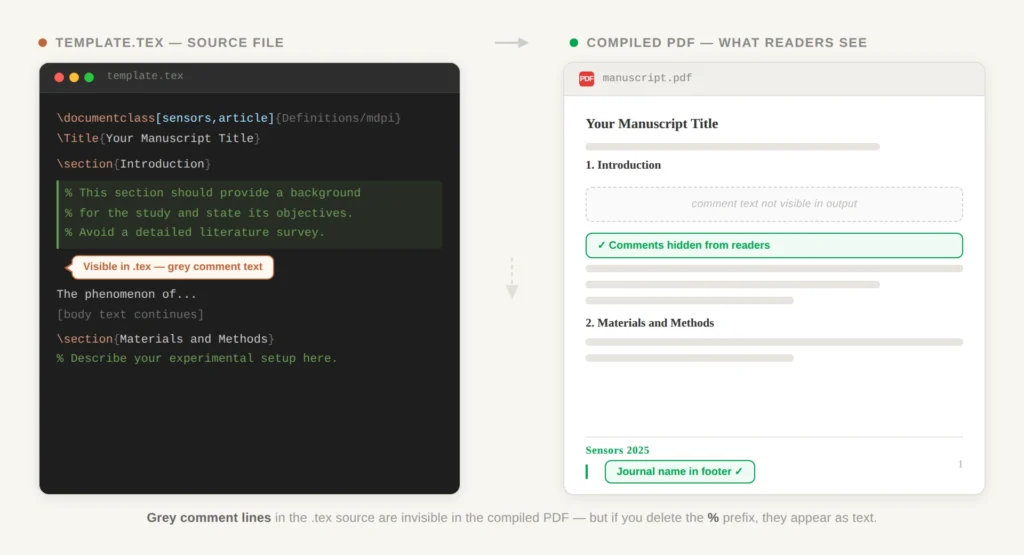
Heavily commented template. MDPI’s template.tex is filled with grey comment text that acts as inline instructions for authors. This text does not appear in the compiled PDF. But if you accidentally delete a % sign at the start of a comment line, that instruction text will appear in your output. During conversion, be careful when pasting Word content into the template – you can easily overwrite comment markers.
Fixed section structure. MDPI strongly prefers a specific order for research articles: Introduction, Materials and Methods, Results, Discussion, Conclusions. The template includes these sections as placeholders. If your Word paper uses a different structure (common in engineering or computer science papers that use “System Model” or “Proposed Method” instead of “Materials and Methods”), you can rename the sections, but be aware that MDPI editors may ask you to restructure during peer review.
Citation style varies by journal. Most MDPI journals use numbered citations with \cite{}. But a specific set of MDPI journals (including Administrative Sciences, Arts, Econometrics, Economies, Humanities, Languages, Laws, Religions, Risks, Social Sciences, and others) use author-date citations with \citep{}. The template includes a comment listing exactly which journals use \citep{}. Check this list before you set up your bibliography – using the wrong citation command will compile fine but produce incorrectly formatted citations.
Step-by-step Convert Word To Latex For MDPI
1. Get the template. Either open the MDPI template on Overleaf or download the .zip from mdpi.com/authors/latex. If downloading, make sure you get the latest version (last updated March 2026) – MDPI updates the template regularly and older versions may be missing your journal.
2. Set the journal name. In the \documentclass line, replace journal with your journal’s short name. You can find the short name in the template’s comments (there is a long list) or on your journal’s MDPI webpage. Example:
% Before:
\documentclass[journal,article,submit,pdftex,moreauthors]{Definitions/mdpi}

% After (for Sensors journal):
\documentclass[sensors,article,submit,pdftex,moreauthors]{Definitions/mdpi}
3. Fill in the metadata. MDPI requires more metadata fields than most publishers. In addition to the standard title, authors, and affiliations, you need to fill in:
\Title{Your Paper Title}
\TitleCitation{Your Paper Title}  % Same title, used for citation
\Author{First Author $^{1,\dagger}$, Second Author $^{2}$
  and Third Author $^{1,*}$}
\AuthorNames{First Author, Second Author and Third Author}
\AuthorCitation{Author, F.; Author, S.; Author, T.}
\cormark[1]  % Corresponding author marker
\orcid[1]{0000-0000-0000-0000}  % ORCID for first author
There are also fields for \abstract{}, \keyword{}, \MSC{} (Mathematics Subject Classification), \JEL{} (economics classification), and \PACS{} (physics classification). Fill in the ones relevant to your journal – leave the others commented out.
4. Transfer your content. Paste your Word text into the appropriate template sections. Delete the placeholder instructional text but keep the section commands. Clean up smart quotes, escape special characters, and remove Word formatting artifacts.
5. Convert equations. MDPI loads amsmath and amssymb automatically. Use standard LaTeX math environments. One MDPI-specific detail: if you are using mathematical symbols that are not standard (like \digamma or certain operators), check that mdpi.cls supports them. Some symbols require additional packages that may conflict with MDPI’s template. If you hit an “undefined control sequence” on a math symbol, add the package in the preamble between \documentclass and \begin{document} and test if it compiles without errors.
6. Add tables and figures. MDPI uses booktabs-style tables (no vertical lines, \toprule/\midrule/\bottomrule) with captions above. For tables, MDPI uses tabularx with \textwidth as the width. Figures should be high-resolution (300+ DPI). MDPI’s template includes a specific syntax for subfigures using \subfloat – check the template examples before building your own.
7. Set up the bibliography. MDPI uses BibTeX with its own bibliography style files (included in the Definitions folder). Add your references to a .bib file and use:
\bibliographystyle{Definitions/mdpi}  % Or Definitions/chicago for author-date journals
\bibliography{your-references}
Make sure to use \cite{} for numbered-citation journals or \citep{} for author-date journals. The template comments specify which journals use which style.
8. Compile and verify. Compile with pdfLaTeX. Check the footer of the first page – it should show your journal name, not “Journal Not Specified.” Verify that all equations, tables, figures, and citations render correctly. For general compilation help, see our guide on common LaTeX compilation errors.
Need your MDPI paper converted professionally?
We convert manuscript documenet from Word to MDPI-ready LaTeX with the correct journal name, citation style, and section structure. Every file is compilation-tested in Overleaf before delivery. From $149.
MDPI-specific errors during Word to MDPI Latex conversion
These are errors specific to MDPI’s template that you will not encounter with other publishers:
“Submitted to Journal Not Specified” appears in the footer of your compiled PDF. This means the journal name in your \documentclass is either missing, misspelled, or not yet added to the current version of mdpi.cls. Fix: check the spelling (case-sensitive), download the latest template version, or contact [email protected] if your journal is genuinely missing from the class file.
Package conflicts with mdpi.cls. MDPI’s class file loads many packages internally (amsmath, amssymb, natbib, graphicx, booktabs, and others). If you add a \usepackage for something already loaded, you get option clash errors. If you add packages that redefine commands MDPI uses (like mathdesign, which conflicts with MDPI’s font setup), you get cryptic errors. The fix MDPI recommends: if mathdesign conflicts, add \let\bm\undefined before loading it. In general, add packages sparingly and test after each one.
Comment text appearing in output. If you see instructional text like “Materials and Methods should be described with sufficient details” in your compiled PDF, you accidentally deleted a % at the start of a comment line. Search your .tex file for any lines of template instruction text that are not preceded by %.
Author metadata errors. MDPI’s metadata fields are interdependent. If you fill in \Author{} but forget \AuthorNames{} or \AuthorCitation{}, the header and citation metadata will be wrong. Fill in all three author fields, even though they feel redundant. The \Author{} field controls the first-page display, \AuthorNames{} controls the running header, and \AuthorCitation{} controls how the paper is cited.
Definitions folder issues. If you reorganize your project files and move mdpi.cls out of the Definitions folder (or rename the folder), compilation fails with “File not found.” The template expects the class file at the exact path Definitions/mdpi. Keep the folder structure as-is.
Submitting via Overleaf or Susy
MDPI offers two submission paths, and unlike most publishers, one of them is directly integrated with Overleaf.
Overleaf direct submission. If you are working in Overleaf, you can submit directly to any MDPI journal from the Overleaf interface: click “Submit” in the top menu, select “Submit to an MDPI journal,” and Overleaf will package your files and redirect you to MDPI’s submission system. This is the fastest path and avoids file packaging issues.
MDPI Susy (Submission System). If you are submitting from a local LaTeX installation, package your files into a .zip containing your .tex file, the Definitions folder with all its contents, your .bib file, and all figure files. Upload through your journal’s submission page on mdpi.com. Susy will compile your files server-side. Unlike Elsevier’s Editorial Manager, Susy is relatively forgiving – but you should still compile locally first and fix all errors.
One important note: MDPI’s production team will reformat your paper after acceptance regardless of how you submit. They use their own internal LaTeX workflow. This means minor formatting imperfections in your submission (like slightly off spacing or an imperfect table alignment) will be fixed during production. Focus on getting the content, equations, and references right rather than pixel-perfect formatting.
Ready to submit to your MDPI journal?
We handle Word to LaTeX conversion for all MDPI journals – correct template, journal name configured, citation style applied, and compilation verified. From $149.