DOCX to LaTeX Conversion - .docx In, Submission-Ready .tex Out.
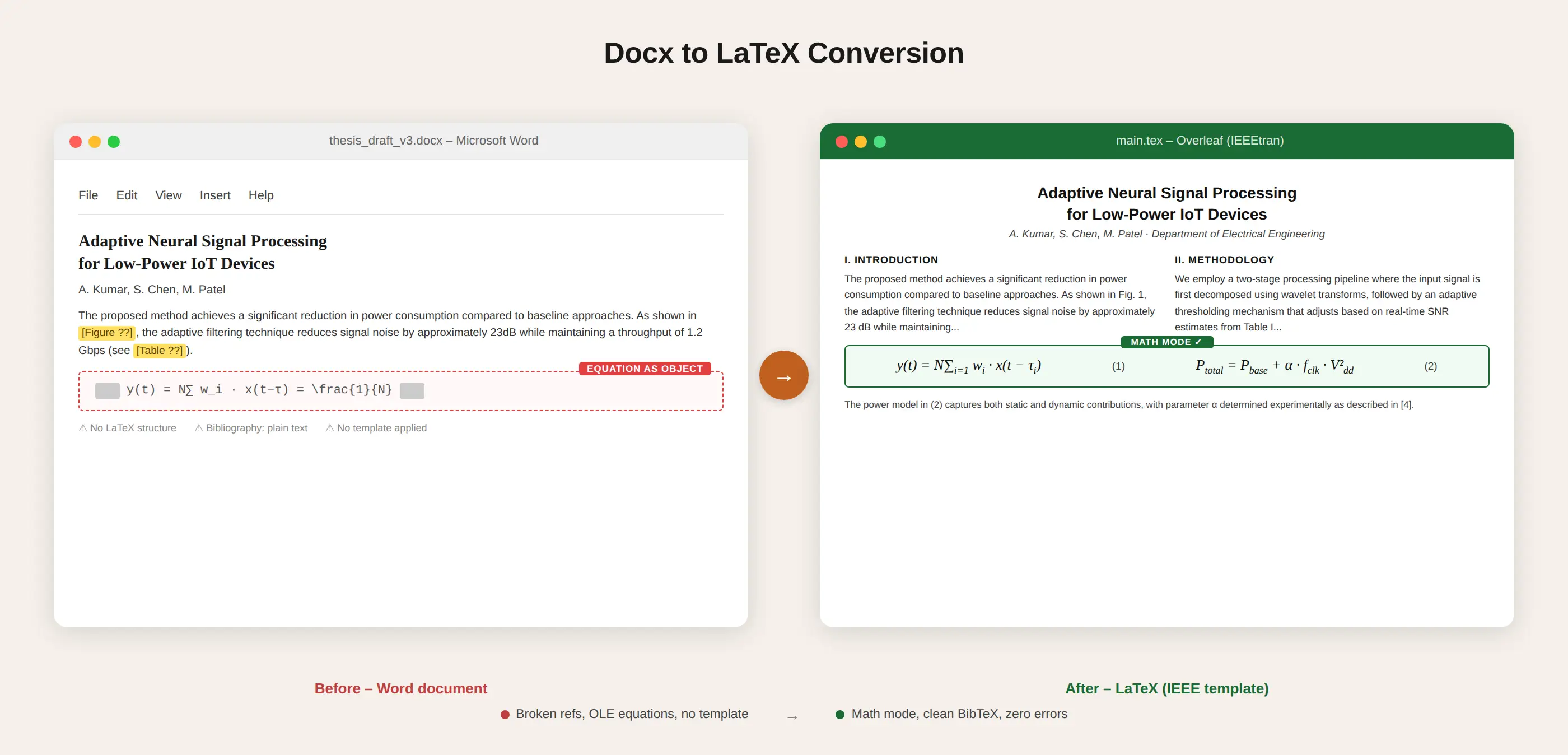
Your journal wants a .tex file. You have a .docx. Between those two formats sits a gap that no converter has reliably closed - because the hard parts of a Word document (the equation editor, the citation manager, merged-cell tables) are stored in proprietary XML that does not map to LaTeX.
We close that gap manually. We open your .docx, rebuild every element in proper LaTeX, apply your journal's exact template, and deliver a .tex file that compiles with zero errors. Pandoc is not involved at any point.
72-hour standard delivery. Compiled and tested in Overleaf before we send it. If it doesn't compile, we fix it free.
Researchers from these institutions trust The LaTeX Lab
The Three Things Every DOCX to LaTeX Converter Breaks
Automated converters handle one thing well: paragraphs of plain text. Bold, italic, headings - these translate to LaTeX without much trouble. The conversion falls apart on exactly three elements, and they happen to be the three elements that define an academic paper.
Word's Equation Editor (OMML)
Word stores equations in Office Math Markup Language (OMML), a proprietary XML dialect that lives inside document.xml. OMML uses a completely different tree structure from LaTeX math. A fraction in OMML is an <m:f> element containing <m:num> and <m:den> child nodes. In LaTeX, it is \frac{numerator}{denominator}. The mapping is not one-to-one.
Pandoc does a reasonable job on simple fractions and Greek letters. Where it breaks: multi-line align environments, matrices with decorators, equation numbering, and custom operators. Older Word files add another layer: equations created with MathType are embedded as OLE objects - binary blobs that no text-based converter can parse at all.
The Citation Manager Database
Word's built-in citation manager stores references in a custom XML namespace. The field names do not match BibTeX. Mendeley and Zotero add their own complexity, inserting citations as ADDIN CSL_CITATION field codes containing JSON payloads. When you run Pandoc on a .docx with Mendeley citations, the citations either disappear entirely or render as the raw field code text.
We extract references from whichever system you used - Word's built-in manager, Mendeley, Zotero, EndNote, or a manual reference list - and create a clean .bib file with correct BibTeX types and all required fields.
Tables With Merged Cells
Word tables use <w:gridSpan> for horizontal merges and <w:vMerge> for vertical merges. LaTeX uses \multicolumn{} and \multirow{}. The mapping logic is fragile: Word allows arbitrary cell spanning, while LaTeX's tabular environment requires explicit column definitions upfront. Pandoc handles simple grids but produces garbled output the moment a cell spans two rows or columns.
elsarticle file in 4 days. Starting from the Pandoc output would have taken longer.
Upload your manuscript and tell us the journal. Quote in 2 hours, no obligation.
Compilation guarantee - If it doesn't compile in your environment, we fix it free. No exceptions.
Get My DOCX to LaTeX QuoteWhat Our DOCX to LaTeX Conversion Delivers
We do not automate this. We read your document and build the LaTeX from scratch. Here is what that means concretely.
Equations Written in LaTeX, Not Extracted From OMML
We look at your equations and typeset them in native LaTeX math syntax. equation for numbered displays, align for multi-line derivations, gather for unnumbered groups, inline $...$ for in-text math. If your Word file has MathType equations or pasted images of math, we typeset those too. The output is indistinguishable from LaTeX written natively.
Bibliography Built as a .bib File, Not Scraped as Text
We do not copy your reference list and hope the formatting is right. We create structured BibTeX entries: correct entry types, all required fields, DOIs where available, author names in {Last, First} format. The .bib file compiles with your journal's required citation style - numbered (natbib), author-year, or a custom .bst file.
Tables Rebuilt With Proper LaTeX Structure
Using booktabs for professional rules, tabularx for flexible columns, longtable for multi-page data. Merged cells handled with \multicolumn and \multirow. No drawn borders from Word's visual model - clean, professional academic tables.
Figures Extracted and Placed in Float Environments
Images pulled from the .docx at full embedded resolution. Each placed in a figure environment with \caption, \label, and working \ref cross-references. No hardcoded "Figure 3" text that breaks when content moves.
Your Journal's Template, Not \documentclass{article}
We load the actual .cls file your journal requires. IEEEtran for IEEE. acmart for ACM. elsarticle for Elsevier. svjour3 or LNCS for Springer. mdpi.cls for MDPI open-access journals. We configure class options, set up the correct bibliography style, and verify that the compiled PDF matches the journal's specimen layout. Need ACM LaTeX formatting or Springer LaTeX formatting? We have dedicated pages for those.
Tested in Overleaf Before Delivery
Every file compiles with zero errors and zero warnings in Overleaf before we send it. If it fails in your local TeX Live or MiKTeX installation, we fix it the same day at no charge.
Complete File Package
- .tex source file
- .bib bibliography file
- All figure files (PDF/PNG)
- Compiled PDF showing final output
- README with compilation instructions
- 1 revision round included
How Pandoc, GrindEQ, and Docx2LaTeX Actually Work (And Where They Stop)
Understanding why tools fail requires understanding what they actually do under the hood.
document.xml, and walks the XML tree node by node. It converts <w:p> to paragraphs, <w:r><w:t> to text runs, <w:tbl> to tables. For equations, it attempts to transform OMML nodes into LaTeX math using an XSLT stylesheet. This works for about 60% of academic equations. It fails on align environments, cases, piecewise functions, and anything involving custom operators or decorators. It does not read Word's citation manager database at all - citations come through as static text. Pandoc does not apply journal templates.| Tool | Equations | Tables | Bibliography | Template | Compiles? | Your time |
|---|---|---|---|---|---|---|
| Pandoc | 60% converted, rest as images | Broken merges | Not extracted | None | 47 errors | 8-12 hrs |
| GrindEQ | 85% correct, custom ops fail | Basic only | Formatting errors | None | 3 errors, 12 warnings | 2-3 hrs |
| Docx2LaTeX / Online | Similar to Pandoc | Partial | Partial | None | 15+ errors | 4-6 hrs |
| The LaTeX Lab | 100% Compilation Gurrantee | Professional rebuild | Clean .bib file | Applied & verified | 0 errors | 0 hrs |
DOCX to LaTeX, Word to LaTeX, DOCX to TeX - Same Conversion, Different Search Terms
If you searched for "docx to latex" you are probably more technical than someone searching "word to latex" - you know the file extension, you have probably already tried a command-line tool. But the conversion is identical regardless of what you call it.
Our Word to LaTeX conversion page covers the same service from a broader angle. Our complete guide to converting Word to LaTeX walks through Pandoc, GrindEQ, and manual methods step by step if you want to try the DIY route before deciding. Have a PDF instead? See our PDF to LaTeX conversion service.
DOCX to LaTeX Conversion Pricing
Fixed prices. No hourly billing. Exact quote within 2 hours of receiving your file.
- Pagesup to 8
- Equationsup to 10
- Citationsup to 10
- Revisions1 round
- Pagesup to 10
- Equationsup to 20
- Citationsup to 20
- Revisions1 round
- Pagesup to 20
- Equationsup to 50
- Citationsup to 50
- Revisions1 round
- Pagesup to 30
- Equationsup to 100
- Citationsup to 100
- Revisions1 round
Need a thesis converted? See our thesis LaTeX formatting service. Full pricing at thelatexlab.com/pricing.
How DOCX to LaTeX Conversion Works
Upload Your .docx and Tell Us the Target
Send us your Word document. Tell us the journal, conference, or university template. If you have a Mendeley/Zotero library export (.bib or .ris), send that too - it speeds up bibliography creation. Quote within 2 hours.
We Build the LaTeX From Your Document
We read your .docx page by page. Equations are typeset in proper LaTeX math mode. Tables are reconstructed. Bibliography is created in BibTeX. Cross-references are rebuilt with \ref and \cite commands. Your template is applied and the entire file is compiled in Overleaf.
Download, Compile, Submit
You receive the complete file package. Open it in Overleaf or compile locally. Submit to your journal. If anything fails to compile, we fix it the same day at no charge.
Ready to convert your .docx?
Supported Journal Templates
We convert .docx to LaTeX for any academic journal. Common requests:
IEEE & ACM
All Transactions, journals, conferences. ACM LaTeX formatting with TAPS validation.
Springer & Elsevier
Springer LNCS/svjour3. Elsevier elsarticle with Editorial Manager compatibility.
MDPI & arXiv
Theses & Others
Nature, PLOS, Wiley, SIAM, AMS, IOP, BMC, bioRxiv, 100+ university thesis templates.
Our Guarantee
This isn't marketing language. This is how we run every docx to latex project.
Your LaTeX will compile without errors. We test every file in Overleaf before sending.
Rush 24hr and 48hr available. Template compliance verified against your journal or university spec.
Fixed price, no obligation, no hourly billing. You know the cost before we touch your files.
No "it worked on my machine" excuses. If it breaks in your environment, we fix it free. No exceptions.