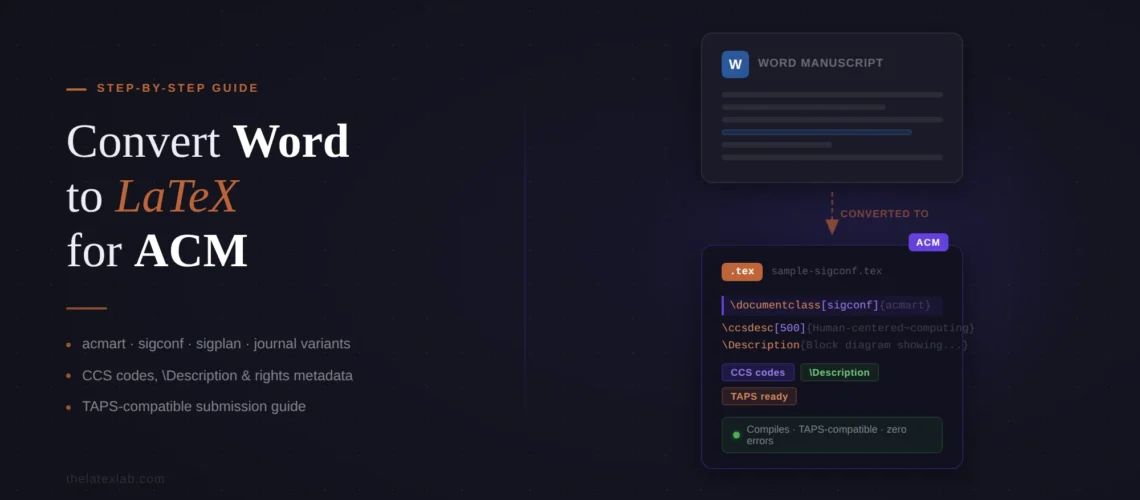
If you need to convert Word to LaTeX for ACM conference or journal, be prepared for a workflow that is different from every other publisher. ACM uses a two-phase submission process: you submit in single-column format for review, then switch to two-column format for the camera-ready version after acceptance. Your final source files go through TAPS (The ACM Publishing System), which regenerates both the PDF and an HTML5 version of your paper – and TAPS will reject your files if you use packages outside ACM’s approved list. This guide covers the full process of converting your Word paper to LaTeX for ACM, including the template variants, the TAPS requirements most authors discover too late, and the ACM-specific metadata that does not exist in any other publisher’s template.
The short version
Template: Use acmart.cls. For conference proceedings, use [sigconf] (or [sigplan] for SIGPLAN venues). For journals, use [acmsmall], [acmlarge], or [acmtog] depending on the publication.
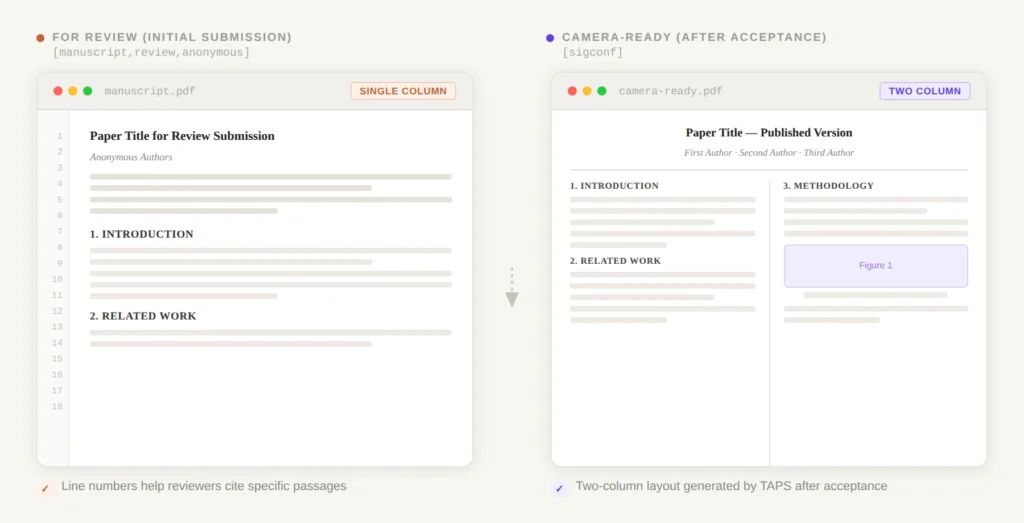
For review: Submit single-column with \documentclass[manuscript,review,anonymous]{acmart}. For camera-ready after acceptance: switch to \documentclass[sigconf]{acmart}.
Unique to ACM: CCS classification codes (generated via a web tool), \Description{} on every figure (mandatory for accessibility), approved LaTeX package list enforced by TAPS, and rights management commands from the ACM Rights Form.
Fastest option: A professional Word to LaTeX conversion service delivers ACM-ready files in 72 hours – acmart template applied, CCS codes configured, TAPS-compatible.
Which acmart variant you need for Word To Latex Conversion for ACM
ACM uses one class file (acmart.cls) but with multiple template style options. Picking the wrong one does not always cause errors – it produces a paper that looks subtly wrong and gets flagged during production.
Conference proceedings:
\documentclass[sigconf]{acmart} – Used by the vast majority of ACM conferences: KDD, SIGMOD, SIGCOMM, SIGIR, WWW, SOSP, CCS, MobiCom, CHI, UIST, and nearly every other ACM conference. If your conference instructions do not specify a different variant, use sigconf.
\documentclass[sigplan]{acmart} – Used only by SIGPLAN conferences (PLDI, POPL, ICFP, OOPSLA, and similar programming languages venues). SIGPLAN is the only SIG with its own template variant. If your conference is not a SIGPLAN venue, do not use this.
Journals:
[acmsmall] – Most ACM journals. [acmlarge] – DGOV, DTRAP, HEALTH, IMWUT, JOCCH, TAP, and some PACM titles. [acmtog] – ACM Transactions on Graphics (TOG) and SIGGRAPH Conference Papers track. Check your journal’s instructions or ask the Editor-in-Chief if unsure.
The two-phase submission workflow
This is where ACM’s process diverges from every other publisher and where most first-time ACM authors get confused during conversion.
Phase 1: Submission for review. You submit a single-column PDF. Your document class line should be:
\documentclass[manuscript,review,anonymous]{acmart}The manuscript option produces single-column output. The review option adds line numbers for reviewers. The anonymous option hides author names for double-blind review (remove it if your conference uses single-blind). At this stage, you also need \setcopyright{none} in your preamble since you have not completed the ACM Rights Form yet.
Phase 2: Camera-ready after acceptance. Once accepted, you switch to the publication format:
\documentclass[sigconf]{acmart}This produces the two-column output. You also need to add the rights management commands from the ACM Rights Form (more on this below) and remove \setcopyright{none}. Then your source files go to TAPS for final processing.
The important thing to understand during conversion: if you are converting your Word paper for initial submission, use the manuscript/review format. Do not spend time perfecting two-column layout at this stage – TAPS will handle the final formatting. Focus on getting the content, equations, and references right in the single-column format.
Need your Word paper converted for an ACM submission?
We handle the template variant selection, CCS code generation, figure accessibility descriptions, and TAPS-compatible formatting. Delivered in 72 hours with zero compilation errors.
Step-by-step convert Word To latex for ACM
1. Open the template. Go to ACM’s official sigconf template on Overleaf or download the latest acmart package from ACM’s proceedings template page. The download includes sample files for each template variant – start with sample-sigconf.tex for conferences.
2. Set the document class for review submission. Change the document class to manuscript/review mode:
\documentclass[manuscript,review,anonymous]{acmart}
\setcopyright{none}
3. Fill in the author block. ACM’s author metadata structure:
\author{First Author}
\authornote{Both authors contributed equally.}
\email{[email protected]}
\orcid{0000-0000-0000-0000}
\affiliation{%
  \institution{University Name}
  \city{City}
  \state{State}
  \country{Country}}

\author{Second Author}
\email{[email protected]}
\affiliation{%
  \institution{Another University}
  \city{City}
  \country{Country}}
Each author gets their own \author, \email, and \affiliation block. Do not try to combine multiple authors into one block – acmart processes them individually for metadata extraction.
4. Generate and add CCS codes. This is unique to ACM. Go to the ACM Computing Classification System tool, select the categories that describe your paper, and click “Generate CCS Codes.” The tool produces a block of LaTeX code that looks like:
\begin{CCSXML}
<ccs2012>...XML content...</ccs2012>
\end{CCSXML}

\ccsdesc[500]{Human-centered computing~User studies}
\ccsdesc[300]{Computing methodologies~Machine learning}
Paste this block into your .tex file before \begin{document}. Do not skip this step – ACM uses these codes for indexing in the Digital Library, and TAPS may flag papers without them.
5. Transfer body text. Copy your Word content section by section. Clean up smart quotes, escape special characters. ACM’s template uses standard \section{}, \subsection{} commands. One ACM-specific requirement: do not use math or special symbols in your title or abstract.
6. Convert equations. acmart loads amsmath automatically. Use standard LaTeX math environments. ACM explicitly recommends against using {eqnarray} – use {align} or {equation} instead.
7. Add figures with \Description. This is the ACM requirement most authors miss. Every figure must include a \Description{} command for accessibility (screen readers). Place it inside the figure environment, before or after \caption:
\begin{figure}
  \includegraphics[width=\columnwidth]{system-architecture.pdf}
  \caption{Overview of the proposed system architecture.}
  \Description{A block diagram showing three components:
    data ingestion on the left, processing pipeline in
    the center, and output dashboard on the right,
    connected by directional arrows.}
\end{figure}
TAPS will reject your paper if any figure is missing its \Description{}. Write a meaningful description – “A figure” or “Screenshot” is not sufficient. Describe what the figure shows so a reader who cannot see it understands the content.
8. Set up the bibliography. ACM uses BibTeX with the ACM-Reference-Format.bst style file (included in acmart). Add:
\bibliographystyle{ACM-Reference-Format}
\bibliography{your-references}
ACM uses numbered citations by default. Some venues (notably SIGGRAPH) use author-year style – add \citestyle{acmauthoryear} to your preamble if your conference requires it. Check your conference’s author instructions.
9. Compile and verify. Compile with pdfLaTeX. Check that CCS codes appear in the output, all figures have descriptions, and all citations resolve. For general compilation help, see our guide on common LaTeX compilation errors.
ACM-specific metadata you will not find elsewhere
ACM’s template requires several metadata elements that no other publisher asks for. These do not exist in your Word document and must be added during conversion:
CCS classification codes (covered in Step 4 above). Generated via the ACM Digital Library web tool. Required for indexing.
Figure alt-text via \Description. Mandatory for every figure and every subfigure. TAPS enforces this. No other major publisher requires this in the LaTeX source (though it is good practice regardless).
Rights management commands. After acceptance, you complete the ACM Rights Form and receive specific LaTeX commands:
\setcopyright{acmlicensed}  % or acmcopyright, rightsretained, etc.
\copyrightyear{2026}
\acmYear{2026}
\acmDOI{10.1145/XXXXXXX.XXXXXXX}
\acmConference[ConfAbbrev '26]{Conference Full Name}{Month 00--00, 2026}{City, Country}
\acmBooktitle{Conference Full Name (ConfAbbrev '26)}
\acmISBN{978-1-4503-XXXX-X/26/XX}
These replace the \setcopyright{none} from your review submission. The values come from the Rights Form – do not make them up. ACM checks that these match their records exactly.
ACM Reference Format block. The template automatically generates an “ACM Reference Format” block at the bottom of the first page showing how the paper should be cited. This is populated from your metadata. If it looks wrong, your metadata fields are incorrect.
Getting through TAPS without rejection
TAPS is the step that catches most authors off guard. After acceptance, you upload your LaTeX source files to TAPS, which processes them into the final PDF and HTML5 publication. TAPS is strict about what it accepts.
Approved packages only. ACM maintains a list of approved LaTeX packages. If your paper uses a package not on this list, TAPS returns your files for correction. Common packages that are NOT on the approved list may surprise you. Check the list before adding any package during conversion. If you need a specific package, email [email protected] to request it be reviewed.
No layout modifications. ACM explicitly prohibits modifying the acmart template: no margin changes, no font size changes, no line spacing adjustments, no \vspace abuse. TAPS uses an unmodified version of acmart to process your paper. If you override template definitions, the TAPS output will not match what you compiled locally.
Every figure needs \Description. Mentioned above but worth repeating: TAPS will reject papers with figures that lack \Description{} commands. This is the single most common TAPS rejection reason for first-time ACM authors.
BibTeX, not biblatex. acmart is designed for BibTeX with ACM-Reference-Format.bst. While biblatex may compile locally, TAPS may not process it correctly. Stick with BibTeX.
Single .tex file preferred. TAPS works best with a single .tex file and a single .bib file. If you split your document into multiple \input{} files, consolidate them before uploading. Some TAPS configurations do not handle multi-file projects well.
Ready to submit to an ACM venue?
We convert Word manuscripts to ACM-ready LaTeX for conferences and journals. acmart template applied, CCS codes configured, figure descriptions added, TAPS compatibility verified. From $149.