MDPI submissions trip up researchers not because the LaTeX is complex, but because the requirements are scattered across half a dozen different pages. The template has its own rules, the submission portal (called SuSy) has another set, and the mandatory back matter sections that MDPI enforces are buried in grey-text comments inside the .tex file that most people skip entirely. If you have searched for how to submit LaTeX to MDPI or tried to troubleshoot an MDPI LaTeX submission error, you already know that no single page covers the full process end to end.
We handle MDPI LaTeX submissions regularly at TheLatexLab, across journals in materials science, environmental research, medicine, engineering, and social sciences. This guide covers the complete workflow: template setup, back matter fields that MDPI actually checks during pre-screening, ZIP packaging, the five-step SuSy portal, and the errors that cause the most last-minute rejections.
Quick answer: How to submit LaTeX to MDPI
- Download the latest MDPI template from mdpi.com/authors/latex
- Set the correct journal name (case-sensitive) in the
\documentclassline - Fill all mandatory back matter fields: Author Contributions (CRediT format), Funding, Data Availability Statement, Conflicts of Interest
- Package everything into a single ZIP with source files, Definitions folder, and images
- Upload through the SuSy portal at susy.mdpi.com and complete all five steps
- Upload a compiled PDF alongside your source files as a reference
The most common rejection reason is a missing or placeholder Data Availability Statement. The second most common is using the wrong journal name string in the documentclass line. Both are preventable.
Getting the Right MDPI LaTeX Template (and Why Your Old One Might Not Work)
MDPI updates its LaTeX template regularly. The current version is available at mdpi.com/authors/latex as a downloadable ZIP, and it is also available as a pre-loaded template on Overleaf. Using an outdated version is one of the most common reasons for compilation errors, especially if your target journal was added to the MDPI portfolio after your template was last downloaded.
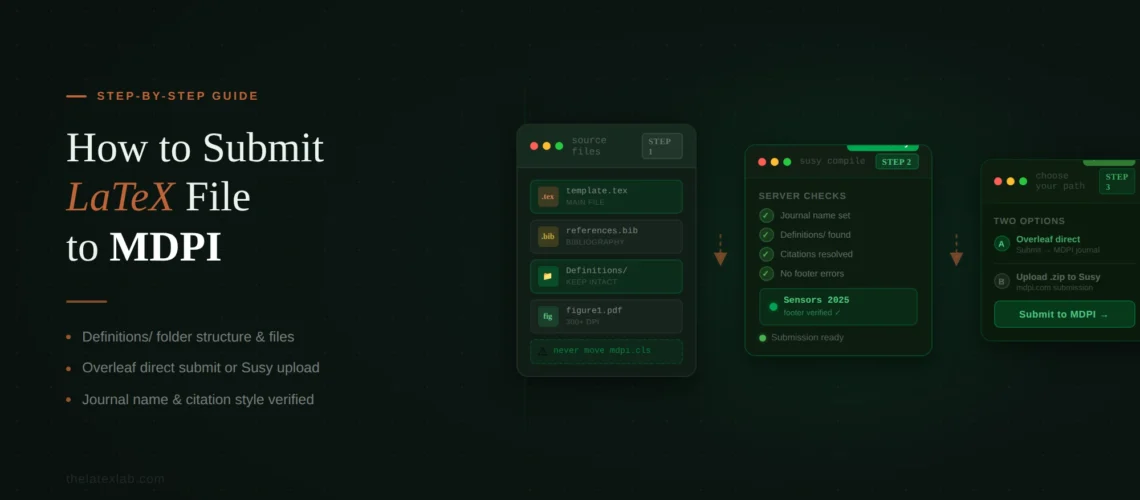
The ZIP contains a main file called template.tex and a subfolder named Definitions that holds the class file (mdpi.cls), journal logos, bibliography style files, and additional formatting definitions. All of these files need to stay together in your project directory, or compilation will fail.
The very first line of your .tex file is the \documentclass declaration, and this is where a surprising number of submissions break:
\documentclass[journal,article,submit,pdftex,moreauthors]{Definitions/mdpi}There are a few things to get right here. The journal option must be the exact name of the MDPI journal you are targeting, and it is case-sensitive. Typing Mathematics when the template expects mathematics (or vice versa) will throw an error, and the compiled PDF will show “Submitted to Journal Not Specified” in the footer. If you are unsure of the exact string, check the grey comments in the template, which list every recognized journal name.
The pdftex option is for compiling with pdfLaTeX. If you are using XeLaTeX or compiling via the traditional LaTeX-to-DVI pipeline with EPS figures, you need to remove this option. Getting this wrong produces cryptic driver-related errors that do not obviously point back to the \documentclass line.
If you have only one author, switch moreauthors to oneauthor. This is not just cosmetic; it affects the header layout in the compiled PDF.
Our insight: We see about 1 in 5 MDPI LaTeX submissions come to us with the journal name wrong in the documentclass line. One researcher spent two hours debugging compilation errors for an Applied Sciences submission. The entire problem was that they had typed “applsci” instead of the exact string the template expected. We pulled the comment block from the template, found the correct string, and the paper compiled in under a minute. Always copy the journal name directly from the template’s comment block rather than guessing the abbreviation.
The Back Matter Fields That MDPI Actually Enforces
This is where MDPI diverges significantly from most publishers, and it is the section that catches the most authors by surprise. The MDPI template includes a long list of back matter fields after the main body of the paper. Most of these are not optional, even though they look like template boilerplate because they are written in placeholder language.
Here is the full list of back matter sections in the order they appear in the template, with notes on which ones MDPI requires:
Author Contributions (mandatory for multi-author papers)
MDPI uses the CRediT (Contributor Roles Taxonomy) system. The template includes the exact format they expect: a semicolon-separated list of roles mapped to author initials. The 14 CRediT roles are Conceptualization, Methodology, Software, Validation, Formal Analysis, Investigation, Resources, Data Curation, Writing (Original Draft Preparation), Writing (Review and Editing), Visualization, Supervision, Project Administration, and Funding Acquisition. You must also include the sentence stating that all authors have read and agreed to the published version. MDPI’s editorial team checks this field during the technical pre-check immediately after submission.
Funding (mandatory)
Even if your research received no external funding, you must explicitly state that. The template provides the exact wording for both funded and unfunded scenarios. If you did receive funding, you need to include the funder name, grant number, and a note about whether the APC was funded. Getting the funder name wrong here can cause real problems: some funding agencies will not reimburse the Article Processing Charge unless the funder and grant number are listed with their exact standardized spelling.
Data Availability Statement (mandatory for all MDPI articles)
This is the requirement that surprises the most authors, especially those coming from publishers that treat data sharing as optional. MDPI requires a Data Availability Statement on every article, regardless of discipline. You need to select one of their recommended statement templates and fill it in. The options range from “Data are contained within the article” to statements about public repository deposits with DOIs. If your data cannot be shared due to privacy, proprietary, or ethical restrictions, you need to explain the restriction explicitly. Leaving this field blank or with placeholder text will get flagged during the technical pre-check, and your paper will be sent back before it reaches a reviewer.
Conflicts of Interest (mandatory)
You must declare conflicts or explicitly state there are none.
Ethics Statements (conditional)
If your research involves human subjects, you need an Institutional Review Board statement and an Informed Consent statement. If it involves animals, you need an ethics committee approval statement. Studies that involve neither can state “Not applicable,” but you should still fill in the field rather than deleting it, because the MDPI production pipeline expects these fields to be present in the source file.
Our insight: A biomedical researcher came to us after their MDPI submission was returned twice during pre-check. Both times, the only issue was the Data Availability Statement. The first time, they had left the template placeholder text in place. The second time, they wrote their own version but did not follow MDPI’s recommended wording closely enough for the automated check to clear. We pulled the exact phrasing from MDPI’s ethics page, adapted it to their dataset (deposited in Zenodo with a CC-BY 4.0 license), and the submission cleared pre-check on the third try. The entire delay was six weeks for what amounted to two sentences.
We handle MDPI back matter formatting for every journal in their portfolio.
CRediT author contributions, Data Availability Statements, funding declarations, ethics statements. All formatted to MDPI’s exact requirements so your paper clears pre-check on the first attempt.
Structuring Your ZIP File for MDPI Submission
MDPI requires LaTeX submissions to be packaged into a single ZIP file. The editorial office needs to recompile your PDF from the source files, so the ZIP must contain everything needed for a clean compilation. Here is a practical folder structure that works:
your-paper.zip
├── template.tex          (your main manuscript file)
├── references.bib        (if using BibTeX)
├── Definitions/
│   ├── mdpi.cls
│   ├── logo-mdpi.eps
│   ├── mdpi.bst
│   └── (other definition files from the template)
├── figures/
│   ├── figure1.png
│   ├── figure2.pdf
│   └── figure3.eps
└── (any additional .sty files you need)
The total upload size across all files must not exceed 120 MB. If your figures are pushing this limit, compress them or use vector formats (PDF or EPS) where possible. Include only the files that are actually needed for compilation. Do not include your working drafts, editor notes, or unused figure files. The editorial office will attempt to recompile the PDF, and extraneous files can sometimes cause path confusion.
If you use BibTeX, make sure your .bib file is included in the ZIP. If your references are written inline using \begin{thebibliography}, the .bib file is not needed, but verify that all references compile without [?] markers.
MDPI recommends figures at a minimum of 600 DPI in PNG, JPEG, or TIFF format. If you are using EPS figures, remember to remove the pdftex option from \documentclass and compile with the LaTeX-to-DVI pipeline instead of pdfLaTeX.
Submit LaTeX to MDPI Through the SuSy Portal: The Five-Step Process
MDPI uses its own submission system called SuSy, accessible at susy.mdpi.com. The process has five steps. It is worth understanding what each one asks for before you start, because partially completed submissions are not easy to return to.
Step 1: Manuscript Information
The journal should already be pre-selected if you navigated to SuSy from the journal’s website. You will choose the journal section (based on your paper’s topic area), article type (research article, review, communication, etc.), and enter the title, abstract, and keywords. If you are submitting to a Special Issue or Topic, you select that here. Missing this selection means your paper may be processed as a regular submission and routed to different editors than the ones who invited it.
Step 2: Author Details
Every co-author’s email, ORCID, affiliation, title, and country needs to be entered. MDPI strongly prefers institutional email addresses. Using personal Gmail or Yahoo addresses can delay processing because the editorial office may request institutional verification. The corresponding author designation happens here. Choose carefully: MDPI routes all communications through the corresponding author, and slow email responses are one of the most common causes of processing delays.
Step 3: Reviewer Suggestions
You can suggest up to three peer reviewers by providing their names, email addresses, and institutional affiliations. This step is optional but recommended. Reviewer exclusions also go here in the submission system fields, not in the cover letter.
Step 4: File Upload
This is where you upload your ZIP file containing all LaTeX source files and images. You also upload supplementary materials here if you have any. Alongside your ZIP, upload a compiled PDF of your manuscript as well. The editorial office uses your source files for production, but the PDF serves as the reference version during review and prevents rendering discrepancies if their TeX distribution compiles your paper slightly differently.
Step 5: Confirmation and Submission
The final step asks you to confirm terms and conditions. This is also where institutional open-access agreements (IOAPs) are applied. If your institution has an agreement with MDPI for discounted or waived APCs, you select your institution from a dropdown here. Missing this step means paying the full APC out of pocket and trying to claim the discount retroactively, which is significantly harder.
Our insight: We have seen three researchers in the past year miss the IOAP dropdown in Step 5 and end up paying the full APC when their university had a 20% discount agreement with MDPI. The dropdown is easy to overlook because it appears after the terms and conditions checkbox. Check with your library or research office before submitting to find out if your institution has an MDPI agreement.
The Cover Letter Requirement
MDPI requires a cover letter with every submission. This is easy to overlook because many open-access publishers have dropped the cover letter. Your cover letter should include: why the paper’s content is significant, how it fits the journal’s scope, and a confirmation that the manuscript is not under consideration elsewhere. If you have previously submitted the manuscript (or a related version) to another MDPI journal, acknowledge that and provide the previous manuscript ID. This speeds up processing on MDPI’s end.
Do not put reviewer suggestions or exclusions in the cover letter. Those go in Step 3 of SuSy.
Need your MDPI submission prepared end to end?
We handle template setup, back matter formatting, ZIP packaging, and pre-submission checks for any MDPI journal. Delivered submission-ready so your paper clears the technical pre-check on the first attempt.
Submitting LaTeX to MDPI Directly from Overleaf
If you are working in Overleaf, you can skip the manual ZIP-and-upload process. Overleaf has a built-in MDPI submission integration. When your manuscript is ready, go to the Submit menu and select “Submit to an MDPI journal.” Overleaf will package your source files and send them to MDPI’s submission system.
This workflow saves time on file packaging, but you still need to complete the SuSy form for author details, reviewer suggestions, and the institutional discount selection. The Overleaf integration handles the file transfer only.
One caution: Overleaf does not always run the latest TeX distribution. If your paper uses packages or features from very recent TeXLive updates, your local compilation and Overleaf’s compilation might produce slightly different results. Always check the compiled PDF in Overleaf before submitting, even if it looks perfect on your local machine. If you run into compilation discrepancies across environments, our guide on submitting LaTeX to IEEE covers troubleshooting compilation differences in its PDF generation section, and many of those fixes apply to MDPI papers as well.
Common MDPI LaTeX Submission Errors and Fixes
These are the errors that come up repeatedly in MDPI’s blog comments, TeX community forums, and in the submissions we process at TheLatexLab. If you are hitting an MDPI LaTeX submission error and cannot figure out what is wrong, check this list before spending hours debugging.
“Submitted to Journal Not Specified” in the footer
Cause: The journal name in your \documentclass line is either missing, misspelled, or not in the format the template expects. Journal names are case-sensitive.
Fix: Download the latest template and check the comments section for the exact string your journal requires. Copy it directly rather than typing it from memory.
Undefined control sequence errors with math symbols
Cause: The MDPI class file (mdpi.cls) loads a specific set of packages, and some of them define math symbols differently than the packages you might be used to. The issue is usually a conflict between a package you added and one that mdpi.cls already loads. The class file loads amsmath, amssymb, hyperref, graphicx, natbib, and several others by default.
Fix: Check whether the symbol is available through the packages already loaded by the class file before adding your own. Remove any packages from your preamble that mdpi.cls already includes.
The mdframed environment inserting page breaks
Cause: The mdframed package does not work correctly with mdpi.cls, causing unwanted page breaks after every few lines inside a frame.
Fix: Use tcolorbox instead, or contact [email protected] for a workaround specific to your case.
Package conflicts with mathdesign
Cause: The mathdesign package changes fonts and can conflict with the font setup in the MDPI template.
Fix: Load mathdesign between the \documentclass declaration and \begin{document}. MDPI documents the specific conflict resolution in their LaTeX questions blog post.
PDF compiles but only generates one page
Cause: The document ended prematurely, often because of an unclosed environment (a \begin{} without a matching \end{}), or because a critical section of the template structure was accidentally deleted.
Fix: Check for mismatched environments and make sure you have not removed any of the mandatory back matter commands, even if you left them empty.
BibTeX not generating references
Cause: BibTeX was not run as part of the compilation pipeline, or the .bib file path is incorrect.
Fix: Run the full compilation sequence: pdfLaTeX, BibTeX, pdfLaTeX, pdfLaTeX. Make sure your .bib file is in the same directory and the \bibliography{} command does not include the .bib extension or a folder path. In Overleaf, this happens automatically. In local editors, you may need to trigger BibTeX manually.
Web citations formatting incorrectly
Cause: The MDPI bibliography style uses the @www entry type for web references, not @ONLINE or @misc.
Fix: Change the entry type in your .bib file from @ONLINE or @misc to @www for all web references.
Our insight: We once received a paper where the author had added 14 custom packages to the MDPI template and spent three days debugging compilation errors. After removing the packages one by one, we found that 11 of the 14 were already loaded by mdpi.cls (amsmath, hyperref, graphicx, natbib among them). The remaining three were causing direct conflicts. MDPI’s own LaTeX team advises beginners not to modify the template at all, and from our experience handling hundreds of MDPI submissions, that is solid advice. The class file handles more than most authors realize out of the box.
Hundreds of MDPI papers formatted, compiled, and submission-ready without a single pre-check rejection.
We handle template setup, package conflict resolution, back matter formatting, and ZIP packaging. Delivered in 72 hours.
What Happens After You Submit
Once you submit in SuSy, your paper enters a two-stage pre-screening process. First, the journal’s Managing Editor runs a technical pre-check. This is where formatting issues, missing back matter, and template problems get flagged. If something is wrong, you get the paper back with a request to fix specific issues before it goes to peer review.
If it clears the technical pre-check, an Academic Editor performs an editorial pre-check to assess suitability for the journal and scientific merit at a high level. The Academic Editor can then send it for peer review, reject it, or request revisions before peer review begins.
MDPI publishes a median turnaround of about 40 days from submission to publication, with a first decision typically arriving in 16 to 17 days. However, this clock only starts once your paper clears the pre-check stage. Every time a submission bounces back for a formatting issue, that timeline resets.
During peer review and revisions, the submission system tracks all versions. You cannot directly edit a submitted manuscript; changes happen during formal revision rounds. If you catch a mistake after submitting, contact the editorial office for your journal directly.
Pre-Submission Checklist for MDPI LaTeX Papers
Run through this before uploading to SuSy.
1. Correct journal name. Your \documentclass line has the correct, case-sensitive journal name. Copy it from the template’s comment block.
2. Latest template version. Check mdpi.com/authors/latex for the most recent download date. If your template is more than a few months old, re-download.
3. Compilation method matches. The pdftex option matches your compiler. pdfLaTeX = keep it; XeLaTeX or DVI workflow = remove it.
4. All mandatory back matter filled. Author Contributions in CRediT format, Funding statement, Data Availability Statement, Conflicts of Interest declaration.
5. Ethics statements present. Either filled with real data or explicitly marked as “Not applicable.”
6. Figures cited and included. All figures are cited in the text as “Figure 1,” “Table 1,” etc. and are included in the ZIP at 600+ DPI.
7. References compile cleanly. No [?] markers. If using BibTeX, the .bib file is in the ZIP.
8. ZIP size under 120 MB. Total across all files.
9. Cover letter prepared.
10. Compiled PDF included. Upload alongside your source files as a reference for the editorial team.
11. Institutional discount checked. Find out whether your institution has an MDPI open-access agreement before reaching Step 5 of SuSy.