
To format a dissertation in APA 7, start from your graduate school’s dissertation manual and template, and use APA 7 for what the manual leaves open: in-text citations, the reference list, headings inside chapters, tables and figures, and block quotations. Where the two disagree, for example on the title page, page numbers or margins, follow the manual; APA’s own guidance says to.
The sections below give the APA 7 rule for each part of a dissertation, what graduate schools commonly change, and how to set it up in Word.
What APA 7 covers in a dissertation
APA 7 sets the style of the text: how you cite, how the reference list looks, how headings, tables, figures and quotations are formatted. It was written for student papers and journal manuscripts, so it has no rules for a committee page, a dedication, or a table of contents.
APA says so itself. Its order of pages guidance notes that dissertations and theses may need elements it does not list and tells you to follow your university for the order of pages. Its margins guidance adds that a dissertation may need different margins, such as a wider left margin for binding.
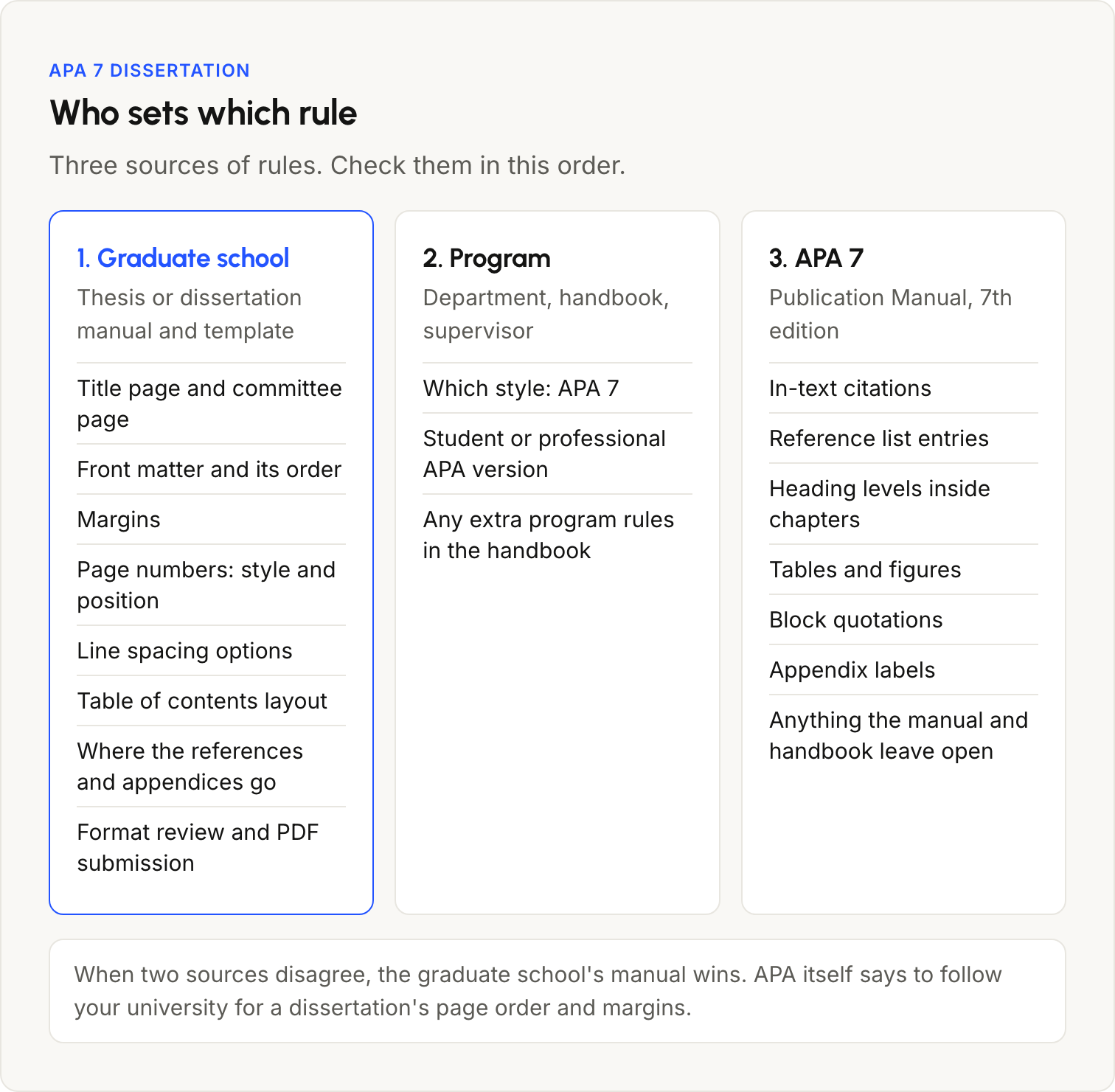
So a dissertation has three sources of rules: the graduate school’s manual and template, your program or supervisor (which style, and any handbook rules), and APA 7. Check them in that order.
When graduate school rules differ from APA 7
When the manual and APA 7 disagree, follow the manual. Graduate schools that require APA 7 still change parts of it, and they do not all change the same parts.
| Rule | APA 7 default | UT Austin (2026 guidelines) | Pepperdine GSEP (2026 manual) |
|---|---|---|---|
| Citation style | APA 7 | Any standardized style the supervisor approves | APA 7 required |
| Front matter page numbers | Arabic; the title page is 1 | Arabic from the first page | Lowercase Roman numerals; Arabic from Chapter 1 |
| Page number position | Top right | Bottom center | Top right or bottom center |
| Running head | Not on student papers | Not mentioned | Not included |
| Margins | 1 in. | 1.25 in. in the templates | 1 in. |
| End of the document | References, then appendices | Appendices, then the bibliography | References, then appendices |
Pepperdine’s dissertation format manual states that its own rules win where they conflict with APA. Liberty University goes the other way on the running head: its APA guide puts graduate and doctoral students on APA’s professional version, with a running head on every page. The full set of rules for one university, with its templates, is in how to format a UT Austin dissertation in APA 7.
Before you format anything:
- Get your graduate school’s current dissertation manual and template, and check the date on both.
- Read what the manual says about style manuals. Look for a statement on which one wins when they conflict, like Pepperdine’s.
- Check your program handbook for rules of its own, such as the student or professional APA version.
- If a rule is still unclear, ask the person who does the format review, not a classmate’s old dissertation.
Margins, font, line spacing and page numbers
APA 7’s page setup, from its Student Paper Setup Guide, is the starting point. Change any of it your manual sets differently.
- Margins: 1 in. on all sides.
- Font: a legible font used the same way throughout, for example 12-point Times New Roman, 11-point Calibri, 11-point Arial, 12-point Aptos or 11-point Georgia.
- Line spacing: double-space everything, including block quotations and the reference list, with no extra space before or after paragraphs.
- Alignment: left aligned with a ragged right margin, never fully justified, and no hyphens added at line ends.
- Paragraph indent: 0.5 in. on the first line of every paragraph.
- Page numbers: top right on every page, starting with 1 on the title page.
- Running head: not used on student papers unless your institution asks for one.
In the examples above, margins and page numbers are where the schools differ from APA: wider margins, Roman numerals for the front matter, or numbers at the bottom center.
Title page, abstract and table of contents
Use your graduate school’s title page, not APA’s. APA’s student title page lists a course, an instructor and a due date, which a dissertation does not have, and its professional title page is for journal submissions. The school’s title page has its own wording instead, such as the degree and the graduation date.
The abstract follows APA unless your manual says otherwise. In APA 7:
- the label “Abstract” is centered and bold at the top of its own page
- the text is one paragraph, double-spaced, with the first line not indented
- journals usually limit it to 250 words, but your school can set a different length
- keywords, if your school wants them, go on the line below: “Keywords:” in italics and indented, then the keywords in lowercase, separated by commas
APA 7 has no rules for a table of contents, so its layout comes from your manual. Build it from your heading styles rather than typing it, so the wording and page numbers always match the text.
APA 7 heading levels for dissertation chapters
APA 7 has five heading levels, all in bold and title case. In a dissertation, each chapter title is a Level 1 heading, and the sections inside the chapter use Levels 2 to 5.
| Level | Format | Text after it |
|---|---|---|
| 1 | Centered, bold, title case | New paragraph |
| 2 | Flush left, bold, title case | New paragraph |
| 3 | Flush left, bold italic, title case | New paragraph |
| 4 | Indented 0.5 in., bold, title case, ending with a period | Same line |
| 5 | Indented 0.5 in., bold italic, title case, ending with a period | Same line |
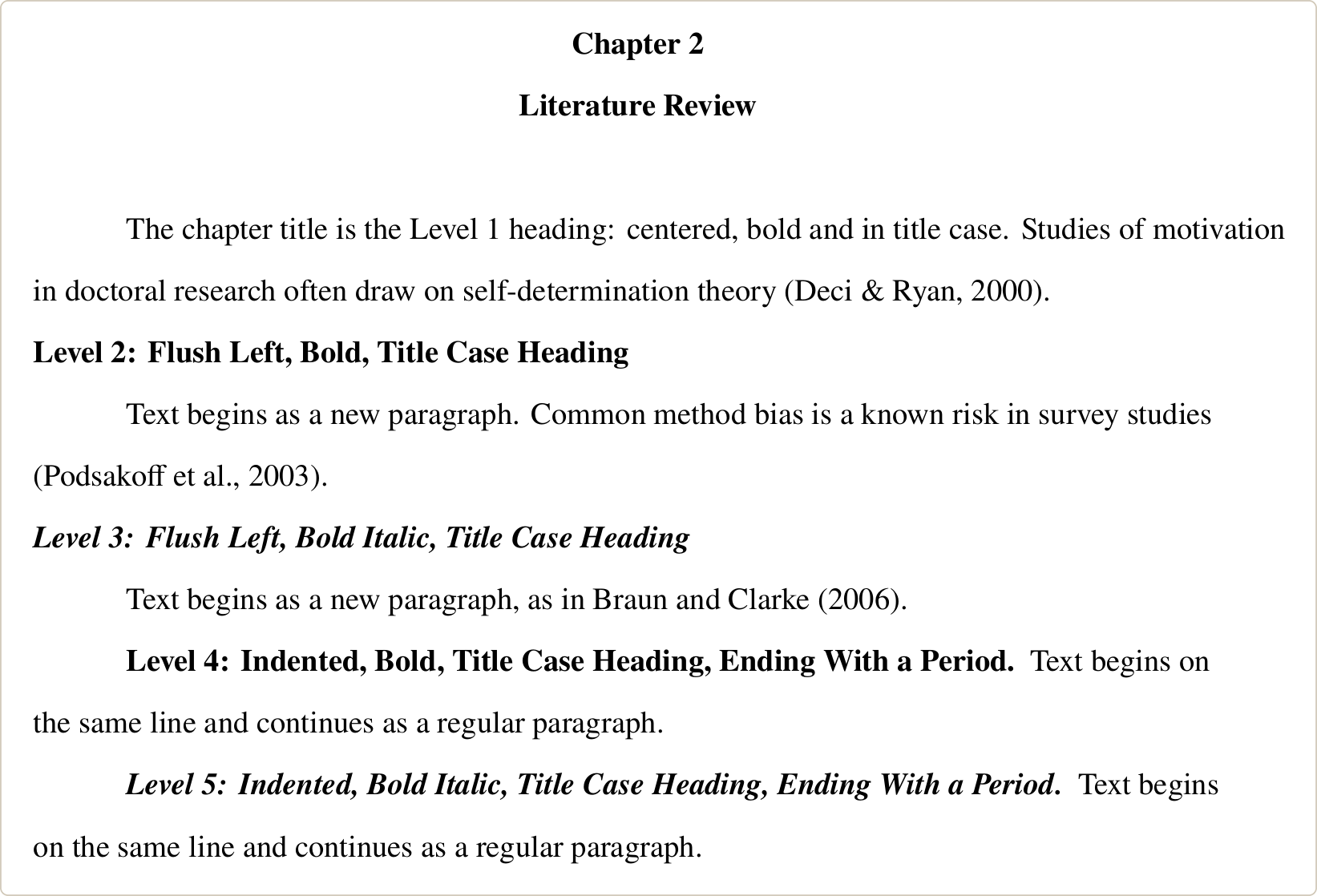
The other heading rules from the APA Style headings page:
- Do not number or letter headings. Chapter labels such as “Chapter 2” come from your school’s template, so keep them as the template has them.
- Use headings of the same level for sections of equal importance.
- Have at least two subsections under a heading, or none.
- Do not add blank lines above or below headings, even at the bottom of a page.
In-text citations and the reference list
APA 7 uses author and year in the text and a full entry in the reference list for every work you cite.
- Two authors: both names every time, with “&” in parentheses, (Braun & Clarke, 2006), and “and” in the sentence, Braun and Clarke (2006).
- Three or more authors: the first author and “et al.” in every citation, including the first, (Podsakoff et al., 2003).
- Direct quotations: add the page number, (Braun & Clarke, 2006, p. 79).
- Quotations of 40 words or more: a block quotation, indented 0.5 in., double-spaced, with no quotation marks and the citation after the final punctuation.
- Group authors with a well-known abbreviation: define it once, then use the abbreviation.
The reference list starts on a new page with the label “References”, centered and bold. Entries are in alphabetical order by first author, double-spaced, with a 0.5 in. hanging indent. Article and book titles are in sentence case, and a DOI is written as a link, https://doi.org/… Every work cited in the text appears in the list, and every entry in the list is cited in the text; personal communications are the one exception.
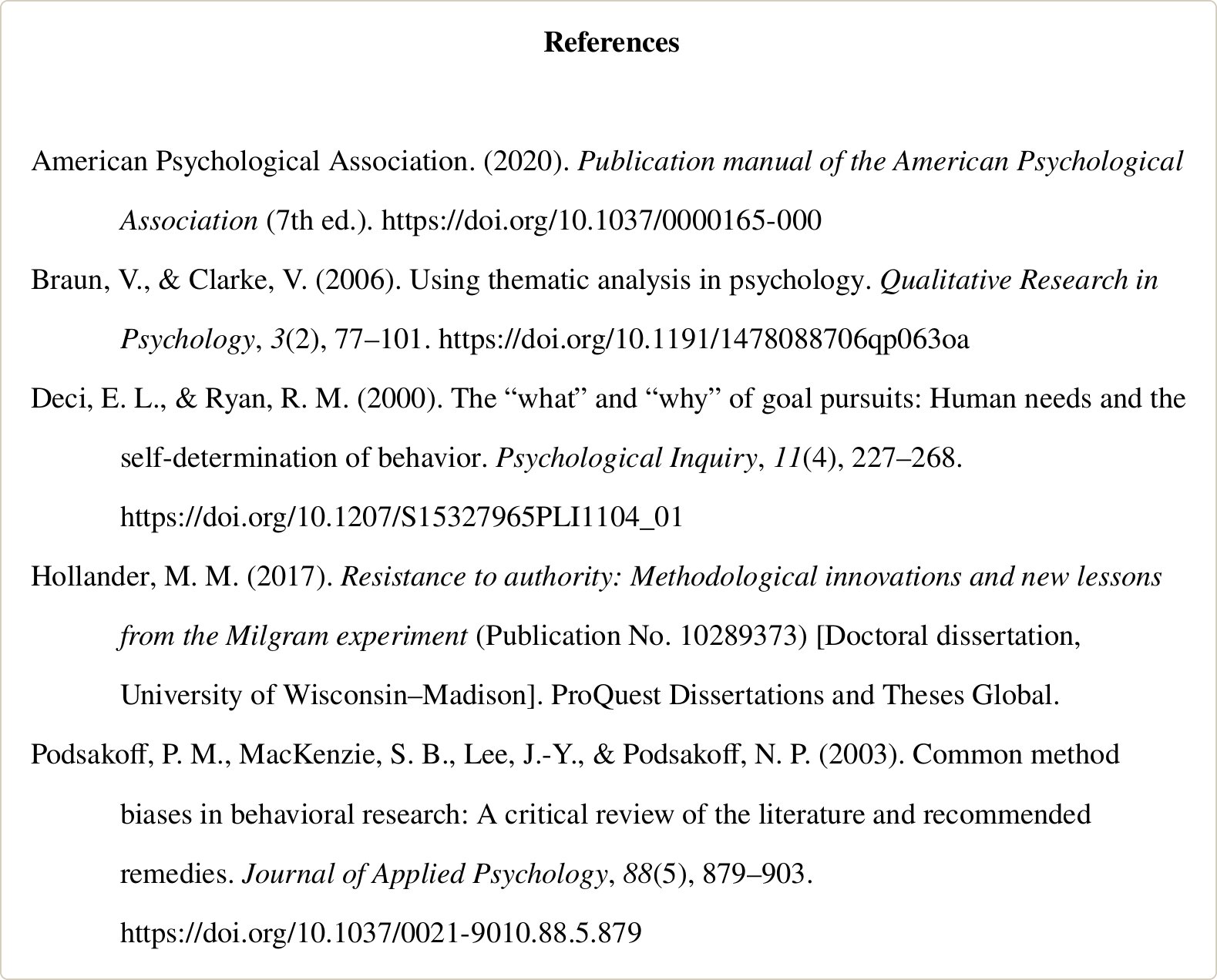
Dissertations cite other dissertations often. APA’s dissertation reference format puts the publication number in parentheses after the title, then “Doctoral dissertation” and the university in square brackets, then the database:
Hollander, M. M. (2017). Resistance to authority: Methodological innovations and new lessons from the Milgram experiment (Publication No. 10289373) [Doctoral dissertation, University of Wisconsin-Madison]. ProQuest Dissertations and Theses Global.
Add a URL only if it opens for readers without a login.
To build entries from a DOI, ISBN or PubMed ID, our APA citation generator gives the reference list entry, and the APA in-text citation generator gives the parenthetical and narrative citations. Check each one against the rules above before you paste it in.
Tables and figures in APA 7
In APA 7 the table number goes above the table in bold, the title goes on the next line in italic title case, and notes go below the table. Figures use the same layout, with the number and title above the image.
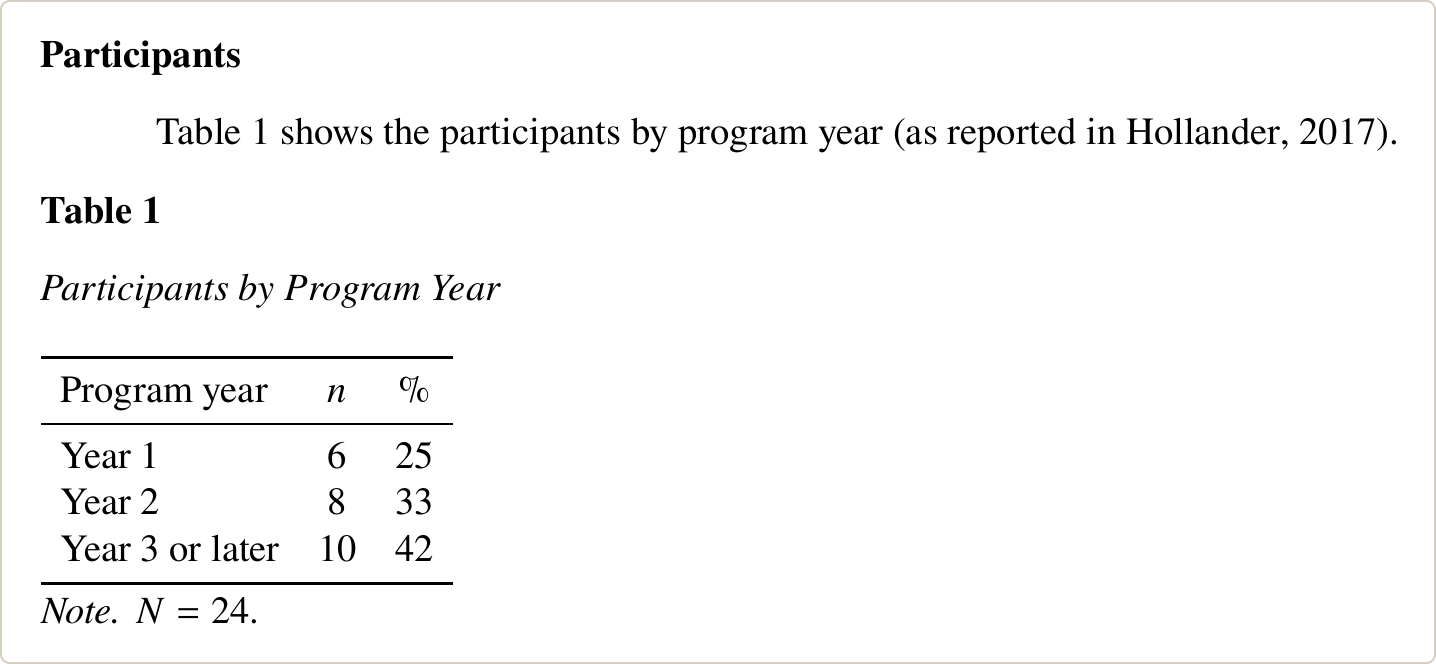
- Number tables and figures 1, 2, 3 in the order you first mention them, and mention each one in the text before it appears.
- Use lines only above and below the table and under the column headings. No vertical lines.
- The table body can be single-, 1.5- or double-spaced; the number, title and notes are double-spaced.
- If a table runs over a page, repeat the column headings on the next page. If it is too wide, put it on a page turned sideways.
Lists of tables and figures are not part of APA 7. If your school wants them, they come from its manual, and Word can build them from your captions (see the Word section).
Appendices in an APA 7 dissertation
Each appendix starts on a new page with the label “Appendix” (or “Appendix A”, “Appendix B” when there are several) centered and bold, and its title on the next line, also centered and bold.
- Mention each appendix in the text, in the order they appear.
- Number tables and figures inside an appendix with its letter: Table A1, Figure B2, with no period between the letter and the number.
- Works cited in an appendix go in the main reference list.
Where the appendices go is your school’s decision. APA puts them after the reference list; some graduate schools, such as UT Austin, put them before it.
How to set up APA 7 in Microsoft Word
If your graduate school gives you a Word template, start from it and change only the styles that differ from APA; it already has the school’s margins, page numbers and front matter. If it does not, set up a blank document like this:
- Body text: on the Home tab, right-click the Normal style and choose Modify. Set the font and size, then under Format, Paragraph: alignment Left, first-line indent 0.5″, spacing before and after 0 pt, line spacing Double.
- Headings: modify Heading 1 to Heading 5 the same way, to match the five APA levels in the table above, with the same font and size as the body text. For Levels 4 and 5, type the heading and the first words of the paragraph on one line, select only the heading words, and apply the style, as the APA headings page describes.
- Page numbers: Insert, Page Number. To switch from Roman numerals in the front matter to Arabic numbers at Chapter 1, put a section break before Chapter 1 (Layout, Breaks, Next Page), turn off Link to Previous in the new section’s header or footer, and set the number format and “Start at” under Insert, Page Number, Format Page Numbers.
- Table of contents: References, Table of Contents. After edits, right-click it and choose Update Field.
- Table and figure titles: select the table or figure, then References, Insert Caption, with the label Table or Figure. Make the number bold and put the title in italics on the next line. References, Insert Table of Figures then builds the list of tables or figures.
- Reference list: select the entries, open the Paragraph settings, and under Special choose Hanging, By 0.5″. Keep double spacing with 0 pt before and after.
Apply the styles to every heading. A heading typed in bold without a style does not appear in the table of contents.
Get your APA 7 dissertation formatted by experts with 10+ years of experience
We format dissertations to your graduate school’s template and APA 7, from the front matter to the reference list. The fee is fixed before work starts, and you pay after you review the first draft.
APA 7 in Google Docs and LaTeX
In Google Docs, our Google Docs citation add-on inserts APA 7 citations as you write and builds the reference list. If your school gives you a Word template, move the text into it for the final layout.
In LaTeX, do not use the apa7 class for a dissertation: it is built on the article class and has no chapters. Keep your university’s thesis class and add biblatex with the APA style. The setup, with compiled examples, is in how to use APA 7 in a LaTeX thesis or dissertation.
Checks before the format review
Run these checks on the final PDF before you send it to the format reviewer:
- Every in-text citation has a reference list entry, and every entry is cited at least once.
- Three-or-more-author works use “et al.” from the first citation.
- The table of contents and the lists of tables and figures are updated and match the headings and captions word for word.
- Page numbers run without gaps and use the style and position your manual sets.
- Each chapter, the reference list and each appendix start on a new page.
- Tables and figures are numbered in the order they are mentioned, and each is mentioned in the text.
- The same font is used throughout, apart from figure images and footnotes.
- Headings are bold and unnumbered (except your school’s chapter labels), with no blank lines added around them.
- The front matter, margins and page order match your school’s manual, not APA’s paper layout.
If your graduate school offers a format check before final submission, ask for it early, while there is time to fix what it finds.
