The UT Austin dissertation format is set by the Graduate School’s Format Guidelines (September 2026), and APA 7 covers only what those guidelines leave to your department: citations, the reference list, headings inside chapters, and the layout of tables and figures. Where the two disagree, as with page numbers, margins, the title page and the place of the reference list, follow the Graduate School.
The Graduate School gives you a Word template and a LaTeX template. Both work for APA 7 after a few changes, listed below for each.
UT Austin dissertation format requirements
The rules are in the Format Guidelines for Dissertations, Treatises, Theses and Reports from the Office of Graduate and Postdoctoral Studies (OGPS). The Digital Submission page links the format guidelines PDF, the Word templates with their user guide, and a LaTeX package.
The guidelines set the layout and leave the citation style to you and your supervisor. Any standardized style is accepted if you use it consistently and your supervisor approves it. So APA 7 is your department’s or supervisor’s choice, and the Graduate School checks the layout.
APA agrees with this split. Its order of pages guidance says a dissertation follows the university’s rules for page order, and its margins guidance says a dissertation may need different margins.
UT Austin rules that differ from APA 7
These are the places where APA 7 and the UT Austin guidelines give different answers. The last column is what to use.
| Item | APA 7 | UT Austin | Use |
|---|---|---|---|
| Margins | 1 in. on all sides | The same on every page; both templates use 1.25 in. on all sides | 1.25 in. |
| Page numbers | Top right; the title page is page 1 | Bottom center; page 1 is the first page of the document | UT |
| Line spacing | Double | 1.5 or double, the same throughout | Double |
| Title page | Student title page with course, instructor and due date | UT title page with degree and graduation month | UT |
| Page order | References, then appendices | Appendices, then the bibliography | UT |
| Abstract | First line not indented; 250 words for journals | Heading block with title, name, degree and supervisor; first line indented; 350 words in the Word template | UT |
| Text alignment | Left aligned, ragged right | Not set; the Word template’s body text is justified | APA |
| Reference list title | References | Bibliography, References or Works Cited | References |
| Table and figure numbers | Table 1, Table 2 | Consecutive or by chapter (Table 2.1), never mixed | Table 1, Table 2 |
| Block quotations | 40 words or more, double-spaced | Over four lines, single or double-spaced | See the FAQ |
Margins, page numbers and line spacing
Use 1.25 in. margins on all sides, number every page at the bottom center starting from 1, and double-space the text.
- Margins: the guidelines only ask for the same margins throughout, including the appendix. Both UT templates set 1.25 in. on every side, so keep them. Tables and figures must fit inside the margins; if one does not, put it on a sideways page (horizontal orientation).
- Page numbers: page 1 is the first page of the document, the copyright page or, without one, the committee page. Arabic numbers run to the end, centered at the bottom. There are no Roman numerals for the front matter; the Word template’s user guide calls this a Graduate School requirement.
- Line spacing: 1.5 or double, the same throughout. Double meets APA too. The abstract must be 1.5 or double, not single. Captions may be single-spaced so a table or figure fits on one page.
- Font: 12 point is recommended, and the Word template uses 12-point Times New Roman, which APA also accepts. Headings may be bold and are normally no more than 2 points larger than the text.
- New pages: each chapter and each major section (appendix, bibliography, vita) starts on a new page.
Order of pages in a UT Austin dissertation
Use the Graduate School’s order, not APA’s:
- Copyright page (optional; the Graduate School encourages it)
- Committee page
- Title page
- Dedication or epigraph (optional)
- Acknowledgments or preface (optional)
- Abstract
- Table of contents
- List of tables, list of figures, list of illustrations (if you have them)
- Text (chapters)
- Appendix (if any)
- Glossary (optional; it can go after the lists instead)
- Bibliography or References
- Vita (optional; always the last page)
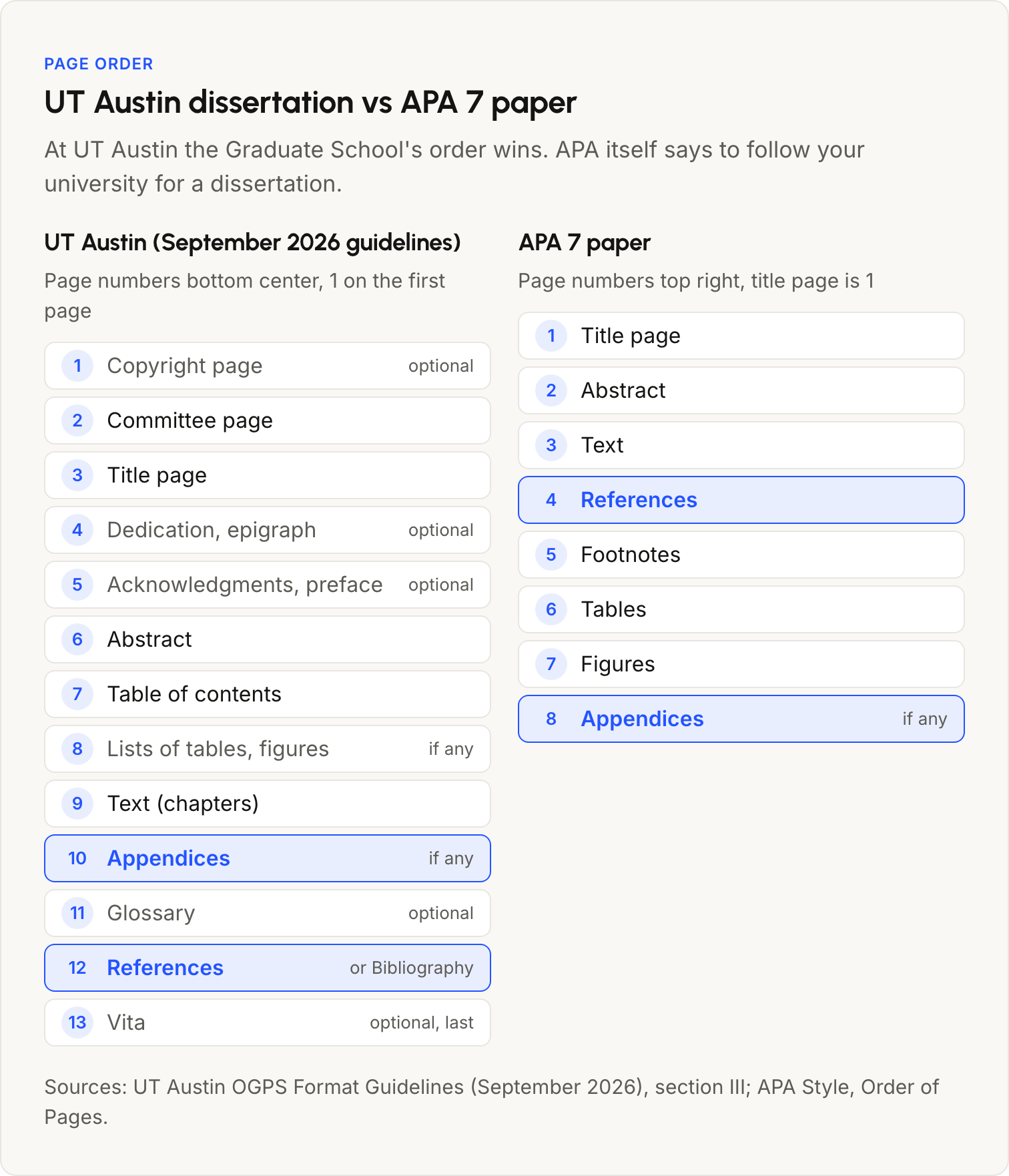
The main difference from APA is the end of the document. APA puts the references before the appendices; UT puts the appendices first and the references last, followed only by the vita.
Copyright page, committee page and title page
All three follow UT’s samples in the guidelines, not APA’s title page. Leave out APA’s course, instructor and due date.
- Copyright page: “Copyright”, “by”, your full name and the year, centered.
- Committee page: “The Dissertation Committee for [your name] certifies that this is the approved version of the following dissertation:”, then the title centered and double-spaced, then “Committee:” and the typed names. Put “Supervisor” or “Co-supervisor” after those names, and no titles such as Dr. or Ph.D. The PDF has no signatures; they go on the Report of Dissertation Committee form.
- Title page: the title (centered, double-spaced), “by”, your name, “Dissertation”, “Presented to the Faculty of the University of Texas at Austin in Partial Fulfillment of the Requirements for the Degree of”, the degree name as the Graduate Catalog words it, “The University of Texas at Austin”, and the graduation month and year. The month can only be May, August or December.
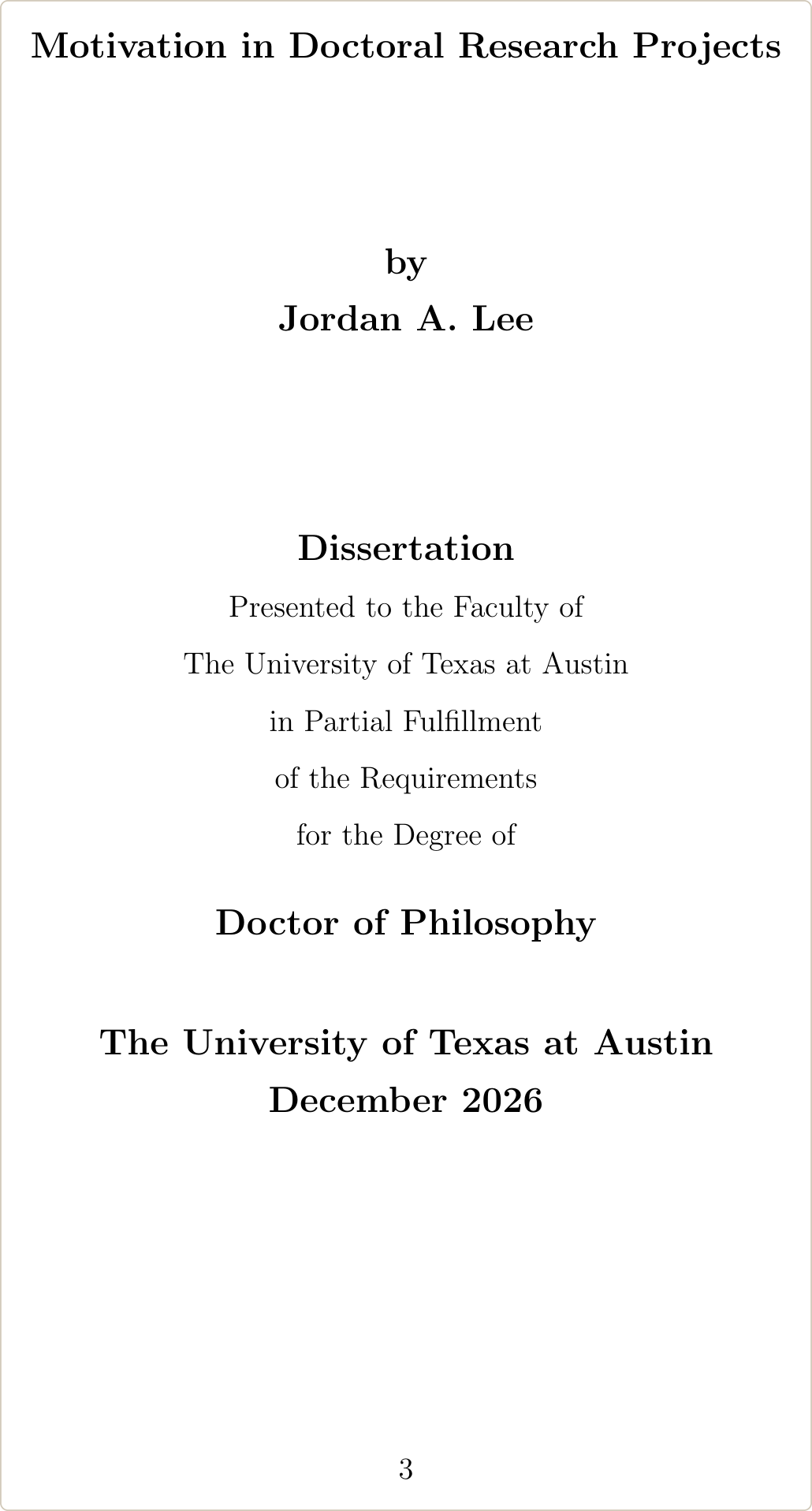
For a dual degree, list both degrees on separate lines joined by the word “And”.
Abstract format
The abstract page starts with a heading block, then the text with its first line indented:
- the title, centered and double-spaced, exactly the same as the dissertation title
- “by”
- your name and the degree abbreviation from the Graduate Catalog, for example “Jordan A. Lee, PhD”
- “The University of Texas at Austin” and the year
- “SUPERVISOR:” and your supervisor’s name, with no titles or degrees
Write it as continuous prose, 1.5 or double-spaced. The Word template says it should not exceed 350 words. APA’s abstract rules (first line flush left, 250 words for journal articles) are for papers, so follow UT’s format here.
Table of contents and chapter headings
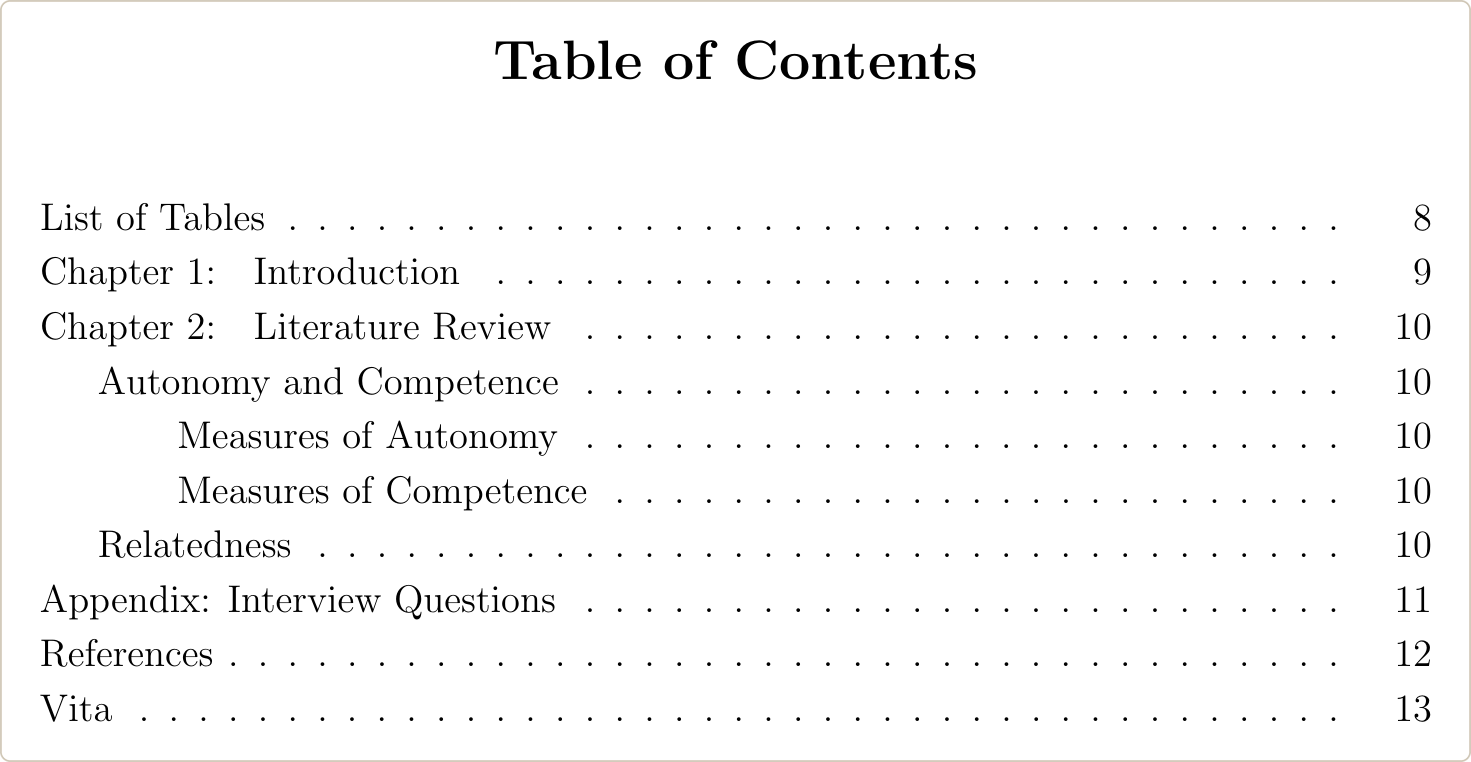
The table of contents comes right before the lists of tables and figures, and those lists are its first entries. It must include every chapter and the bibliography with page numbers, and its wording must match the headings in the text exactly: “Chapter 3” in the table of contents cannot be “Chapter III” in the text.
- Chapters and major sections are flush left; subheadings are indented under them.
- Page numbers are right-aligned.
- Entries are double-spaced; an entry that runs over one line is single-spaced, with the second line indented.
- Each list (tables, figures, illustrations) starts on its own page.
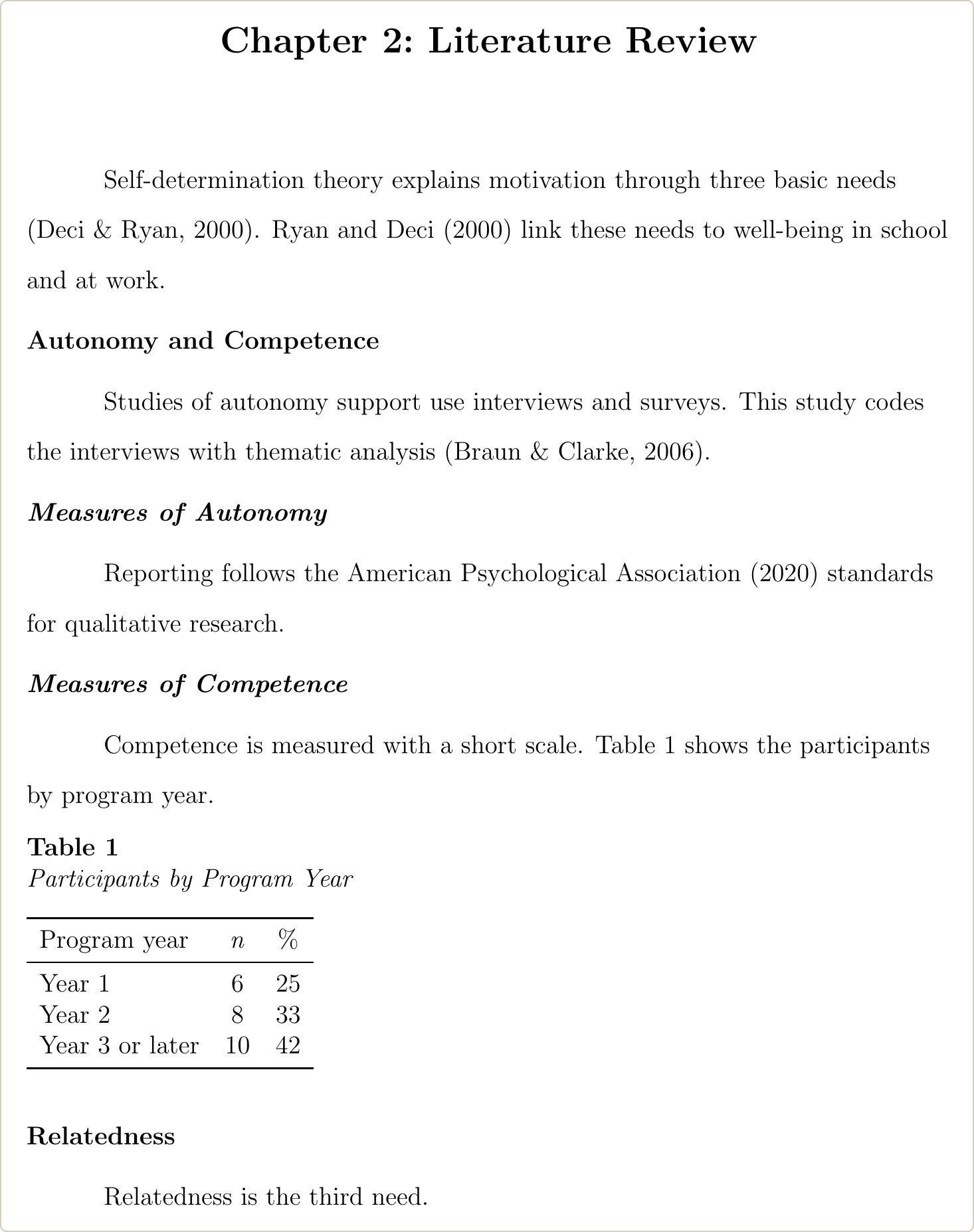
Inside the chapters, use APA’s heading levels. The chapter title is Level 1 (centered, bold). Below it, Level 2 is flush left and bold, Level 3 is flush left, bold and italic, and Levels 4 and 5 are indented and run into the paragraph, as the APA Style headings page shows. APA does not number headings. Keep the chapter labels (“Chapter 1”) that both UT templates use, and number sections only if your department asks for it.
Tables and figures
Number tables and figures 1, 2, 3, put the number and title above each one, and keep that placement the same throughout.
UT’s rules:
- Number them consecutively (Table 1, Table 2) or by chapter (Figure 9.3 is the third figure in Chapter 9). Do not mix the two.
- Place captions all above or all below the tables and figures, on the same page as the table or figure. If they cannot fit together, put a short caption (“Figure X”) on the figure’s page and the full caption on the next page.
- A table that runs over a page has its caption on the first page and “Table X, cont.” on the next ones.
- Put tables and figures right after their first mention, at the end of each chapter, or all together before the appendix, and do it the same way every time. If you group them at the end, add that section to the table of contents.
- Everything must be readable at 100 percent in the PDF. Plates or charts larger than 11 x 14 in. can be uploaded to the Texas Digital Library as supplemental files.
APA 7 puts the table number in bold above the table and the title in italics on the next line, with notes below. That meets UT’s “all above” rule. For tables in an appendix, APA uses Table A1 and UT’s guide shows Figure A.2 for chapter-style numbering; choose one form and use it for the whole dissertation.
References and appendices
Every UT dissertation needs a reference section, unless you use reference lists or endnotes at the end of each chapter. UT accepts the titles Bibliography, References or Works Cited; for APA, title it References.
The reference list is the last required section. Only the vita comes after it, so the appendices and glossary go before it. It must list the works you used, with the edition when it is later than the first; APA 7 entries include the edition already.
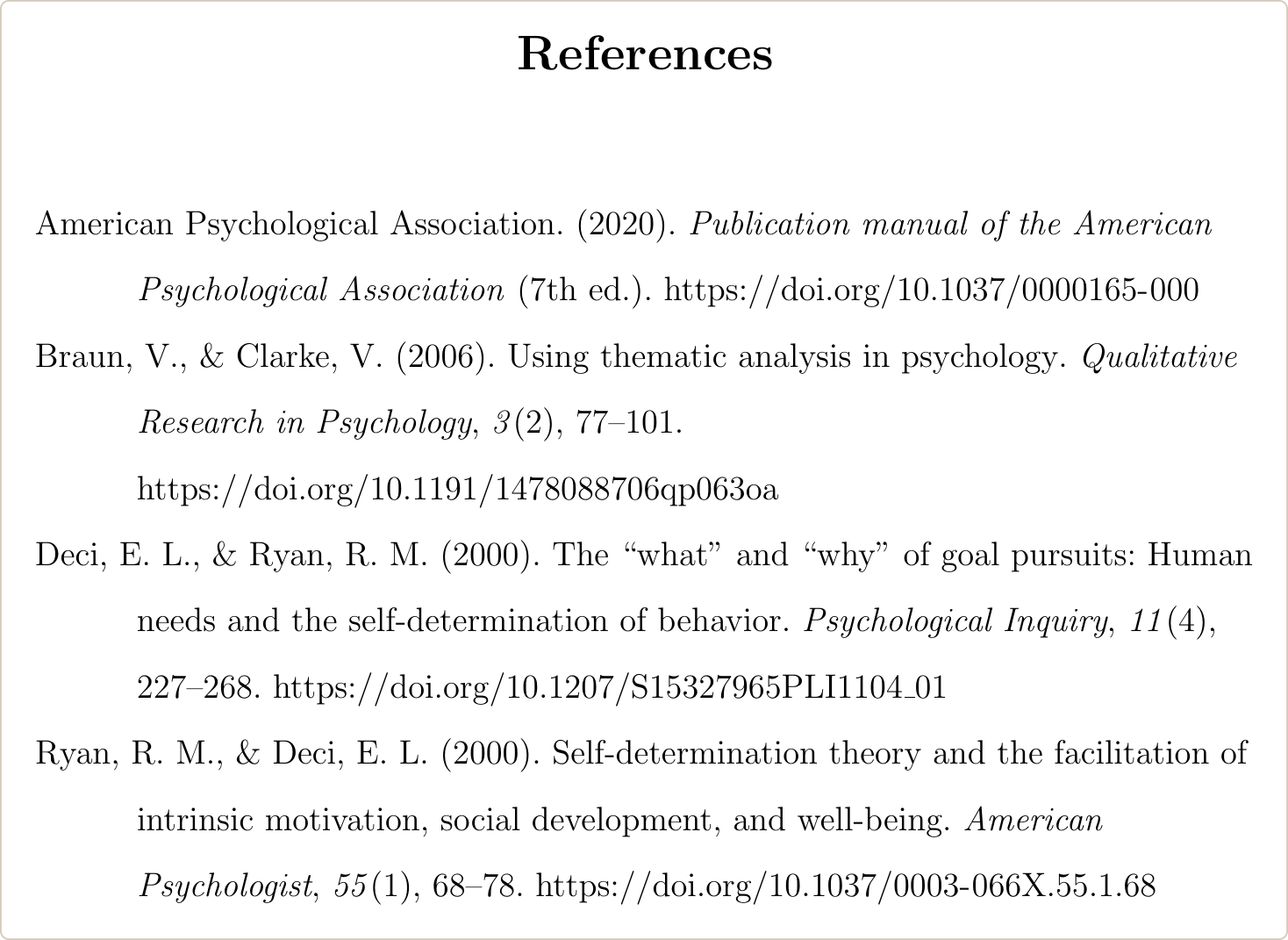
If your references are in a .bib file but you write in Word, a BibTeX to APA converter gives you an APA 7 reference list to paste in.
How to use the UT Austin Word template with APA 7
Download the dissertation templates from the Digital Submission page and read the user guide first. There are four files: Front Matter, Master Document, Back Matter, and a Chapter file that is only an example.
- Replace the placeholder text in angle brackets with your own.
- Delete the sample text in square brackets.
- Keep the free-standing text; the Graduate School requires it.
- Apply the template’s styles: Heading 2 for chapter titles, Heading 3 to 6 for subheadings, Heading 7 for table titles, Heading 8 for figure titles. The table of contents and the lists of tables and figures are built from these styles. Update them with F9 on Windows or Command+Option+Shift+U on a Mac.
The template keeps UT’s margins and page numbers. These styles need changing for APA 7:
| Style | Template setting | Change for APA 7 |
|---|---|---|
| text | Double-spaced, 0.5 in. indent, justified | Align left |
| Heading 3 (APA Level 2) | Bold small caps | Turn off small caps |
| Heading 4 (APA Level 3) | Bold | Add italic |
| Heading 5 (APA Level 4) | Bold italic, on its own line | Bold, not italic, indented 0.5 in., ending with a period, with the text on the same line |
| reference | Single-spaced, 6 pt before and after, justified | Double-spaced, 0 pt before and after, aligned left; keep the 0.5 in. hanging indent |
| text quote | Single-spaced | Double-spaced (UT allows either) |
| Heading 7 and Heading 8 | “Table 1:” and the title on one line, not bold | Keep the styles; make the number bold and the title italic |
For run-in Level 4 and 5 headings, the APA headings page explains how to apply a Word style to the heading words only.
None of these template settings is required by the guidelines, and the user guide says you can change the look of the styles. The guide also says the templates do not guarantee a correct format, so ask for a format check (below).
If you draft in Google Docs, our Google Docs citation add-on inserts APA 7 citations and the reference list. Move the text into the Word template for the final layout.
How to use the UT Austin LaTeX template with APA 7
The Graduate School’s LaTeX package is linked from its LaTeX page. It was last updated in 2023 and compiles with pdfLaTeX. You edit three files: structural/about.tex (name, title, committee), structural/body.tex (the content) and structural/preamble.tex (packages). UT gives graduate students Overleaf Professional through UT sign-in, but projects under a Technology Control Plan should not go on Overleaf; ask UT’s export control office first.
As shipped, the template uses natbib with author-year citations, titles the list “Works Cited”, numbers sections, uses 1.5 spacing and numbers figures by chapter. UT accepts all of that, but it is not APA. These changes were tested on the 2023 package.
1. In structural/preamble.tex, delete \usepackage[authoryear, round]{natbib}, \usepackage{styles/citesort}, \usepackage{bibentry} and \nobibliography*. Then add this after \usepackage{styles/utformat}:
\usepackage[american]{babel}
\usepackage{csquotes}
\usepackage[style=apa, backend=biber, natbib=true]{biblatex}
\addbibresource{references.bib}

\usepackage{ragged2e}
\setlength{\RaggedRightParindent}{0.5in}
\AtBeginDocument{\RaggedRight}
\hyphenpenalty=10000
\exhyphenpenalty=10000

\makeatletter
\renewcommand\section{\@startsection{section}{1}{\z@}%
  {\z@}{1sp}{\normalsize\default@spacing\bfseries}}
\renewcommand\subsection{\@startsection{subsection}{2}{\z@}%
  {\z@}{1sp}{\normalsize\default@spacing\bfseries\itshape}}
\renewcommand*{\bibfont}{\normalfont\normalsize\default@spacing\raggedright}
\makeatother
\setlength{\bibitemsep}{0pt}

\usepackage{caption}
\captionsetup{labelfont=bf, textfont=it, labelsep=newline,
  justification=raggedright, singlelinecheck=false}
\counterwithout{table}{chapter}
\counterwithout{figure}{chapter}
2. In the same file, change \oneandonehalfspacing to \doublespacing and \setcounter{secnumdepth}{3} to \setcounter{secnumdepth}{0}. Chapters keep their numbers; sections lose theirs.
3. In structural/body.tex, replace \bibliographystyle{plainnat} and \bibliography{references} with:
\printbibliography[heading=bibintoc, title={References}]4. Compile with biber instead of BibTeX. Your \citet and \citep citations keep working because of natbib=true.
\default@spacing is the template’s own spacing command. The headings and the reference list need it; without it they come out single-spaced. What the other lines do is explained in how to use APA 7 in a LaTeX thesis.
Two more things to check in the LaTeX template:
- Title page wording: the 2023 package prints “Presented to the Faculty of the Graduate School of The University of Texas at Austin”. The September 2026 sample says “Presented to the Faculty of the University of Texas at Austin”. To match it, change that line in
styles/utformat.stytoPresented to the Faculty of\\, or ask the format checker which wording they accept. - Graduation month: the template sets May, August or December from the date you compile. To fix it, add
\graduationmonth{May}and\graduationyear{2027}tostructural/about.tex.
If your draft is in Word, moving it into this template chapter by chapter is covered in converting a thesis from Word to LaTeX.
Get your UT Austin dissertation formatted to the Graduate School’s rules
We format dissertations in LaTeX to your graduate school’s template and guidelines, with APA 7 citations and references, and compile and test every file on Overleaf and a local TeX installation before delivery. You pay after you review the first draft.
Format check and submission to the Texas Digital Library
Ask OGPS for a format check before you upload, then upload one PDF to the Texas Digital Library. After you submit, only the corrections OGPS asks for are allowed, so the file has to be complete and correct.
- Format check: email the OGPS Degree Plan Evaluators at GradStudentSvcs@austin.utexas.edu. A format check is done again when you submit your final paperwork, even if you had one before. The Word template’s user guide says doctoral candidates get a format check when they schedule the final oral examination.
- Upload: a single PDF to the Texas Digital Library submission site.
- Signatures: the Report of Dissertation Committee must be signed by every committee member and the Graduate Studies Committee representative. Proxy signatures and typed names are not accepted; scanned or electronic signatures are, if they are legible.
- Copyrighted material: anything beyond brief excerpts needs the copyright owner’s written permission.
- Publication: UT publishes dissertations open access through the Texas Digital Library.
