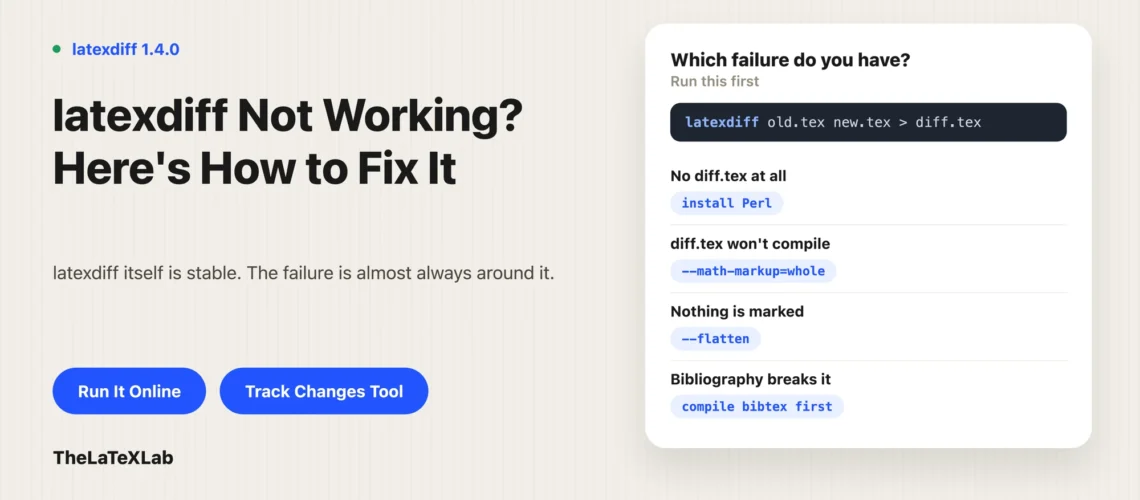
Most reports of latexdiff not working are one of five things: Perl is missing, the diff file compiles with errors rather than latexdiff failing, math markup produced invalid LaTeX, the bibliography broke it, or the project has \input files that were never flattened. latexdiff itself is stable, currently version 1.4.0 from January 2026. The failures are almost always in the environment around it or in the output file. Here is how to tell which one you have.
Work out whether latexdiff failed or the output failed
Do this first, because it splits the problem in half and takes ten seconds.
latexdiff old.tex new.tex > diff.tex- No
diff.tex, or an error on the command line. latexdiff did not run. Usually Perl, a path problem, or a file it cannot parse. diff.texexists but pdflatex errors on it. latexdiff worked. The markup it produced is not valid in your document, which is a different problem with different fixes.
Almost everything below assumes you know which half you are in.
How to install latexdiff on Windows
latexdiff is a Perl script, not a compiled binary, so Windows needs Perl. This is the single most common reason for latexdiff not working on Windows, and the error is usually that the command is not recognized at all.
- Install Perl. Strawberry Perl is the usual choice and it puts itself on the PATH. Perl 5.8 or later is required.
- Get latexdiff. MiKTeX and TeX Live both ship it. Check with
latexdiff --version. - If the command is not found, locate the latexdiff script in your TeX installation’s scripts directory and call it through Perl directly:
perl latexdiff.pl old.tex new.tex > diff.tex. Some MiKTeX setups need the.plextension added to the script files and that directory added to PATH. - After changing anything in MiKTeX, refresh the file name database from MiKTeX Console. Skipping that is why a correct install still reports the command as missing.
If you have Perl and it still fails, run perl -v and latexdiff --version separately so you know which of the two is broken.
The diff file will not compile
This is the most common complaint, and it means latexdiff did its job. The markup commands it inserted are colliding with something in your document.
Start with the packages. The output uses \DIFadd{...} and \DIFdel{...}, and the default markup needs ulem. latexdiff writes the preamble additions itself, but if you are splicing the diff into another file, or your class loads something that fights ulem, that is your first suspect.
Then narrow it down:
- Read the first error, not the last. A single broken
\DIFaddproduces a cascade. The line number of the first error tells you which construct latexdiff could not handle. - Look at what is around that line in
diff.tex. Usually a table, a custom macro, or an equation. - Try a different markup type.
-t CFONTor-t CHANGEBARavoid the underlining that causes a lot of these failures, especially inside tables.
You can also edit diff.tex by hand. It is a normal LaTeX file, and for a one-off submission, deleting one problem \DIFdel block is faster than finding the right flag.
Math changes break the diff
Equations are the usual culprit when the output will not compile, because markup inside math mode often is not valid. latexdiff has a dedicated control for this and it is the fix worth knowing.
latexdiff --math-markup=whole old.tex new.tex > diff.tex--math-markup takes four levels: fine, coarse, whole, and off. Working down that list is the standard escalation. At whole, any change marks the entire equation as changed rather than trying to mark up inside it, which loses detail but produces valid LaTeX. At off, math is not marked at all and deleted equations do not appear in the diff, so use it only when nothing else compiles.
For custom macros that latexdiff keeps trying to look inside, --append-safecmd=mycmd tells it the command can appear inside markup but its argument should be left alone.
latexdiff bibliography not working
Bibliographies break latexdiff diffs often enough that it has its own set of GitHub issues, and the reason is structural rather than a bug.
latexdiff compares .tex source. Your bibliography is not in the source: it is in a .bib file, turned into a .bbl file by bibtex or biber at compile time. So latexdiff sees \bibliography{refs}, a single unchanged line, and has nothing to compare.
Two things go wrong from there.
With --flatten. Flattening pulls \input and \include files into one document, and it will also inline the .bbl so the reference list can be diffed. But if the .bbl is not there, latexdiff leaves \bibliography alone and tells you to run bibtex on the old and new versions first. So compile both versions fully before running latexdiff, or there is nothing to flatten.
When it does flatten. Each field of a changed \bibitem gets wrapped in its own \DIFadd, which frequently produces something that will not compile. A new reference is the worst case. The manual fix reported in those issues is to edit diff.tex and wrap the whole \bibitem in a single \DIFadd instead of the per-field markup.
biblatex with biber is harder still. There is a --biber flag, but bibliography diffing with biblatex remains unreliable, which is worth knowing before you spend an evening on it. If you are unsure which system your document uses, BibTeX vs biblatex vs biber covers telling them apart.
How to make latexdiff ignore the bibliography
There is no --ignore-bibliography flag. What people actually do, in order of how much trouble it saves:
- Leave the bibliography unflattened. Run latexdiff without
--flatten, or without a.bblpresent. The reference list then appears unmarked in the diff, which is usually what you want anyway. Reviewers care about changes to your text, not about a reference list that regenerated itself. - Stop latexdiff looking inside citations.
--append-safecmd=cite,citep,citettells it those commands can sit inside markup without their arguments being analyzed. This clears up a lot of noise where citation keys are marked as changed. - Fix the output by hand. Generate the diff, then paste your original
\bibliographylines back over whatever latexdiff produced. Unglamorous, works every time, and takes a minute.
Deciding to show bibliography changes at all is worth a thought. For a resubmission, “we added six references” is usually better said in the response letter than shown as strikethrough in the reference list.
Multi-file projects need –flatten
If your paper is split across \input{intro}, \input{methods} and so on, plain latexdiff only compares the main file. It sees the same \input lines in both versions, finds no difference, and gives you a diff with nothing marked.
latexdiff --flatten old/main.tex new/main.tex > diff.tex--flatten pulls the included files in before comparing. Two things to watch: the included files must be findable from where you run the command, and the flattened output is one large file, so a compile error in it points at a line number that no longer matches any file you wrote.
Accented characters come out wrong
If the diff has mangled characters where accented letters or non-Latin text used to be, latexdiff read the file in the wrong encoding. Pass it explicitly:
latexdiff --encoding=utf8 old.tex new.tex > diff.texCheck both files are actually the same encoding first. A common cause is one file saved as UTF-8 and the other as Latin-1, usually because they came from different machines or different collaborators.
Nothing is marked even though the files differ
A diff that compiles cleanly and shows no changes at all normally means one of these:
- Multi-file project without
--flatten. See above. This is the most frequent cause. - You compared the wrong pair of files. Easy with
old/main.texandnew/main.texopen in different windows. - The changes are all inside math and
--math-markup=offis set. Deleted equations do not appear at all in that mode. - The changes are only in
.bibfiles. latexdiff does not read them, as above.
Sanity-check it by changing one word in the new file and rerunning. If that word shows up marked, latexdiff is working and the question is what happened to your real changes.
How to run latexdiff without installing it
If you are hitting the install problems rather than the LaTeX ones, or you are on a machine where you cannot install Perl, TheLaTeXLab latexdiff online tool runs the real latexdiff script server-side and hands back the marked-up .tex file.
What it takes and what you get:
- Paste two
.texfiles, or upload two.zipfiles for a multi-file project. - The markup style options are exposed rather than hidden: UNDERLINE, CHANGEBAR, CFONT, CTRADITIONAL, BOLD, PDFCOMMENT for additions, and COLOR, DVIPS, COLFONT, STRIKE, SAFE for deletions, plus float handling and the math markup level. Those are the same switches you would pass on the command line, which matters because the math level is the one you will be changing when the output does not compile.
- Limits: 500 KB per file, 4 MB decompressed project, 5 MB zip, and a 30 second timeout.
- You get a
.texfile, not a PDF. Compile it yourself with pdflatex, andulemneeds to be available.
Being straight about it: it does not do anything special with bibliographies. Everything in the bibliography section above still applies. What it removes is the Perl install, the PATH problems, and the Windows setup, which is the majority of latexdiff not working reports.
Run latexdiff without installing Perl.
Paste two versions or upload two project zips, pick the markup style, and get the marked-up LaTeX back. Free, in the browser.
If what you actually want is to show changes to a reviewer rather than to diff two files, TheLaTeXLab LaTeX track changes tool is aimed at that instead.
What to try, in order
- Confirm whether latexdiff ran or the output failed to compile.
- If it did not run: check Perl, check
latexdiff --version, refresh MiKTeX’s file database. - If nothing is marked: add
--flatten. - If the output will not compile: read the first error, then try
--math-markup=whole, then-t CFONT. - If the bibliography is the problem: compile both versions first, or leave the bibliography out of the diff.
- If the characters are wrong: set
--encoding. - Still stuck: edit
diff.texby hand. It is just LaTeX, and one bad block is faster to delete than to diagnose.
Compile errors that have nothing to do with the markup are worth ruling out too, and the usual suspects are in common LaTeX compilation errors.
