
To format a thesis by publication in LaTeX, put each paper in its own chapter file inside your university’s thesis class, add the introduction, linking text and conclusion around the papers, and keep the references of all papers in one .bib file. Two rules decide most of the remaining work, and they differ by university: whether a published paper may go in as the journal’s PDF, and whether references are listed once at the end or after each chapter.
Below are the rules from university guidelines in Australia, Canada and the US, LaTeX code for each step (all of it compiled in TeX Live 2026), and the errors that come up when papers written for different journals are put into one thesis.
What a thesis by publication is
A thesis by publication is a thesis that includes your own journal papers, published or still in progress, as chapters, with an introduction, linking text and a conclusion that tie them into one piece of work. Each country, and often each university, has its own name for it:
| Country | Names used | Example universities |
|---|---|---|
| Australia | Thesis by publication, thesis including published works, thesis by compilation | Monash (“thesis including published works”), ANU (“thesis by compilation” and “thesis by publication”) |
| United States | Three-article dissertation, multiple-article dissertation | UNLV (“3-Article (Multiple-Article) Dissertation Option”) |
| Canada | Manuscript-based or article-based thesis, integrated-article thesis, sandwich thesis | McGill, Western, McMaster |
| United Kingdom | Journal format thesis, publication format thesis | Manchester (“journal format”), Sheffield (“publication format thesis”) |
| Sweden | Compilation thesis, with a summary chapter called the “kappa” | Karolinska Institutet |
| Germany | Kumulative Dissertation (cumulative dissertation) | University of Marburg, Faculty 03 |
The LaTeX steps below apply under every name. What differs is the rules (number of papers, layout, reference lists, statements), and those are set by your graduate school, so read its own page for your format before you start.
PhD by publication vs thesis by publication
“PhD by publication” is used for two different things. It can mean a PhD whose thesis is a thesis by publication: papers written during your candidature, put together with an introduction and conclusion. ANU, for example, lists the thesis by publication as one of its thesis types for research degrees, and requires the papers to be researched and written during the candidature.
Some UK universities use “PhD by published work” for a separate degree based on work you published before applying. At the University of Hull, the PhD by Published Work regulations (May 2025) apply to staff, alumni and external applicants, require a bachelor’s degree from at least seven years before applying (or a master’s from at least six), and ask for the published works with an exegesis of up to 15,000 words. Adelaide University states that it does not offer a “PhD by prior publication”.
This post is about the first kind, where you format your own recent papers into a thesis.
What universities require in a thesis by publication
Universities set the number of papers, whether the journal’s PDF is accepted, and where references go. These are the rules at six universities, from their current guidelines:
| University | Minimum papers | Published papers | Reference lists |
|---|---|---|---|
| Monash (Australia) | Set by each faculty | Any layout if the content matches the article; published PDFs must be high quality, no scans | One consolidated bibliography |
| ANU (Australia) | 3 | “Formatted as published” | A bibliography at the end of the thesis, for the parts that are not papers |
| McGill (Canada) | 2 for a PhD, 1 for a master’s | Text unchanged from the published or submitted version, in the thesis font and size | A list in each paper’s chapter; a master list at the end for the rest of the thesis |
| McMaster (Canada) | 3 for a PhD, 2 for a master’s | The published reprint, renumbered with thesis page numbers, or the paper reformatted to match the thesis | Each article keeps its own references; new chapters use a main list at the end |
| Western (Canada) | Not specified | Each article without its abstract | One list, or one per chapter, by discipline |
| UNLV (US) | Not stated; the option is called 3-Article | PDFs not allowed; each article reformatted to the Graduate College format | Allowed at the end of each chapter |
Three rules from the table change the LaTeX work the most:
- Published PDFs. If PDFs are not allowed (UNLV) or the text must use the thesis font (McGill), every paper is rebuilt as a LaTeX chapter. If they are allowed (Monash, McMaster), you can include the journal’s PDF with pdfpages.
- Reference lists. One list at the end, a list after each paper, or both. biblatex does all of these from one .bib file.
- Statements. Most of these universities want each paper’s publication status and your contribution, in a declaration, a preface or a footnote on the chapter.
Minimums can also vary inside one university. At Monash, the Faculty of Science asks for at least one paper submitted, accepted or published, while the Faculty of Education does not count submitted papers.
Get your thesis by publication formatted to your university’s template
We put your papers into your university’s LaTeX template, with the declaration pages and reference lists its rules ask for. The fee is flat and fixed before work starts; theses start from $599.
For Australian universities, see thesis formatting for Australian universities.
How to set up a thesis by publication in LaTeX
Use your university’s thesis class or template as the main file and give each paper its own chapter file. Keep each paper’s figures in their own folder, and all references in one .bib file:
thesis/
|-- thesis.tex
|-- references.bib
|-- chapters/
|   |-- introduction.tex
|   |-- paper1.tex
|   |-- paper2.tex
|   |-- paper3.tex
|   `-- conclusion.tex
|-- figures/
|   |-- paper1/
|   `-- paper2/
`-- papers/
    `-- paper3-published.pdf
The main file loads the packages once and includes the chapters in order. In this example report stands in for your university’s class:
\documentclass[12pt,a4paper]{report}
\usepackage[T1]{fontenc}
\usepackage{graphicx}
\usepackage{booktabs}
\usepackage{tabularx}
\usepackage{pdfpages}
\usepackage[style=authoryear, backend=biber]{biblatex}
\addbibresource{references.bib}
\usepackage[hidelinks]{hyperref}

\begin{document}
\pagenumbering{roman}
% title page, abstract, declaration, list of publications
\tableofcontents
\cleardoublepage
\pagenumbering{arabic}

\include{chapters/introduction}
\include{chapters/paper1}
\include{chapters/paper2}
\include{chapters/paper3}
\include{chapters/conclusion}

\printbibliography[heading=bibintoc, title={References}]
\end{document}
\include starts each chapter on a new page, and \includeonly{chapters/paper2} in the preamble compiles one chapter at a time while you work on it. The title page, abstract, page numbering and appendices are set up as in any thesis; formatting a PhD thesis in LaTeX covers those parts.
How to turn a journal paper into a thesis chapter
Copy the body of the paper into its chapter file, then delete everything that belongs to the journal’s class: the preamble, the title block, the keywords and the bibliography commands. The paper’s title becomes the \chapter title, and its sections stay \section, so they number 2.1, 2.2 and so on inside the chapter.
This is a paper in elsarticle (version 3.5):
\documentclass[preprint,12pt]{elsarticle}
\usepackage{graphicx}
\begin{document}
\begin{frontmatter}
\title{Calibrating low-cost turbidity sensors against laboratory measurements}
\author{Alex Candidate}
\affiliation{organization={Example University}, country={Australia}}
\begin{abstract}
Low-cost turbidity sensors were compared with laboratory measurements at six stations.
\end{abstract}
\begin{keyword}
turbidity \sep low-cost sensors \sep calibration
\end{keyword}
\end{frontmatter}

\section{Introduction}
\label{sec:intro}
Laboratory measurements remain the reference for turbidity \citep{author2019}.
...
\bibliographystyle{elsarticle-harv}
\bibliography{paper1}
\end{document}
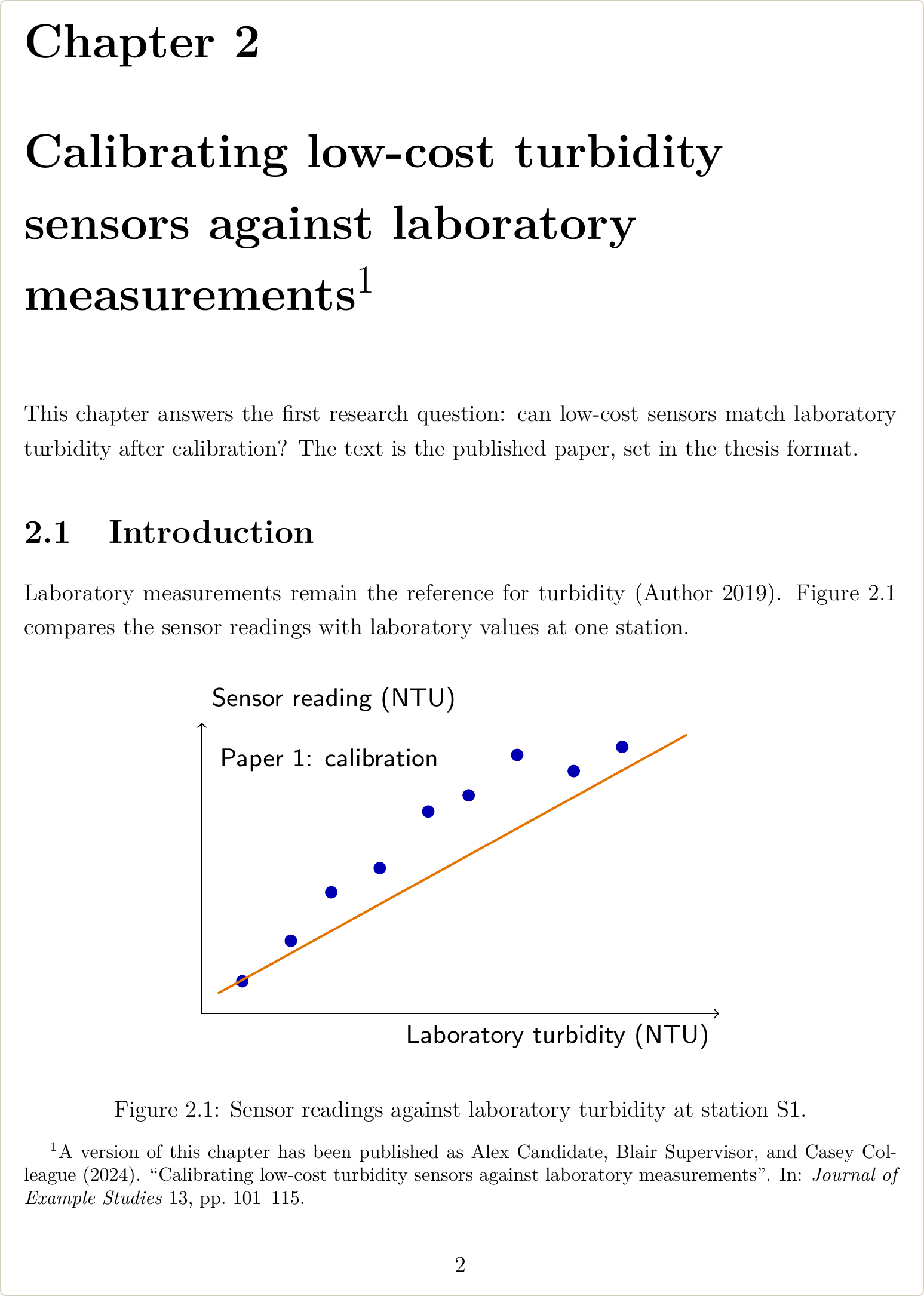
And this is the same paper as chapters/paper1.tex:
\chapter[Calibrating low-cost turbidity sensors]{Calibrating low-cost
  turbidity sensors against laboratory measurements\footnote{A version
  of this chapter has been published as \fullcite{candidate2024}.}}
\label{chap:paper1}

This chapter answers the first research question: can low-cost sensors
match laboratory turbidity after calibration?

\section{Introduction}
\label{p1:sec:intro}
Laboratory measurements remain the reference for turbidity
\parencite{author2019}.
...
What happens to each part of the journal file:
| In the journal file | In the thesis chapter |
|---|---|
\documentclass, \usepackage, \begin{document}, \end{document} | Delete. Add any package the chapter needs to the thesis preamble, once. |
\title | Becomes the \chapter title. Put a short version in the square brackets for the contents page. |
\author, \affiliation, \maketitle | Delete. The authors go in the publication note. |
| Abstract | Keep it as \section*{Abstract}, or delete it if your university asks (Western presents each article without an abstract). |
Keywords and journal-only commands such as \sep, \corref, \tnoteref | Delete. |
\section, \subsection, figures, tables, equations | Keep. Give each label a prefix for the paper. |
| Citations | Keep. Change \citep and \citet to \parencite and \textcite if the thesis uses biblatex without natbib=true. |
\bibliographystyle, \bibliography | Delete. The thesis prints the references. |
If a paper exists only in Word, convert it chapter by chapter as in converting a thesis from Word to LaTeX, then follow the same steps.
Publication notes and contribution statements
These universities ask you to state, for each paper, where it was published or its current status, and what you contributed. Where that goes differs:
- Western: every chapter that has been published, accepted or submitted carries a footnote: “A version of this chapter has been published/accepted for publication/submitted for publication (Cite the reference)”. A co-authorship statement for each paper also gives the publication status and an estimate of the percentage of the work you did yourself.
- McMaster: a preface in the preliminary pages documents your and the other authors’ contributions to each paper. The first page of each published chapter gives the full citation, with first and last page numbers or the DOI, and the copyright holder.
- ANU: a signed declaration gives the title, word length, authorship, outlet and status (In press, Accepted, Under Review, In preparation) of each paper and your contribution to it. Co-authors sign it.
- Adelaide University: a Statement of Authorship for each publication, signed by all co-authors.
- UT Austin: co-author signatures and a statement of your contribution to each paper; see UT Austin dissertation format.
For a footnote on the chapter title, give the short title in square brackets. Without it, the compile stops with an error (listed in the errors section below):
\chapter[Short title]{Full title of the paper\footnote{A version of this
  chapter has been published as \fullcite{candidate2024}.}}
\fullcite prints the full reference from your .bib file in the thesis’s citation style, so the note always matches the reference list. It is a biblatex command; with BibTeX, type the reference in the footnote.
A list of publications with your contribution, as several universities ask for in the front matter, is a table with \fullcite in one column:
\chapter*{Publications included in this thesis}
\addcontentsline{toc}{chapter}{Publications included in this thesis}

\begin{tabularx}{\textwidth}{@{}l
  >{\raggedright\arraybackslash}X
  >{\raggedright\arraybackslash}p{2.1cm}
  >{\raggedright\arraybackslash}p{3.9cm}@{}}
\toprule
Ch. & Publication & Status & My contribution \\
\midrule
2 & \fullcite{candidate2024} & Published & Designed the study,
  collected and analysed the data, wrote the first draft (75\%) \\
3 & \fullcite{candidate2025a} & Submitted & Collected and analysed
  the data, wrote the first draft (80\%) \\
\bottomrule
\end{tabularx}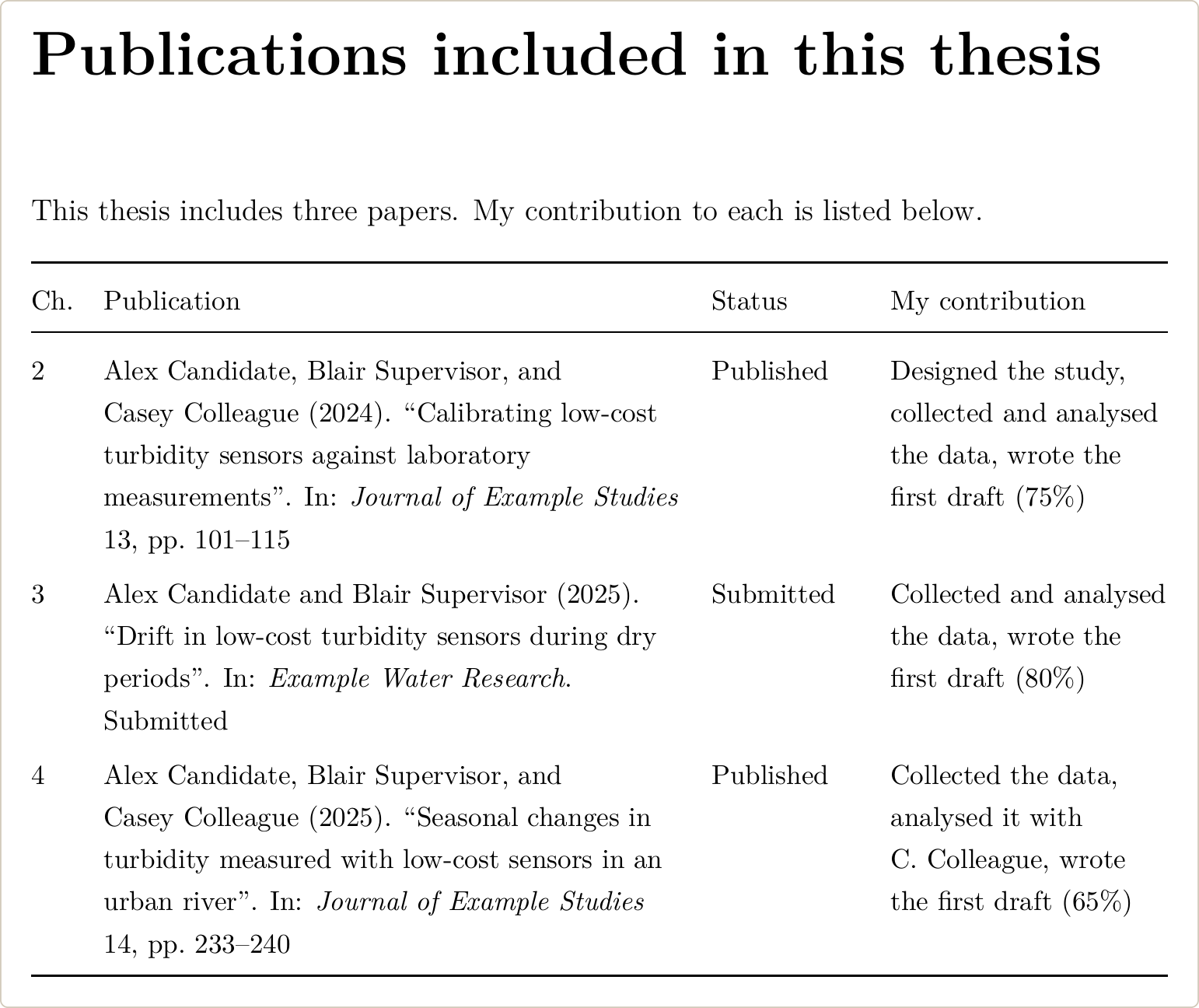
For a submitted paper, add pubstate = {submitted} to its .bib entry and biblatex prints “Submitted” at the end of the reference. If your university gives a form or a Word template for the declaration, use its wording and columns. A signed form can go in as a PDF page with \includepdf.
Labels and figure files from several papers
Papers written separately can use the same label names and the same figure file names. LaTeX handles the two differently, and neither one stops the compile.
Two papers with \label{fig:results} give this warning:
LaTeX Warning: Label `fig:results' multiply defined.
LaTeX uses the last label it reads, so every \ref{fig:results} in the thesis points to the figure in the later chapter, including the references in the earlier one. Give each paper a prefix: p1:fig:results, p2:fig:results. Replace it in \label, \ref, \eqref and \autoref (or \cref) in that paper’s file only.
Figure files give no warning at all. With \graphicspath{{figures/paper1/}{figures/paper2/}}, \includegraphics{fig1} in the second paper’s chapter shows figures/paper1/fig1.pdf, because LaTeX takes the first file it finds with that name. Write the folder in each \includegraphics instead:
\includegraphics[width=0.62\textwidth]{figures/paper2/fig1}One reference list or one per chapter
Keep the references of all papers in one .bib file either way. What changes is where biblatex (version 3.22a here, with biber 2.22) prints them:
| Your university wants | biblatex setup |
|---|---|
| One list at the end (Monash) | The default. \printbibliography once, after the last chapter. |
| A list after each paper, and a main list for the other chapters (McGill, McMaster) | A refsection environment around each paper’s chapter, and \printbibliography at the end for the rest. |
| A list after every chapter, no main list (allowed at UNLV) | Load biblatex with refsection=chapter and print a list at the end of each chapter. |
For a list after each paper, wrap the paper’s chapter file in a refsection and print its list before the end:
\begin{refsection}
\chapter[Short title]{Full title of the paper\footnote{...}}
...
\printbibliography[heading=subbibintoc, title={References}]
\end{refsection}
Citations inside the environment go only to that chapter’s list. Citations in the introduction, the linking chapters and the conclusion go to the final \printbibliography. A reference cited both in a paper and in the introduction appears in both lists, which is what McMaster’s guide asks for. heading=subbibintoc prints each chapter’s list as an unnumbered section and adds it to the contents page:
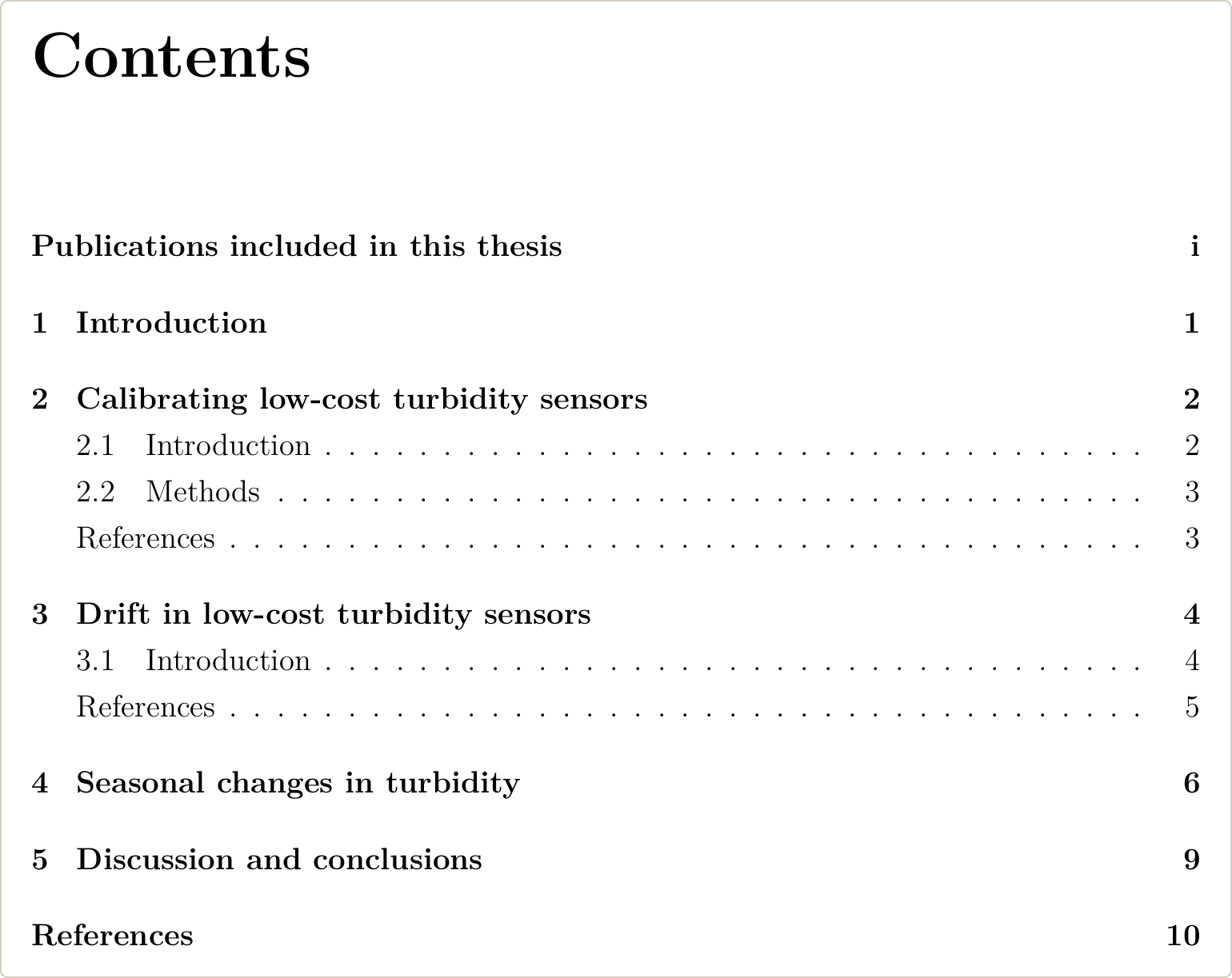
With the refsection=chapter option there is no full list at the end: a \printbibliography after the last chapter shows only the references cited in that last chapter. In numeric styles, each chapter’s list starts again at [1].
When you merge the .bib files of several papers, the same reference can appear twice:
- Same key twice. biber keeps the first entry and warns
WARN - Duplicate entry key: 'author2019' in file 'references.bib', skipping .... If the two entries are different papers, the second one is lost and its citations point to the first. - Same paper, two keys. No warning. The paper is printed twice, and in author-year styles the copies become 2019a and 2019b.
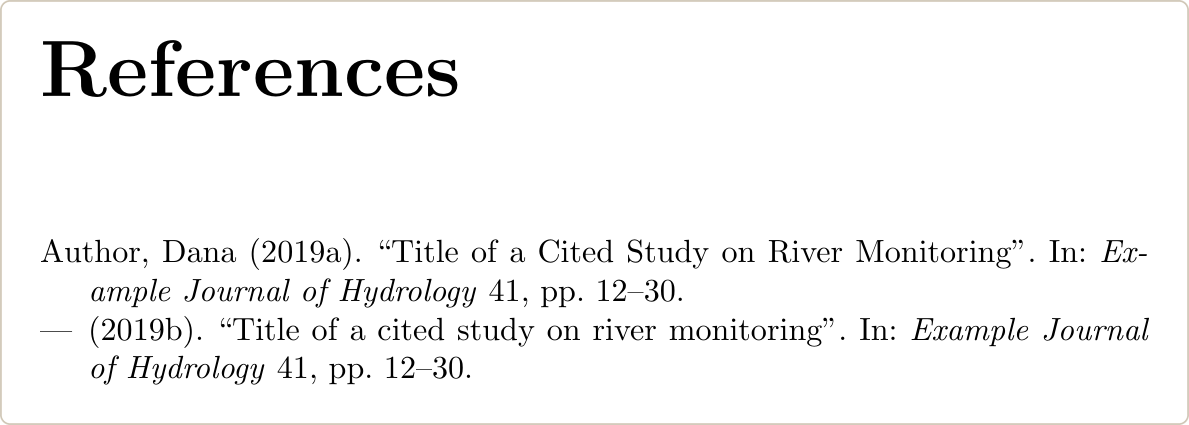
Search the merged file for repeated titles or DOIs, keep one key, and replace the other key in the chapter files. In a Monash thesis by publication we formatted, each chapter came with its own EndNote library and each published paper used its own journal’s reference style. Monash’s template needs one consolidated bibliography, so all references went into one BibTeX file with the duplicates removed. To move an EndNote library into LaTeX, export it from EndNote and convert it with our EndNote to BibTeX converter.
The setup above is biblatex. If your university’s template uses BibTeX, check whether you may switch; BibTeX vs biblatex explains what changes.
Get your thesis formatted by LaTeX experts with 10+ years of experience
We combine your papers, reference files and linking chapters into one LaTeX thesis with one set of references. Every file is compiled and tested before delivery, and you pay after you review the first draft.
How to include a published paper as a PDF
Include the journal’s PDF only if your university allows it. Monash accepts high-quality PDFs, not scans, with page numbers that run through the whole thesis. McMaster accepts the published reprint with thesis page numbers and the journal’s own page numbers removed. UNLV does not accept PDFs.
Where it is allowed, use the pdfpages package (version 0.6h) after the chapter heading and the linking text:
\chapter[Seasonal changes in turbidity]{Seasonal changes in turbidity
  measured with low-cost sensors in an urban river\footnote{This chapter
  has been published as \fullcite{candidate2025b}.}}
\label{chap:paper3}

Linking text for this paper.

\includepdf[pages=-, scale=0.85,
pagecommand={\thispagestyle{plain}}]{papers/paper3-published.pdf}pages=-includes every page of the PDF.pagecommand={\thispagestyle{plain}}prints the thesis page number on each included page. The pdfpages default is\thispagestyle{empty}, so without it the pages are counted but show no thesis page number.scale=0.85shrinks the journal page so the thesis page number does not sit on the journal’s own footer.
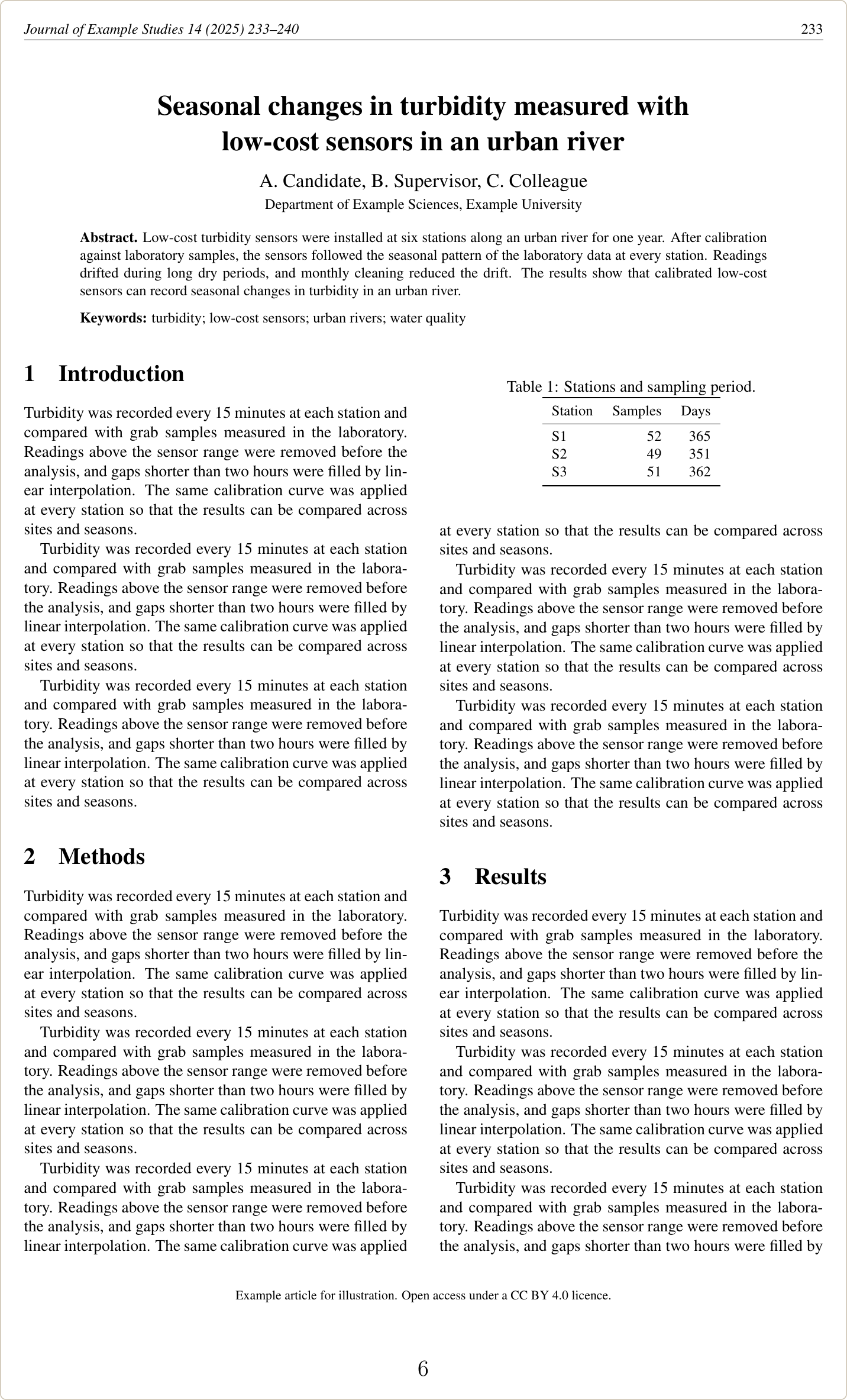
To remove the journal’s page numbers, as McMaster asks, trim the edge where they are printed. The values are left, bottom, right and top. This journal prints them in the header, so the top 22 mm go:
\includepdf[pages=-, scale=0.85, trim=0 0 0 22mm, clip,
  pagecommand={\thispagestyle{plain}}]{papers/paper3-published.pdf}
The trimmed text is hidden, not deleted: it can still be found with search or copied from the thesis PDF. Two more limits come with included PDFs. Links inside them, such as DOIs, stop working, which the pdfpages manual notes. And the pages keep the journal’s fonts, margins and line spacing. UNLV, for example, asks for each article to be reformatted so the formatting stays consistent.
Permission to include your published papers
Elsevier, IEEE and Springer Nature all let authors reuse their own articles in a thesis, each with its own conditions. Check the policy for every paper, and your university’s rules on permission letters:
| Publisher | Reuse in your thesis | What to add |
|---|---|---|
| Elsevier | In full or in part, if the thesis is not published commercially; no written permission needed. In a repository copy, the published article must be embedded in the thesis and not separately downloadable. | Proper acknowledgment of the article |
| IEEE | Allowed without asking. Only the accepted version, not IEEE’s final published version, may be posted online in your thesis. | IEEE’s copyright notice in the references, the IEEE copyright line with each reprinted figure and table, and IEEE’s message when the thesis is posted on a university website |
| Springer Nature | Authors may reuse the Version of Record, in whole or in part. | A citation of the published work and “Reproduced with permission from Springer Nature” |
In LaTeX, IEEE’s notice for a full-text article is:
\textcopyright~2025 IEEE. Reprinted, with permission, from
\fullcite{yourIEEEpaper}.
If your thesis will be posted online, for example in the university repository, an IEEE paper has to go in as the accepted version: rebuild the chapter from your own accepted manuscript instead of including IEEE’s PDF. For an open access paper, the licence decides: CC BY 4.0 lets anyone reuse the work if they give appropriate credit, link to the licence and say if changes were made.
The university side varies too. ANU asks you to make sure publishers’ agreements do not prevent including the work. McMaster asks for written permission from the copyright holder, written waivers from co-authors, and a statement that each paper is printed “with permission” or “under license”. Western asks for any permission from the publisher to be included in the appendices.
Errors when combining papers into one thesis
Each of these came up in test compiles of journal paper files inside a thesis, in TeX Live 2026.
! LaTeX Error: Environment frontmatter undefined.
The chapter still has elsarticle’s front matter. The report class used here has no frontmatter or keyword environment, and \sep gives ! Undefined control sequence. Delete the whole block and move the title to \chapter.
! LaTeX Error: Can be used only in preamble.
The line under the error shows the command. l.1 \documentclass or \usepackage means the chapter file still starts with the journal’s preamble: delete it and add the packages to the thesis preamble. \bibliography means the paper’s bibliography command is still at the end of the chapter while the thesis uses biblatex: delete it.
! Package biblatex Error: '\bibliographystyle' invalid for 'biblatex'.
The journal’s \bibliographystyle line is still in the chapter. Delete it; the style is set once, when biblatex is loaded.
! Use of \@xfootnote doesn't match its definition.
A footnote in \chapter without the short title in square brackets. Add it: \chapter[Short title]{Full title\footnote{...}}.
LaTeX Warning: There were multiply-defined labels.
Two papers use the same label. Search the log for “multiply defined” to find which ones, then add a prefix to each paper’s labels.
WARN - Duplicate entry key: 'author2019' in file 'references.bib', skipping ...
Two merged .bib files had an entry with the same key. Check that both entries are the same paper; if not, rename one key and update the citations in that paper’s chapter.
