The bibtex vs biblatex question is confusing mostly because the two things being compared are not the same kind of thing, and because biber and natbib get thrown into the same list. BibTeX is a program with its own style language. biblatex is a LaTeX package. biber is a backend program that only biblatex uses. natbib is a small package that changes citation commands. Once you see which of those actually compete with each other, the decision takes about a minute, and in most cases your journal template has already made it for you.
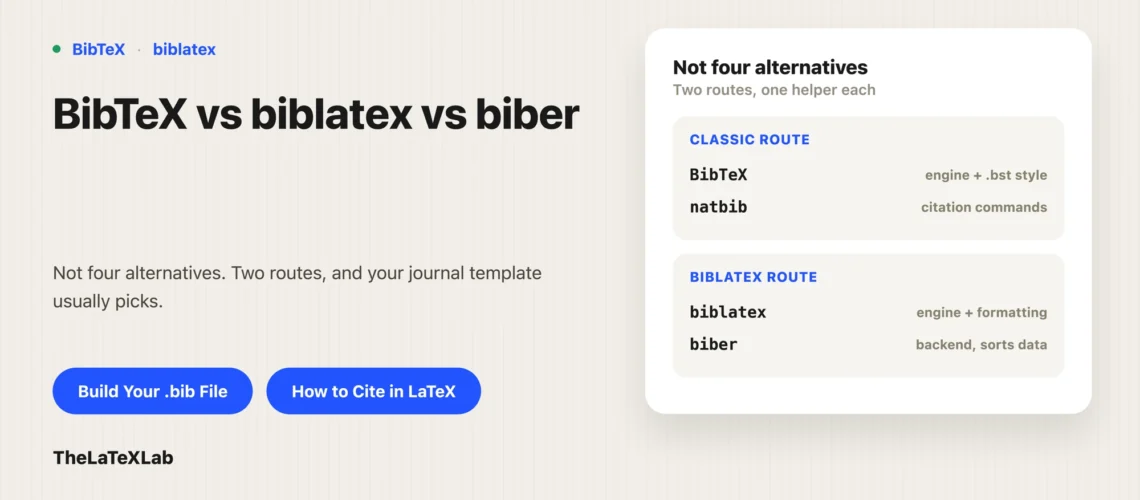
BibTeX, biblatex, biber and natbib are not four alternatives
Sort them into what they do first:
- BibTeX is an external program from 1985 plus a style language. The style lives in a
.bstfile (plain.bst,IEEEtran.bst,elsarticle-num.bst). BibTeX reads your.bibfile and writes a finished, formatted reference list into a.bblfile. LaTeX then just prints that file. - biblatex is a LaTeX package. It does the formatting itself, in LaTeX macros, at compile time. It still needs an external program to read and sort the
.bibdata, but that program no longer decides what the references look like. - biber is that external program. It is the default backend for biblatex and it works with nothing else. It is not a replacement for BibTeX in a classic BibTeX document.
- natbib is a LaTeX package that adds citation commands (
\citep,\citet) on top of the classic BibTeX route. It is part of the BibTeX side, not a third system.
So there is really one choice with a follow-up. First: classic BibTeX with a .bst style, or biblatex. Then, if you picked biblatex: biber or bibtex as the backend. The rest of this walks both.
BibTeX vs biblatex: the practical differences
| Classic BibTeX (+ natbib) | biblatex | |
|---|---|---|
| Formatting controlled by | .bst files, written in a stack language most people never learn | LaTeX macros you can redefine in your preamble |
| Changing a style | Find or commission a different .bst | Change one package option, or override a macro |
| Non-ASCII names | Needs escapes like M{\"u}ller | Full UTF-8 with biber, write Müller |
| Sorting | Fixed by the .bst | Configurable, Unicode aware with biber |
| Multiple bibliographies, per-chapter lists, filtering | Awkward, needs extra packages | Built in |
| Entry types | Fixed small set | Larger set plus @online, @dataset, @software, and a user-extensible data model |
| Journal template support | Universal | Patchy, depends on the publisher |
| Maintenance | Stable and effectively frozen | Actively developed |
On features it is not close. biblatex wins. The reason people still use classic BibTeX in 2026 is the last two rows: every publisher ships a .bst, and far fewer ship a biblatex style.
One thing worth knowing before you get attached to either: your .bib file is not the problem. Both systems read the same file. Field names differ on paper (journaltitle, location) but biblatex keeps the old BibTeX names as aliases, so journal and address keep working. Switching systems means editing your preamble, not your references.
Biber vs bibtex as the biblatex backend
If you load biblatex, you pick a backend:
\usepackage[backend=biber]{biblatex}   % default, recommended
\usepackage[backend=bibtex]{biblatex} % legacy, reduced features
The biber vs bibtex comparison here is narrower than the BibTeX vs biblatex one, because in this position bibtex is not doing any formatting. Set backend=bibtex and biblatex still uses biblatex styles. BibTeX is reduced to reading and sorting the data. You cannot use IEEEtran.bst this way. That is the single most common misunderstanding we see: people set backend=bibtex expecting their journal’s .bst to take over, and it does not.
What you lose with backend=bibtex: full Unicode handling, Unicode-aware sorting, dynamic entry sets, custom data models, the smarter cross-referencing, and the extra input formats biber reads (RIS, EndNote XML, Zotero RDF). biblatex will also warn you that functionality may be reduced. Use biber unless something in your toolchain genuinely cannot run it.
The one real cost of biber is that it is a separate binary that has to be installed and kept in step with your biblatex version. More on that below.
BibTeX vs biblatex vs natbib: what natbib is for
natbib gets listed as a third option, but comparing it to the other two is a category error. natbib does not read your .bib file and does not format the bibliography. It replaces \cite with a richer set of commands, mainly \citep{key} for a parenthetical citation and \citet{key} for a narrative one, and it makes author-year citations work with .bst styles that support them.
You use natbib when you are on the classic BibTeX route and want author-year citations or the \citep/\citet distinction. Plenty of publisher classes require it: REVTeX 4.2 needs natbib 8.31a or later, and Elsevier’s elsarticle-harv author-year style depends on it.
You do not load natbib with biblatex. biblatex has its own commands (\parencite, \textcite, \autocite). If you want the natbib names anyway, biblatex has a natbib=true option that provides compatible aliases. Loading both packages properly is a fight you do not need.
Use BibTeX Generator tool to convert DOI, ISBN, arXiv, PubMed ID, etc to BibTeX
Paste a DOI, ISBN, arXiv ID or PubMed ID and get a formatted BibTeX entry. It works the same whether your document uses classic BibTeX or biblatex. Free, no sign-up.
Your journal template usually decides bibtex vs biblatex for you
This is the part most comparison articles skip, and it settles the question more often than any feature does. Verified against the current class and style documentation:
| Template | What it ships | biblatex? |
|---|---|---|
| REVTeX 4.2 (APS, AIP) | apsrev4-2.bst / apsrmp4-2.bst, requires natbib | No official support |
ACM acmart | ACM-Reference-Format.bst | Only via third-party acmnumeric / acmauthoryear styles, not official |
Elsevier elsarticle | elsarticle-num.bst, elsarticle-num-names.bst, elsarticle-harv.bst | Not shipped |
IEEE IEEEtran | IEEEtran.bst | biblatex-ieee exists on CTAN and is well maintained, but it is not what IEEE hands you |
The pattern: if you are submitting to a big STEM publisher, the class was built around a .bst file, and the path of least resistance is classic BibTeX. If you are writing a thesis, a book, a report, or anything in the humanities and social sciences where citation styles are fussier, use biblatex. Language and script handling, per-chapter bibliographies, and style tweaking are exactly where biblatex earns its keep. Publisher class quirks around bibliographies are a common source of submission trouble, which is why our Elsevier elsarticle guide spends time on the .bst and authoryear options.
There is also a hard constraint that has nothing to do with features. Several publishers and arXiv want the .bbl file with the submission because they do not run your bibliography processor for you. arXiv’s rule is explicit: if you upload a pre-generated .bbl, its name must match the main .tex file, and the paper and the .bbl must be produced by the same program. A biber-generated .bbl in a document set up for BibTeX will fail, and a .bbl from a biblatex version that does not match arXiv’s TeX Live installation will also be rejected. If you are on biblatex and heading to arXiv, compile locally with a current TeX Live and upload the matching .bbl.
Should you use bibtex or biblatex on Overleaf
On Overleaf the practical answer is biblatex with biber, because the usual reason to avoid biber (installing and updating it) does not apply. Overleaf runs latexmk, which detects what your document needs and runs bibtex or biber the right number of times when you hit Recompile. You do not configure anything.
Two Overleaf-specific notes. First, if you start from a journal template on Overleaf, that template has already chosen for you, and the choice is nearly always classic BibTeX. Do not add biblatex on top of a template that has a \bibliographystyle line. Second, if citations come out as [?] or the reference list is empty, it is almost always that the bibliography processor has not run yet rather than a wrong choice of system. Recompile, and if biblatex prints “Please (re)run Biber”, that is exactly what it means. The full setup for both routes is in our guide to citing in LaTeX.
How to tell which system your document already uses
Read the preamble. It takes ten seconds and saves you from mixing the two.
\usepackage[...]{biblatex}and\addbibresource{refs.bib}, with\printbibliographyin the body: biblatex.\bibliographystyle{...}and\bibliography{refs}: classic BibTeX. If\usepackage{natbib}is there too, it is BibTeX plus natbib.- Both sets of commands present: that document will not build properly. Pick one and delete the other.
Whichever it is, the .bib file is the same file, and it is worth building it properly. Hand-typed entries are where wrong page numbers, missing DOIs and inconsistent journal names come from, and both systems will faithfully print whatever mistakes are in there. Our free BibTeX generator resolves a DOI, ISBN, arXiv ID or PubMed ID into a complete entry that works under either system.
The biber and biblatex version mismatch error
This is the one biber problem everyone eventually hits, and it is worth knowing before you choose biber. biblatex and biber ship as a matched pair. The current pair is biblatex 3.21 and biber 2.21, both released on 10 July 2025. Run a biber that does not match your biblatex and the build stops with an error along the lines of “Found biblatex control file version X, expected version Y”.
It usually happens one of two ways. You updated biblatex through tlmgr but biber came from your operating system’s package manager (Homebrew, apt, pacman), so only one of the two moved. Or you are on a distribution that updates them on different schedules.
The fix is to bring them back into step:
tlmgr update --self
tlmgr update biblatex biber
If biber came from outside TeX Live, update it there instead, or remove it and let TeX Live’s copy take over so there is only one biber on your PATH. Classic BibTeX never has this problem, because bibtex and the .bst files have not changed in decades. That stability is a genuine argument for BibTeX on a shared machine or a build server you do not control. Other build failures around citations are covered in common LaTeX compilation errors.
Switching from BibTeX to biblatex
If you decide to move, the work is in the preamble. Remove \bibliographystyle and \bibliography{refs}, and add:
\usepackage[backend=biber, style=numeric, sorting=none]{biblatex}
\addbibresource{refs.bib}
Then put \printbibliography where the reference list goes. Swap \citep/\citet for \parencite/\textcite, or add the natbib=true option and leave your cite commands alone. Drop \usepackage{natbib}.
Your .bib file usually needs nothing. The aliases cover the old field names. What does need attention: @misc entries for web pages are better as @online with a urldate, and any raw LaTeX formatting you put into title fields to force a .bst to behave should come out, because biblatex handles capitalization and punctuation itself.
Going the other direction, biblatex to BibTeX, is harder. You lose whatever style customization you did in macros and you have to find a .bst that matches. If you know a journal submission is coming and that journal is BibTeX-only, start there.
Picking bibtex or biblatex for your situation
- Your template already picks one. Use it. Do not fight a journal class.
- New document, you control everything: biblatex with biber.
- Thesis, book, non-English or multilingual, unusual citation style, per-chapter bibliographies: biblatex with biber, clearly.
- STEM journal submission with a publisher class: classic BibTeX with the supplied
.bst, plus natbib if the class asks for it. - Submitting a
.bblto arXiv or a publisher portal: whichever system, but generate the.bblwith the same program that built the document, on a current TeX Live. - Shared or locked-down machine where you cannot install or update biber: classic BibTeX, or biblatex with
backend=bibtexif you want biblatex styles anyway.
FAQ
Can biber be used without biblatex?
No. biber only produces output that biblatex reads. There is no way to point biber at a classic \bibliography{refs} document or to use it with a .bst style. If a document is not loading biblatex, running biber on it does nothing useful.
Is classic BibTeX obsolete?
It is unmaintained, not obsolete. The program and the standard .bst files have been stable for decades and are not going away, mostly because thousands of publisher templates depend on them. biblatex still supports it as a backend, with a reduced feature set. Treat classic BibTeX as frozen but reliable: no new features, and no surprises either.