To cite a website in LaTeX depends on which bibliography system your document uses, and that is why the advice you find is contradictory. With biblatex you use the @online entry type, which has proper url and urldate fields. With classic BibTeX you use @misc, and then you hit the real problem: several common .bst styles silently throw the url field away. This covers both, the fields that actually get printed, and what to do when the URL does not show up.
The two ways to cite a website in LaTeX
Work out which system your document uses before you write the entry. If the preamble has \usepackage{biblatex} and \addbibresource, you are on biblatex. If it has \bibliographystyle{...} and \bibliography{refs}, it is classic BibTeX. If you are not sure which you should be on, we go through the trade-offs in BibTeX vs biblatex vs biber.
- biblatex: use
@online. Put the address inurland the access date inurldate. Both are real fields and the style formats them for you. - Classic BibTeX: use
@misc. Whetherurlprints at all depends on your.bstfile, so the safe route ishowpublished.
How to cite a website in LaTeX with biblatex and @online
@online is the entry type for a source that only exists online. The CTAN biblatex cheat sheet describes it as an “inherently online source”, and lists urldate as the access date for url, written as yyyy-mm-dd.
@online{who2026guidelines,
  author  = {{World Health Organization}},
  title   = {Guidelines on Physical Activity},
  year    = {2026},
  url     = {https://www.who.int/publications/example},
  urldate = {2026-07-20},
}
Cite it the normal way, with \cite{who2026guidelines} or \parencite{who2026guidelines}. Two things to get right:
- The date format is strict.
urldatemust beyyyy-mm-dd. Write2026/07/20or20 July 2026and biblatex will not parse it as a date, so it will not format properly. How it prints is a style option:urldate=short,long,terse,comp, oriso8601, set in the biblatex package options. - Double braces around an organization name.
author = {{World Health Organization}}stops biber treating “Organization” as a surname. Single braces give you “G. Health Organization” or similar. This is the most common mangled web citation we see.
@electronic and @www are aliases of @online. They produce identical output, so use @online.
How to cite a website in BibTeX with the @misc entry
Classic BibTeX has no entry type for a web page. @misc is the one everyone uses. The safe version:
@misc{who2026guidelines,
  author       = {{World Health Organization}},
  title        = {Guidelines on Physical Activity},
  year         = {2026},
  howpublished = {\url{https://www.who.int/publications/example}},
  note         = {Accessed: 2026-07-20},
}
Note what is not there: no url field and no urldate field. Classic BibTeX has neither as a standard field. The address goes in howpublished wrapped in \url{}, and the access date goes in note as free text you format yourself. Load \usepackage{url} or \usepackage{hyperref} in the preamble or \url{} will not be defined.
Your URL disappears because plain.bst ignores the url field
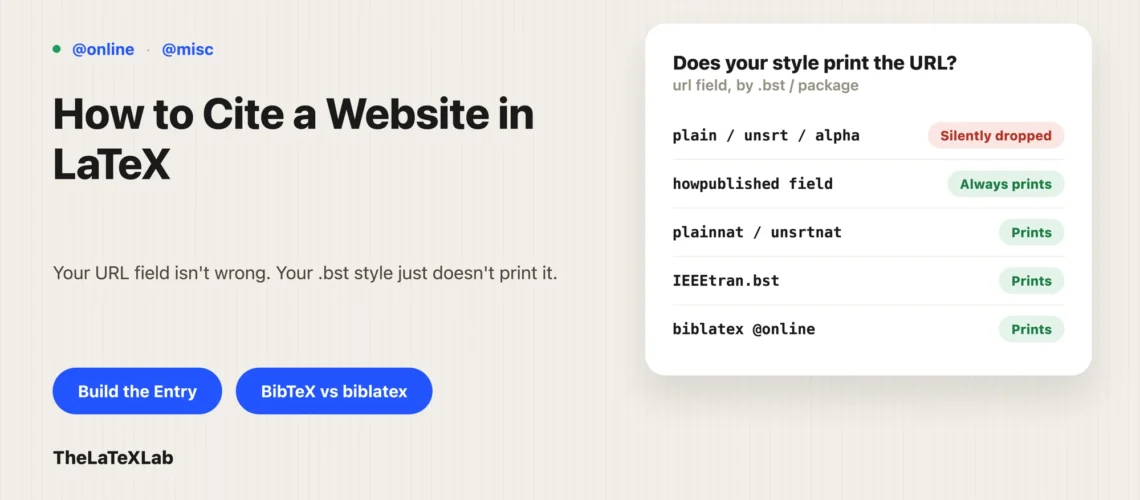
This is the most common complaint about citing websites in BibTeX, and it is not a mistake in your entry. The standard styles predate the web. plain.bst, unsrt.bst, abbrv.bst and alpha.bst do not know what a url field is, so if you put one there, BibTeX reads it and prints nothing. No error, no warning, just a reference with no link. The TeX FAQ is blunt about it: there is no citation type for URLs in the standard BibTeX styles.
You have three ways out.
- Use
howpublishedinstead. Works with every style, becausehowpublishedis a standard@miscfield. This is the reason the entry above is written that way. - Switch to a url-aware style. The natbib styles
plainnat,unsrtnatandabbrvnatsupport a realurlfield, as do the harvard styles. Add\usepackage{natbib}and change\bibliographystyle{plain}to\bibliographystyle{plainnat}. - Patch your style with urlbst. urlbst (version 0.9.1, January 2023) is a Perl script that rewrites an existing
.bstfile to add awebpageentry type plusurl,lastchecked,eprintandDOIfields. Worth it when a journal forces a specific style that lacks URL support and you cannot switch.
A related detail: BibTeX can break a long URL across lines and insert a % in the middle. Loading the url or hyperref package handles that, which is another reason to load one of them.
Generate BibTeX from DOI, ISBN, arXiv, PubMed ID, etc online
Paste a DOI, ISBN, arXiv ID or PubMed ID and get a complete entry for your .bib file. Works with classic BibTeX and biblatex. Free, no sign-up.
What the misc BibTeX entry type is actually for
@misc gets used for web pages because there is nothing better in classic BibTeX, but that is a workaround, not its purpose. @misc is the catch-all for anything that fits no other type, and it has no required fields at all. Every field is optional, which is also why BibTeX will happily produce a near-empty reference from a sloppy @misc entry without complaining.
In practice the things people put in @misc are websites, software, datasets, preprints, standards and unpublished notes. If you are on biblatex, most of those have a better home:
| What you are citing | Classic BibTeX | biblatex |
|---|---|---|
| Web page | @misc + howpublished | @online |
| Software or a code repository | @misc | @software |
| Dataset | @misc | @dataset |
| Preprint (arXiv and similar) | @misc or @unpublished | @online with eprint, or @article once published |
| Technical report, white paper, standard | @techreport | @report |
The biblatex cheat sheet calls @misc the “last resort”, which is fair. Reaching for a specific type gets you better-formatted output with no extra work, because the style already knows what a dataset or a web page should look like.
Which citation styles want an access date, and when
The habit of putting “Accessed: date” on every web citation is not what most style guides ask for.
- APA 7 wants a retrieval date only when the content is designed to change over time and the page is not archived. A wiki page, a live statistics dashboard, a page with a version history: yes. A dated news article or a stable PDF: no.
- MLA 9 treats the access date as optional. It is recommended for pages that change often or that carry no publication date.
- IEEE does want the access date on online sources, and prints the URL after “[Online]. Available:”.
So put a real publication date in year or date whenever the page has one, and add the access date when the style calls for it or the page has no date of its own. Something else worth doing regardless: if a page matters to your argument and looks like it might vanish, archive it first (the Wayback Machine or Perma.cc) and cite the archived copy. Link rot in reference lists is a slow, quiet problem, and it is much easier to fix before submission than after.
Citing a website in IEEE style with IEEEtran
IEEE is worth its own note because IEEEtran.bst behaves differently from both routes above. It does declare a real url field, so this works:
@misc{ieeeexample,
  author = {{IEEE Standards Association}},
  title  = {Example Standard Overview},
  year   = {2026},
  url    = {https://standards.ieee.org/example},
  note   = {Accessed: Jul. 20, 2026},
}
But IEEEtran.bst declares no urldate or lastchecked field, so there is nowhere structured to put the access date. It goes in note, formatted by hand. The style prints the URL with its default “[Online]. Available:” prefix, which is what IEEE wants, so do not add that text yourself.
Websites with no author and no date
Most web pages are missing something. What to do with each gap:
- No personal author. Use the organization, in double braces:
author = {{Stack Exchange Inc.}}. Do not leave the field out and hope the title floats up, because how that renders is style-dependent and often ugly. - No date at all. Leave
yearout. biblatex prints “n.d.” in styles that expect a date. This is exactly the case where an access date earns its place. - No obvious title. Use the page heading, not the browser tab text. And protect capitalization you need to keep with braces:
title = {The {NASA} Open Data Portal}, otherwise styles that lowercase titles will turn it into “nasa”. - A page that is really a PDF report. Cite it as
@report(biblatex) or@techreport(BibTeX) with aurl, not as a web page.
Building the entry without typing it by hand
Hand-writing a @misc or @online entry is fine for one web page. It stops being fine at thirty, and typos in a citation key or a stray unbraced author name are exactly the kind of thing that produces a broken reference you do not notice until the proofs.
If the page has a DOI, an ISBN, an arXiv ID or a PubMed ID (many reports, datasets and preprints do), resolve it instead of transcribing it. Our free BibTeX generator takes an identifier and returns a complete entry with the fields filled in, which you then paste into your .bib file and adjust. For a plain web page with no identifier, you still have to write it yourself, but the entry above is a template you can copy.
If the citation or the URL still does not appear
Two different failures that look similar:
- The whole citation prints as
[?]and the reference list is empty. The bibliography processor has not run. Recompile the full sequence; on Overleaf just hit Recompile again. If that does not do it, work through why BibTeX is not showing your bibliography. The full compile order is in our guide to citing in LaTeX. - The citation appears but the URL does not. That is the style, not the compile. You put the address in
urland your.bstignores it. Move it tohowpublished, or switch style, as above.
One more that catches people on biblatex: some styles hide URLs for entry types they consider print sources, and there are url=false-style options that switch URL printing off globally. If a URL prints for your @online entries but not your @article entries, that is by design in the style, not a broken entry.