Two symptoms cover almost every report of BibTeX not working: the bibliography comes out empty, or every citation prints as [?]. In both cases the main LaTeX log tells you almost nothing useful. The file that does tell you is the .blg file, which almost nobody opens. This goes through how to read it, then the causes in the order they actually occur, including the ones that produce no error message at all.
The .blg file says why BibTeX is not working
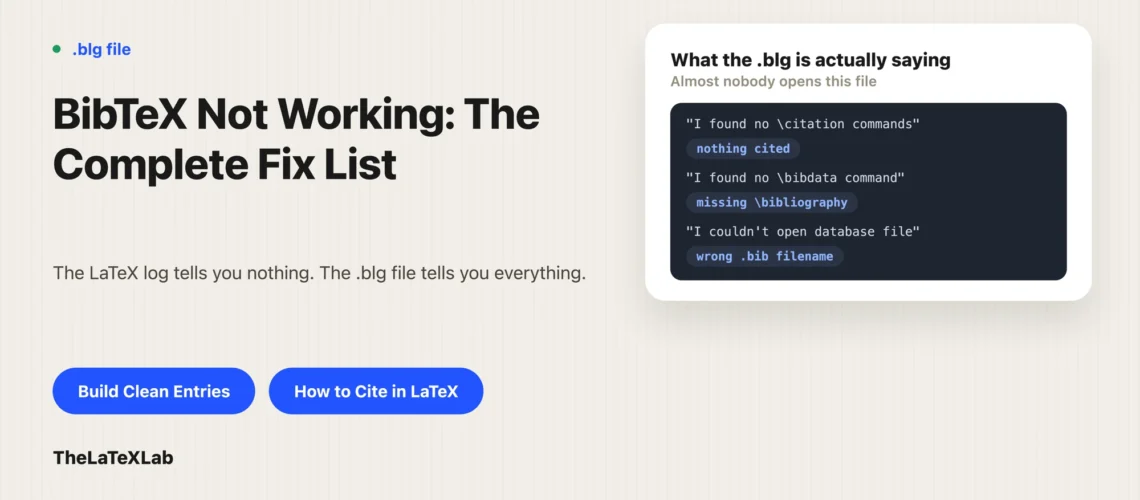
Every run of bibtex or biber writes its own log, separate from the LaTeX .log. It is called main.blg, matching your main file’s name. That is where bibliography problems are reported, and it is the first thing to open.
- Locally: the
.blgsits next to your.texfile. Open it in any text editor. - On Overleaf: click Logs and output files, then look for the
.blgin the list of output files.
What to look for in it:
I found no \citation commandsmeans nothing in your document cited anything.I found no \bibdata commandmeans the\bibliographyline is missing or was never seen.I couldn't open database filenames a.bibfile it could not find.Warning--empty journalor similar names a specific entry with a missing field.- A syntax error names the line in the
.bibfile where parsing broke.
If the .blg does not exist at all, then bibtex or biber never ran, and that is a different problem, covered next.
The bibliography processor never ran
This is the most common cause of a bibliography not showing in LaTeX, and it is not really a bug. Citations need more than one pass: LaTeX writes out what you cited, the bibliography processor reads that and builds the list, then LaTeX runs again to place it.
The sequence is pdflatex, then bibtex or biber, then pdflatex twice. On Overleaf this happens automatically when you click Recompile, so hitting Recompile once more is often the entire fix. Locally, run the steps yourself or let latexmk do it.
This and the other general citation errors are covered alongside the rest of the usual build failures in common LaTeX compilation errors, so the rest of this post sticks to the causes that survive a correct compile.
BibTeX only prints entries you actually cite
Worth knowing before you go hunting for a fault that is not there. Classic BibTeX does not print your whole .bib file. It prints the entries you cited, and nothing else.
So a .bib file with sixty references and a document with four \cite commands produces a bibliography with four entries. That is correct behavior, not a failure. If you want everything listed whether cited or not:
\nocite{*}Put that before the bibliography command. It marks every entry in the file as cited without printing anything in the text. Useful for a reading list or a thesis appendix, and the reason a lot of “only some of my references show up” reports turn out to be nothing at all.
An empty bibliography with zero \cite commands anywhere gives you the I found no \citation commands line in the .blg.
The .bib file path or filename is wrong
Two specific mistakes, both of which produce an empty bibliography.
The extension. Classic BibTeX takes the filename without .bib:
\bibliography{refs}      % correct
\bibliography{refs.bib}  % fails
biblatex is the other way round. \addbibresource wants the full filename with the extension: \addbibresource{refs.bib}. Mixing these up between projects is common, and the .blg will say it could not open the database file.
The path. If the .bib lives in a subfolder, give the path relative to the main .tex file: \bibliography{bib/refs} or \addbibresource{bib/refs.bib}. Forward slashes, even on Windows.
A syntax error in the .bib file drops entries silently
This is the one that wastes the most time, because your document compiles, no error appears in the LaTeX log, and the reference is just missing.
BibTeX parses the .bib file itself. When it hits something malformed it reports it in the .blg and carries on, so an entry can vanish with no visible sign in the PDF. The usual causes:
- An unbalanced brace in a title or author field. Everything after it may be swallowed.
- A missing comma between fields.
- A stray
@or%inside a field value. - Special characters typed raw: an unescaped
&or#. - A duplicate citation key. Two entries with the same key means one wins and one disappears.
Duplicate keys deserve special mention on a long project, because merging a co-author’s .bib file into yours is exactly how you get two different papers both keyed smith2020.
Citation keys that do not match give an undefined citation
A BibTeX undefined citation warning, and a [?] in place of the number, means the key in your \cite does not exist in the .bib file as written.
Keys are case sensitive. \cite{Smith2024} does not find an entry keyed smith2024. Beyond case, the things that catch people are trailing spaces inside the braces, a hyphen against an underscore, and keys that were auto-generated by a reference manager and then changed when the entry was re-exported.
The fix is to copy the key out of the .bib file rather than typing it from memory. If several citations broke at once after an export, the manager probably regenerated all the keys.
The bibliography is not showing in Overleaf
Overleaf runs the full sequence for you, so when a bibliography does not show there and the source looks right, it is usually stale cached files. Overleaf keeps the generated .aux, .bbl and friends between compiles, and an old .bbl can persist after you have fixed the actual problem.
Click Logs and output files, then Clear cached files at the bottom. It deletes the generated files but does not recompile, so click Recompile afterwards. This is worth trying before you start editing anything, because it costs nothing and it resolves a decent share of Overleaf bibliography reports.
Two other Overleaf-specific things. Check the compiler and TeX Live version under Menu if a project that used to work has stopped. And if you started from a journal template, do not add biblatex on top of a template that already has \bibliographystyle, because you end up with two bibliography systems in one document and neither works properly.
biblatex needs printbibliography
If you are on biblatex rather than classic BibTeX, the list is printed by \printbibliography, and it will not appear on its own. There is no equivalent of \bibliography{refs} doing double duty as both the loader and the printer.
So a biblatex document needs three things: \usepackage{biblatex}, \addbibresource{refs.bib} in the preamble, and \printbibliography where the list goes. Missing the third gives you a document that compiles perfectly with no reference list anywhere.
Also check the backend. If your biblatex options say backend=biber and your editor is running bibtex, nothing works. The two systems and their backends are covered in BibTeX vs biblatex vs biber.
BibTeX is not showing the URL or other fields
Different problem, same feeling. The bibliography appears, the entry is there, but a field you put in the .bib file does not print.
For URLs this is almost always the style rather than your entry. The standard BibTeX styles, plain, unsrt, abbrv and alpha, do not know the url field and print nothing when they see one. No error, no warning. The workaround is howpublished = {\url{...}}, or switching to a url-aware style like plainnat. We go through this properly in how to cite a website in LaTeX.
The same logic applies to any missing field: check whether the style prints it before assuming the entry is broken. DOIs behave the same way in older styles.
Most of this comes from hand-built .bib files
Looking at the list above, most causes of BibTeX not working are data problems rather than LaTeX problems: unbalanced braces, missing commas, duplicate keys, fields that were never filled in. They come from typing entries by hand or pasting them from places that produce sloppy output.
Building entries from an identifier avoids the whole category. Our free BibTeX generator turns a DOI, ISBN, PubMed ID or arXiv ID into a complete, syntactically valid entry, so there is no missing comma to hunt for and the fields come back filled in.
Start from clean entries instead of debugging broken ones.
Paste a DOI, ISBN, PubMed ID or arXiv ID and get a valid BibTeX entry with the fields already populated. Free, in the browser, no sign-up.
If your references are currently in a Word document, moving them across has its own set of problems, covered in converting Word references to BibTeX.
What to check, in order
- Recompile again. On Overleaf, twice.
- Open the
.blgfile and read it. - No
.blgat all: the processor never ran. - Check the
\bibliographyor\addbibresourcefilename, extension and path. - Check you have
\printbibliographyif you are on biblatex. - Overleaf: clear cached files, then recompile.
- Compare a failing citation key against the
.bibfile character by character. - Field missing rather than entry missing: it is the style, not your entry.