![Featured image for 'How to Cite in LaTeX' blog post from The LaTeX Lab, showing the four-step compile sequence - needed to resolve citations, warning that skipping a step prints [?] instead.](https://thelatexlab.com/wp-content/uploads/2026/07/how-to-cite-in-latex-featured-1000x450-1-1140x500.webp)
Learning how to cite in LaTeX comes down to three pieces: a .bib file that holds your references, a command in the text that cites one, and a command that prints the bibliography. There are two ways to wire those together, the modern biblatex approach and the classic BibTeX approach, and your journal or class template usually decides which. This shows how to add references and a bibliography in LaTeX with both, what a .bib file looks like, and the fastest way to build it without typing every entry by hand.
What you need to cite in LaTeX
Whichever approach you use, citing in LaTeX always needs the same three things:
- A
.bibfile: a plain-text file of reference entries, one per source, each with a citation key. - A cite command in your document body, like
\cite{key}, that points at an entry by its key. - A command that prints the reference list where you want it.
\cite{key} works in both approaches. The difference is the package you load and the command that prints the list. Pick the one your template already uses; if you are starting fresh, biblatex is the modern default.
How to make a .bib file
A .bib file is just text. Each source is an entry: an entry type, a citation key, and fields. An article looks like this:
@article{knuth1984,
  author  = {Donald E. Knuth},
  title   = {Literate Programming},
  journal = {The Computer Journal},
  volume  = {27},
  number  = {2},
  pages   = {97--111},
  year    = {1984},
}
The citation key (knuth1984) comes right after the brace, and it is what you pass to \cite{knuth1984}. Fields are key-value pairs, and multiple authors are joined with and: author = {Jane Doe and John Smith}. Other entry types cover other sources: @book, @inproceedings for conference papers, @phdthesis, and @misc or @online for citing a website. Save all your entries in one file, for example refs.bib, in the project.
How to build a .bib file from a DOI or ISBN
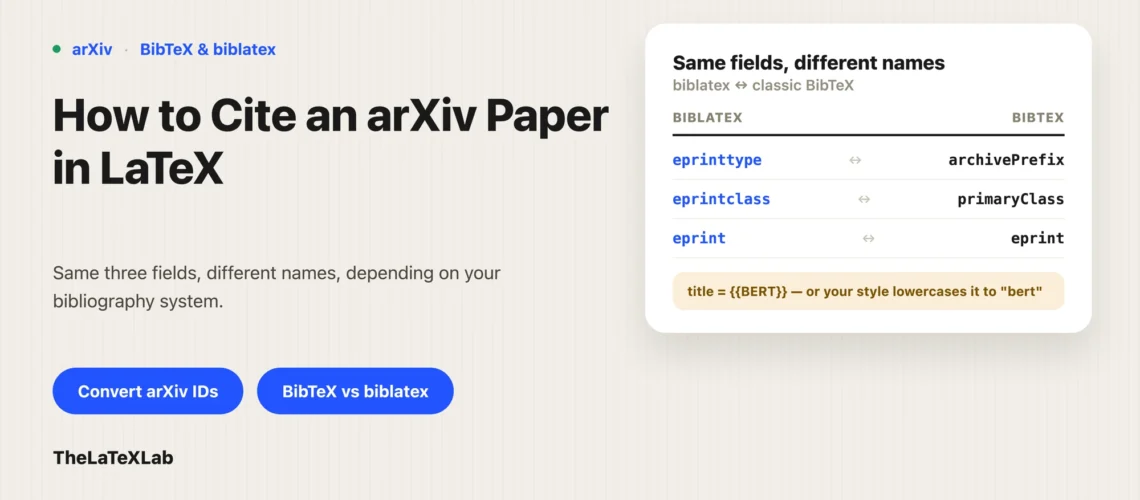
You do not have to type entries by hand, and you should not, because a hand-typed entry is where wrong page numbers and missing fields come from. Copied entries have the same problem: Google Scholar BibTeX exports usually arrive with no DOI and a truncated journal name. If a source has a DOI, an ISBN, an arXiv ID, or a PubMed ID, you can resolve it straight to a clean entry. Preprints have their own fields and their own decisions, covered in how to cite an arXiv paper.
Our free BibTeX generator does this in the browser: paste an identifier and it returns the formatted entry to drop into your file. For a single DOI, DOI to BibTeX is the direct route. If your references already live in a reference manager or another format, the same tools import .ris, EndNote, and PubMed files and hand you BibTeX. Build the file this way and the fields come back complete and consistent, which saves the cleanup later.
Generate BibTeX from DOI, ISBN, Pubmed, arXiv ID, etc.
Paste an identifier and get a clean BibTeX entry to drop straight into your references file. Free, in the browser, no sign-up.
How to add references in LaTeX with biblatex
biblatex is the current, more flexible system, with better language handling than the older tools. To add references in LaTeX with it, load the package in the preamble and point it at your .bib file with \addbibresource:
\usepackage[backend=biber, style=numeric, sorting=none]{biblatex}
\addbibresource{refs.bib}
backend=biber is the recommended processor, and style sets the look (for example numeric, alphabetic, or authoryear); you swap that one word to change the whole format. The reference list itself is printed with \printbibliography, covered further down. If you are not sure which system to commit to, we compare the two in BibTeX vs biblatex vs biber.
How to add references in LaTeX with classic BibTeX
Classic BibTeX is older but still everywhere, because many journal templates ship with it. There is no package to load; you add references with two preamble-and-body commands plus your cites:
\bibliographystyle{plain}  % choose the style
\bibliography{refs}        % load refs.bib and print the list here
\bibliographystyle picks the format (plain, unsrt, and alpha are common), and \bibliography{refs} points at refs.bib (no extension) and prints the list at that spot. If your template already has a \bibliographystyle line, keep it and match it; do not add biblatex on top.
In-text citation commands
The plain \cite{key} works in both systems. Beyond that, the command depends on your setup:
- biblatex:
\parencite{key}gives a parenthetical citation, and\textcite{key}gives a narrative one that reads the author name into the sentence. - classic BibTeX with natbib: load
\usepackage{natbib}and use\citep{key}for a parenthetical citation and\citet{key}for a narrative one.
You can cite several keys at once by separating them with commas: \cite{smith2019, jones2021}.
How to add the bibliography in LaTeX and compile it
To add the bibliography in LaTeX, put the print command where you want the reference list, usually a new page at the end. In biblatex that is \printbibliography; in classic BibTeX the \bibliography{refs} command both loads the file and prints the list at that point.
Then compile. Citations need more than one pass, because LaTeX writes the citation data on one run and reads it back on the next. The order is: run LaTeX, then the bibliography processor (bibtex or biber), then LaTeX twice more. On Overleaf this is automatic; it runs the right sequence when you click Recompile. On a local install you run the steps yourself or let latexmk handle them.
If a citation prints as [?] or the bibliography is empty, it is almost always the compile sequence: the bibliography processor has not run yet, so recompile the full sequence (on Overleaf, hit Recompile again). The other usual causes are a citation key that does not match the one in the .bib file, or the wrong backend. Missing bibliographies and undefined-citation errors are a common LaTeX snag covered in common LaTeX compilation errors, and diagnosed properly in BibTeX not working: fix a missing bibliography. And if your references are still sitting in a Word document, moving them across is its own job, covered in converting Word references to BibTeX.