To use APA 7 in LaTeX for a thesis or dissertation, keep your university’s thesis class, load biblatex with the apa style, and compile with biber instead of BibTeX. The apa7 class does not work for a dissertation: it is built for papers, so it has no chapters.
These lines go in the preamble, and the last one goes where the reference list should appear:
\usepackage[american]{babel}
\usepackage{csquotes}
\usepackage[style=apa, backend=biber]{biblatex}
\addbibresource{references.bib}

\printbibliography[heading=bibintoc, title={References}]
Headings, spacing and tables need a few more lines. Each is shown below with the compiled output.
Why the apa7 class does not work for a dissertation
The apa7 class (version 2.16, July 2022) is built on LaTeX’s article class, so it has no \chapter command. Its student mode (stu) prints APA’s student title page, with the course, instructor and due date, not your university’s dissertation title page.
Use apa7 for a journal manuscript or a course paper. For a dissertation, keep the thesis class or template your graduate school gives you and add biblatex-apa to it. If you have not set up the template yet, start with formatting a PhD thesis in LaTeX.
| apa7 class | Thesis class + biblatex-apa | |
|---|---|---|
| Chapters | No | Yes |
| University title page and front matter | No (APA student or manuscript title page) | Yes |
| APA 7 citations and references | Yes, with its biblatex option | Yes |
| APA heading levels | Built in | A few lines with titlesec (below) |
Do not use apacite for APA 7 either. apacite (version 6.03, 2013) follows the 6th edition, and the apa7 class manual says its apacite and natbib options also give 6th edition citations. The difference shows in the reference list: APA 6 adds the publisher’s city and writes “doi:” before the DOI.
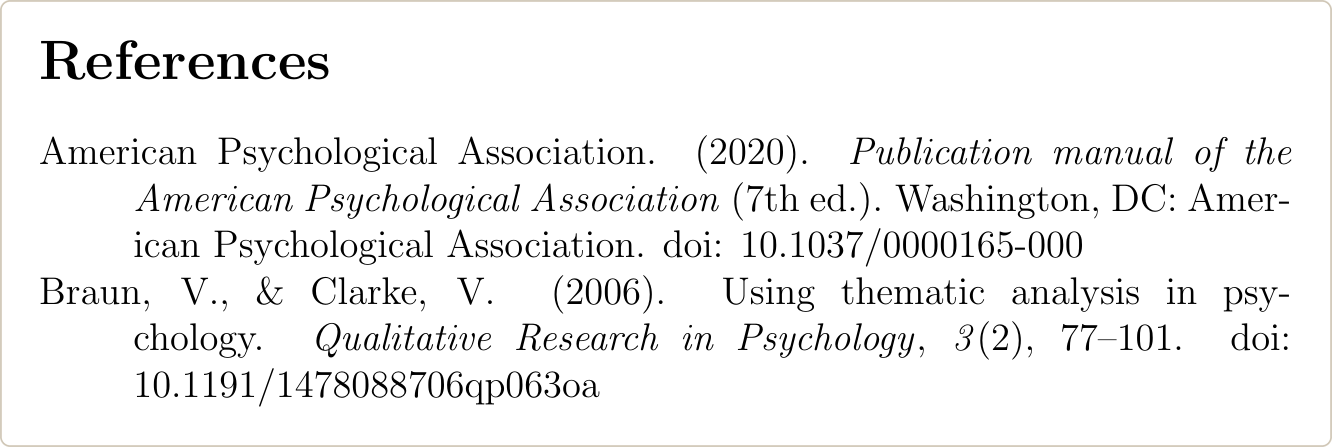
biblatex-apa is the APA 7 style for biblatex. Version 9.0 was rewritten for the 7th edition, and the current version is 9.20 (August 2025).
How to set up biblatex-apa in a thesis template
Remove the template’s old bibliography setup, add four lines to the preamble, and put \printbibliography where the reference list goes.
- Delete
\usepackage{natbib}or\usepackage{apacite}if the template loads them, and packages that only work with BibTeX, such asbibentry. Delete\bibliographystyle{...}and\bibliography{...}too. biblatex stops with an error if natbib or apacite is loaded. - Add the babel, csquotes, biblatex and
\addbibresourcelines from the top of this page. - Replace the old bibliography commands with
\printbibliography[heading=bibintoc, title={References}].
What each part does:
americanin babel gives APA’s American punctuation and date format.- csquotes is required by the style. Without it biblatex warns
'babel/polyglossia' detected but 'csquotes' missing. heading=bibintocadds the reference list to the table of contents.title={References}is needed because thesis classes built on report or book call the list “Bibliography” by default. APA uses “References”.
Older guides also add \DeclareLanguageMapping{american}{american-apa}. Current versions load the APA language file by themselves, so the line is not needed. It does no harm if it is already there.
Cite with \parencite and \textcite. These are the outputs from the example on this page:
| Command | Output |
|---|---|
\parencite{braun2006} | (Braun & Clarke, 2006) |
\textcite{braun2006} | Braun and Clarke (2006) |
\parencite[79]{braun2006} | (Braun & Clarke, 2006, p. 79) |
\parencite{braun2006,deci2000} | (Braun & Clarke, 2006; Deci & Ryan, 2000) |
\cite{braun2006} | Braun and Clarke, 2006 (no parentheses) |
If your chapters already use natbib’s \citep and \citet, add natbib=true to the biblatex options and they keep working.
How to compile biblatex-apa with biber in Overleaf and TeX Live
biblatex-apa works only with biber, so the order is LaTeX, then biber, then LaTeX twice.
On Overleaf there is nothing to set. Overleaf builds projects with latexmk, and latexmk runs biber by itself when the document uses biblatex. If citations stay undefined after you edit the .bib file, use Recompile from scratch to clear the cached files. A long dissertation can also hit Overleaf’s time limit; see how to fix an Overleaf compile timeout.
On TeX Live or MiKTeX, run:
pdflatex thesis
biber thesis
pdflatex thesis
pdflatex thesis
or latexmk -pdf thesis, which works out when biber is needed. In TeXstudio, set the bibliography tool to Biber under Options, Configure TeXstudio, Build. If BibTeX runs instead, it stops with I found no \citation commands.
biblatex-apa 9.20 needs biblatex 3.18 and biber 2.18 or later. If biber stops with a version error, update biblatex and biber together. The roles of BibTeX, biblatex and biber are explained separately.
APA 7 headings in LaTeX
APA 7 has five heading levels. All are bold, in title case, and not numbered. In a dissertation, start each chapter with a Level 1 heading (the chapter title) and use Levels 2 to 5 inside it.
| Level | APA 7 format | LaTeX command |
|---|---|---|
| 1 | Centered, bold | \chapter |
| 2 | Flush left, bold | \section |
| 3 | Flush left, bold italic | \subsection |
| 4 | Indented, bold, ends with a period, text continues on the same line | \subsubsection |
| 5 | Indented, bold italic, ends with a period, text continues on the same line | \paragraph |
The formats come from the APA Style headings page. With the titlesec package:
\usepackage{titlesec}
\setcounter{secnumdepth}{0}
\titleformat{\chapter}[display]{\normalfont\bfseries\centering}{\chaptertitlename\ \thechapter}{0pt}{}
\titlespacing*{\chapter}{0pt}{0pt}{\baselineskip}
\titleformat{\section}{\normalfont\bfseries}{}{0pt}{}
\titleformat{\subsection}{\normalfont\bfseries\itshape}{}{0pt}{}
\titleformat{\subsubsection}[runin]{\normalfont\bfseries}{}{0pt}{}[.]
\titleformat{\paragraph}[runin]{\normalfont\bfseries\itshape}{}{0pt}{}[.]
\titlespacing*{\section}{0pt}{0pt}{0pt}
\titlespacing*{\subsection}{0pt}{0pt}{0pt}
\titlespacing*{\subsubsection}{0.5in}{0pt}{0.5em}
\titlespacing*{\paragraph}{0.5in}{0pt}{0.5em}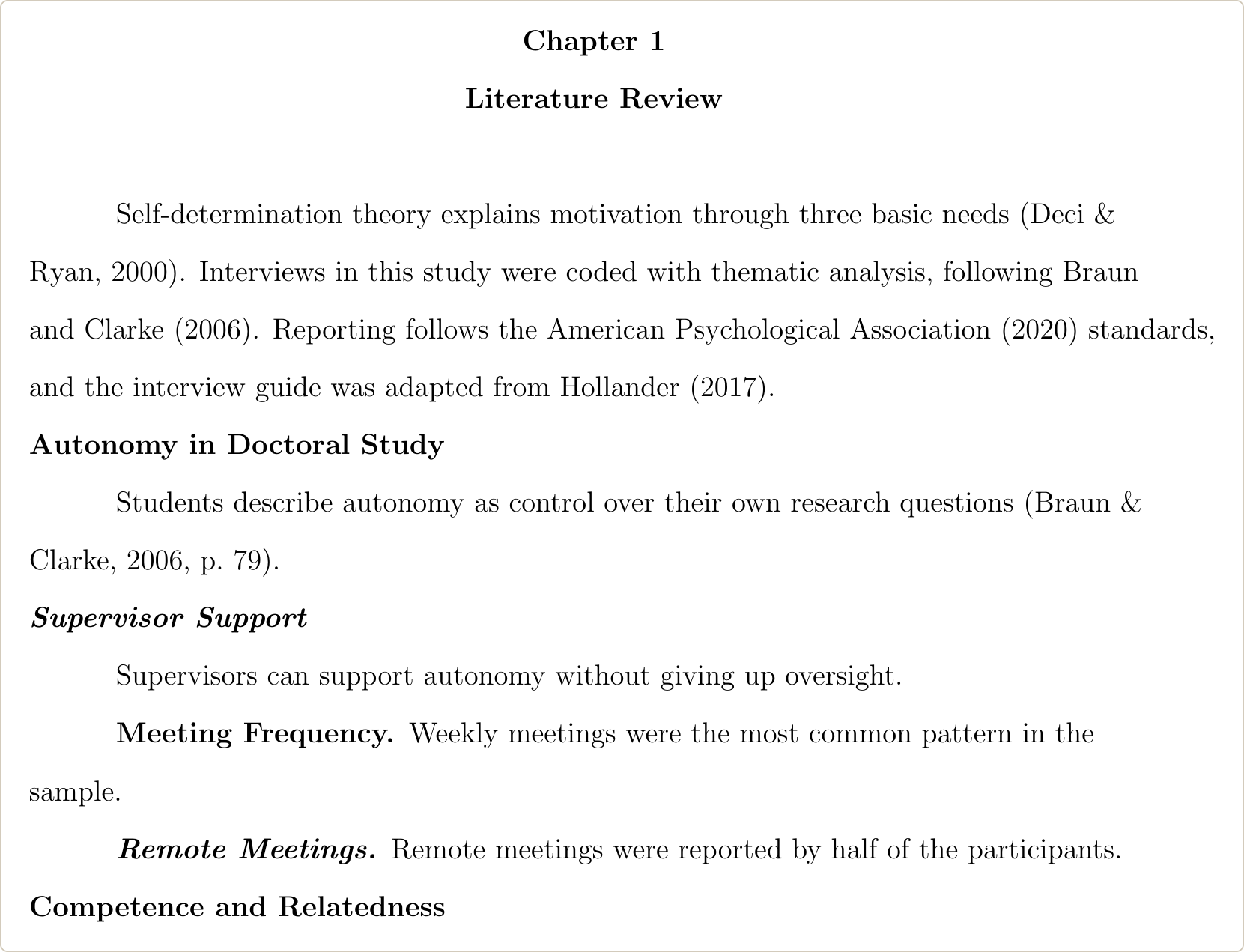
\setcounter{secnumdepth}{0} removes section numbers but keeps “Chapter 1”. APA does not number headings, but if your graduate school wants numbered sections, delete that line and follow the school.
Check what your class already does before adding this. If it formats \chapter to your graduate school’s rules, delete the two \chapter lines and keep the school’s version. KOMA-Script classes (scrreprt, scrbook) print a warning when titlesec is loaded; use their \RedeclareSectionCommand instead.
Double spacing, paragraph indents and a ragged right margin
APA 7 double-spaces the whole paper, including block quotations and the reference list. Every paragraph starts with a 0.5 in. indent, the right margin is left ragged, and APA asks for no hyphens at line ends, except in long DOIs and URLs.
\usepackage{setspace}
\doublespacing
\setlength{\parindent}{0.5in}
\usepackage{indentfirst}

\usepackage{ragged2e}
\setlength{\RaggedRightParindent}{0.5in}
\AtBeginDocument{\RaggedRight}
\hyphenpenalty=10000
\exhyphenpenalty=10000
\renewcommand*{\bibfont}{\raggedright}indentfirstindents the first paragraph after a heading, which LaTeX leaves flush left by default.\RaggedRightkeeps the paragraph indent. Plain\raggedrightremoves it.- Do not load ragged2e with its
documentoption. It also applies inside captions, which then get the 0.5 in. indent. - The
\bibfontline stops long DOIs from breaking with wide gaps in the reference list.
biblatex-apa already sets a 0.5 in. hanging indent and no extra space between references, so the reference list needs nothing else.
If your template has its own spacing command, use that instead of setspace.
Margins and page numbers usually come from the graduate school. APA uses 1 in. margins and puts the page number in the top right corner, but its own margins page says a dissertation may need different margins, such as 1.5 in. on the left for binding. If your school wants APA’s top-right page numbers, use fancyhdr:
\usepackage{fancyhdr}
\setlength{\headheight}{14.5pt}
\pagestyle{fancy}
\fancyhf{}
\fancyhead[R]{\thepage}
\renewcommand{\headrulewidth}{0pt}
\fancypagestyle{plain}{\fancyhf{}\fancyhead[R]{\thepage}\renewcommand{\headrulewidth}{0pt}}
The plain line is needed because chapter pages use the plain page style.
APA lists 10-point Computer Modern, LaTeX’s default font, as acceptable. If your graduate school asks for 12-point type, load the class with the 12pt option.
APA 7 tables and figures in LaTeX
In APA 7 the table number goes above the table in bold, the title goes on the next line in italic title case, and notes go below. Figures use the same layout. Number tables and figures 1, 2, 3 in the order you first mention them, and use lines only above and below the table and under the column headings, as the APA table setup page shows.
\usepackage{booktabs}
\usepackage{caption}
\captionsetup{labelfont=bf, textfont=it, labelsep=newline,
  justification=raggedright, singlelinecheck=false, font=doublespacing}
\counterwithout{table}{chapter}
\counterwithout{figure}{chapter}
A table in a chapter:
\begin{table}[ht]
\caption{Participants by Program Year}
\label{tab:participants}
\noindent\begin{tabular}{lcc}
\toprule
Program year & \emph{n} & \% \\
\midrule
Year 1 & 6 & 25 \\
Year 2 & 8 & 33 \\
Year 3 or later & 10 & 42 \\
\bottomrule
\end{tabular}

\smallskip
\noindent\textit{Note.} \(N = 24\).
\end{table}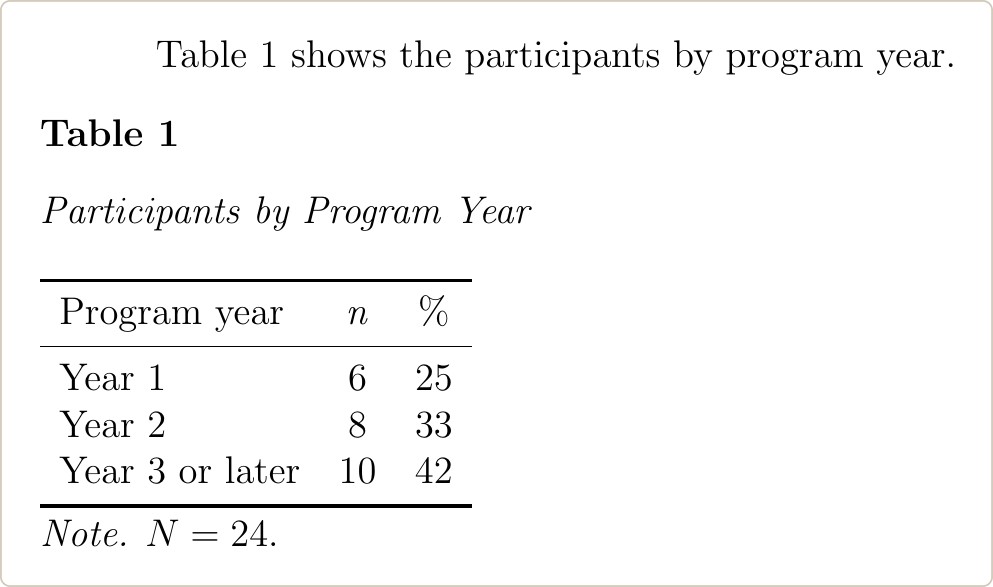
- Put
\captionbefore the tabular so the number and title print above it. \counterwithoutchanges the report class’s chapter numbering (Table 2.1) to Table 1, Table 2. Some graduate schools accept chapter numbering, so check yours before you change it, and do not mix the two.font=doublespacingdouble-spaces the number and title, as APA asks.- For figures, put
\captionbefore\includegraphics.
In appendices APA numbers tables A1, A2, with no period between the letter and the number. Add this after \appendix and the appendix’s \chapter line:
\setcounter{table}{0}
\renewcommand{\thetable}{A\arabic{table}}
Hire an Expert to format the dissertation
We format dissertations in LaTeX to your university’s template and APA 7, including citations, references, headings and tables, and compile every file on Overleaf and a local TeX installation before delivery. You pay after you review the first draft.
How to write .bib entries for APA 7
biblatex-apa builds the APA format from ordinary .bib fields, but a few habits decide whether the reference list comes out right.
- Type titles in title case. The style changes them to sentence case in the reference list. Put braces around words that must keep their capitals, such as
{Milgram}or{COVID-19}. - Put group authors in double braces:
author = {{American Psychological Association}}. With single braces, biblatex reads it as a person’s name and prints “Association, A. P.” - Give the DOI without
https://doi.org/; the style adds it. If an entry has both a DOI and a URL, it prints only the DOI, as APA asks. - Put braces around “and” inside publisher or institution names. Without them biblatex reads “and” as a list separator and prints “ProQuest Dissertations; Theses Global”.
A dissertation from ProQuest, using APA’s own example:
@phdthesis{hollander2017,
  author      = {Hollander, M. M.},
  title       = {Resistance to Authority},
  subtitle    = {Methodological Innovations and New Lessons from the {Milgram} Experiment},
  institution = {University of Wisconsin--Madison},
  publisher   = {ProQuest Dissertations {and} Theses Global},
  number      = {10289373},
  year        = {2017}
}
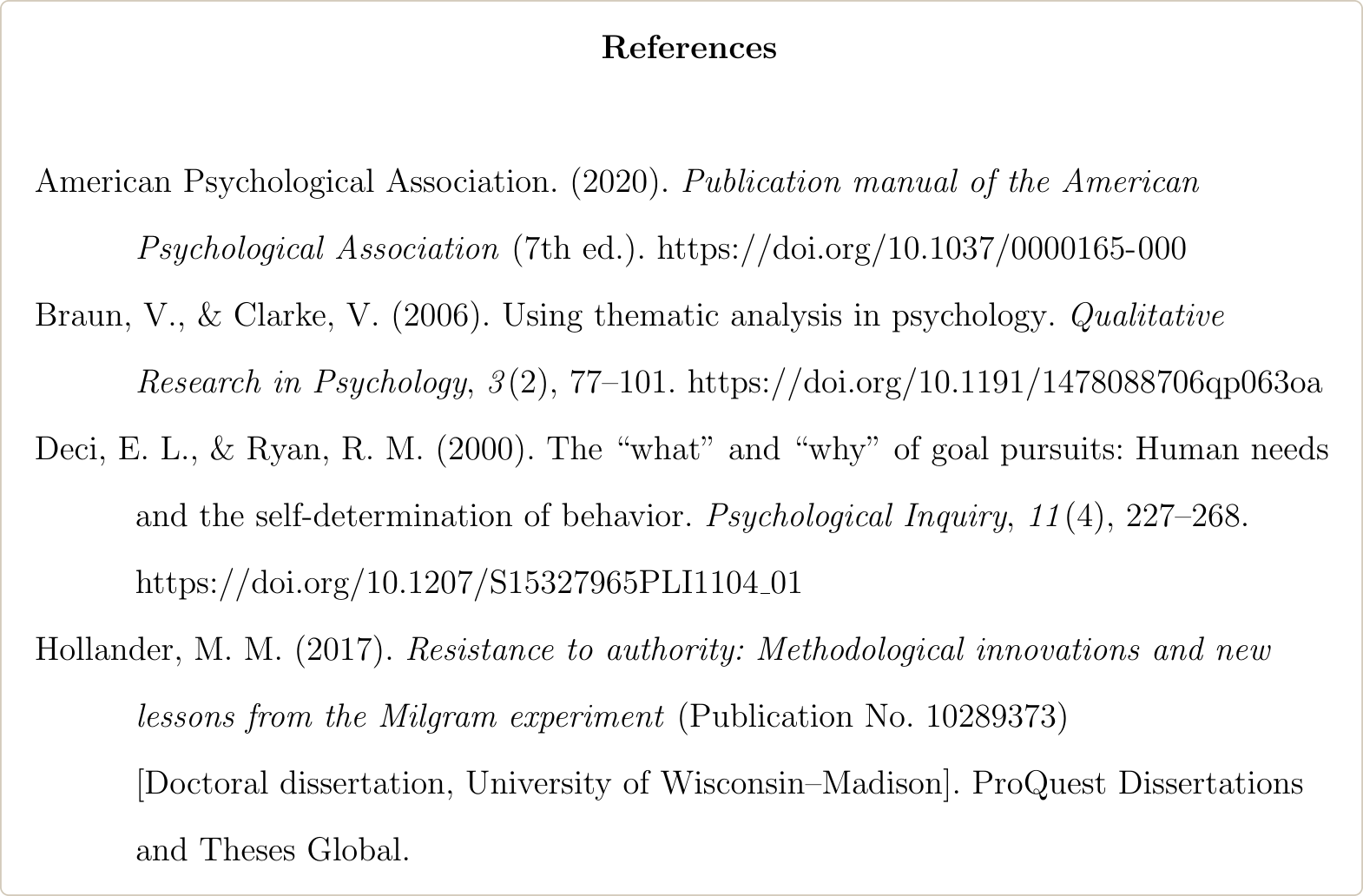
It prints as “Hollander, M. M. (2017). Resistance to authority: Methodological innovations and new lessons from the Milgram experiment (Publication No. 10289373) [Doctoral dissertation, University of Wisconsin-Madison]. ProQuest Dissertations and Theses Global.”
Entries copied from Google Scholar often have no DOI and a shortened journal name; fixing Google Scholar BibTeX entries covers what to check. If the paper has a DOI, a DOI to BibTeX converter gives the full record instead.
Common biblatex-apa errors and fixes
These are the errors from the setup above, compiled on TeX Live 2026 with biblatex-apa 9.20.
File biblatex-apa.sty not found
! LaTeX Error: File `biblatex-apa.sty' not found.
The preamble has \usepackage{biblatex-apa}. biblatex-apa is a style, not a package. Delete the line; style=apa in the biblatex options loads it.
Biber backend is required by style
! Package biblatex Error: Biber backend is required by style.
The biblatex options say backend=bibtex. Change it to backend=biber, or remove the option, since biber is the default, and compile with biber.
Incompatible package natbib
! Package biblatex Error: Incompatible package 'natbib'.
The thesis template still loads natbib. apacite gives the same error with its own name. Delete the package line. To keep \citep and \citet in your chapters, add natbib=true to the biblatex options.
Citations show as bold keys
The citations print as bold keys such as braun2006, the reference list is empty, and the log says Please (re)run Biber on the file. Biber has not run, or BibTeX ran instead. Run biber and compile twice more. On Overleaf, use Recompile from scratch. If the keys still show, the cause is in the .bib file or the citation keys; see why citations and the bibliography do not show.
The reference list is titled Bibliography
Thesis classes built on report or book name the list “Bibliography”. Add title={References} to \printbibliography.
