Google Scholar BibTeX export is the quickest way to get a citation into a .bib file, and it is also the reason a lot of reference lists are quietly wrong. Scholar builds its metadata by crawling, so the entry it hands you often has no DOI, no ISSN, a truncated journal name, and sometimes the wrong entry type. This covers how to turn the export on, how to fix the 403 error, what Scholar leaves out, and when to skip it and pull a clean BibTeX entry from the DOI instead.
How to turn on BibTeX export in Google Scholar
The BibTeX link is off by default. Turn it on once and it stays on for that browser.
- Go to
scholar.google.com/scholar_settings, or click the three-line menu and choose Settings. - Under Bibliography manager, select Show links to import citations into and pick BibTeX from the dropdown.
- Click Save.
Every search result now carries an Import into BibTeX link under it, next to the Cite and Save links. Click it and Scholar shows the raw entry on a plain page, which you copy into your .bib file.
Settings are stored per browser profile, in a cookie. Clear your cookies, switch browsers, or use a private window and the link is gone until you set it again.
How to export several Google Scholar BibTeX entries at once
Clicking through one result at a time is slow and, worse, it is what gets you blocked. Use My Library instead.
- Click the Save (star) link under each result you want. That puts it in My Library.
- Open My library from the top left.
- Tick the checkboxes for the entries you want, or use select all.
- Open the three-dot menu, click Export, and choose BibTeX.
The export is batched rather than unlimited, and reports put the practical ceiling around twenty records at a time, so break a long list into groups by label or topic. This route is also easier on Scholar’s rate limits than opening dozens of import links in a row.
How to fix the Google Scholar BibTeX 403 error
The Google Scholar BibTeX 403 error looks like a permissions failure but is not one. The page says your client does not have permission to get the URL. What actually happened is that Scholar decided your traffic looks automated and cut you off. It shows up most often during a literature review, when someone exports citation after citation, or when a reference manager plugin is saving items in bulk.
What works:
- Complete the CAPTCHA if you are offered one. That usually restores access immediately.
- Wait. If there is no CAPTCHA, access typically comes back on its own within a few hours. Zotero’s own guidance on site access limits says the same.
- Slow down and switch to My Library. Star results as you go, then do one batch export at the end instead of dozens of individual requests.
- Check your network. A shared campus IP, a VPN, or an institutional proxy puts you behind the same address as a lot of other people, and the limit is per address. Trying from a normal home connection often works when the campus one does not.
- Go around it. If you have the DOI, you do not need Scholar’s export at all. See below.
There is no setting that raises the limit and no way to appeal it. The block is automated and temporary.
What Google Scholar BibTeX entries leave out
Even when the export works, the entry arrives thin. Scholar generates it from crawled page metadata, not from the publisher’s record, so several fields that matter are usually missing:
- DOI. Almost never included. This is the biggest one, because most journal styles want it and it is the field that makes a reference verifiable.
- ISSN and publisher. Usually absent.
- URL and abstract. Not included.
- Full journal name. Often truncated or given as an abbreviation, and sometimes replaced by a domain name.
- Correct entry type. Conference papers frequently come back as
@articleinstead of@inproceedings, which changes how the reference is formatted. - Brace protection on acronyms. Scholar does not add it, so a title containing NASA or DNA gets lowercased to “nasa” by any style that applies sentence case.
A pattern we see repeatedly in .bib files people send us: a mix of Scholar entries and publisher entries, where half the references have DOIs and half do not, and the bibliography comes out visibly inconsistent. Reviewers notice.
How often Google Scholar metadata is wrong
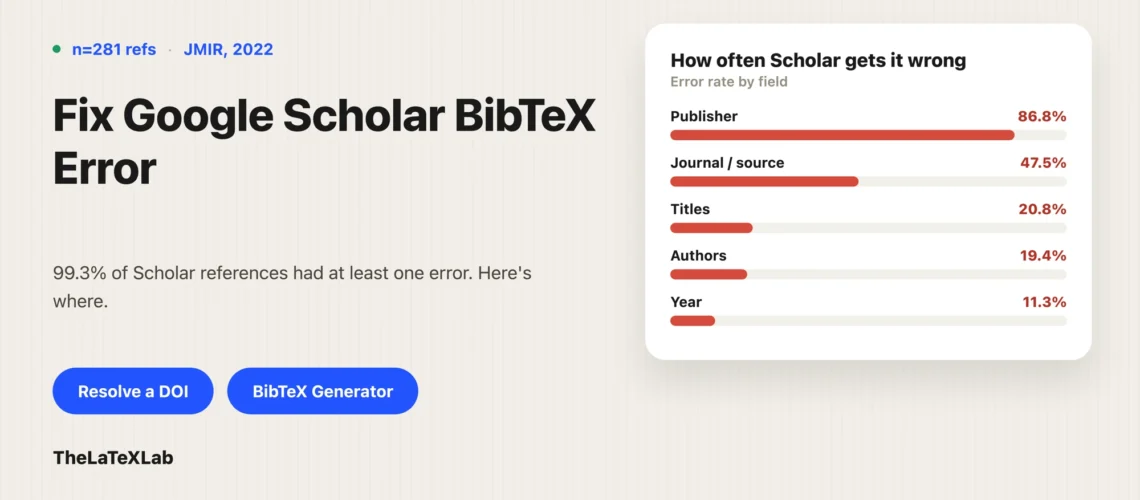
This is measured, not folklore. A study published in the Journal of Medical Internet Research (Sauvayre, 2022) examined 281 references retrieved from Google Scholar and found that 279 of them, 99.3 percent, contained at least one error, at an average of 2.7 errors per reference.
The breakdown is the useful part, because it tells you what to check:
- Publisher information: 86.8 percent error rate. Domain names and irrelevant text substituted for the publisher.
- Publication or source: 47.5 percent. Truncated journal names, capitalization errors, domains in place of the journal.
- Titles: 20.8 percent. Incomplete titles, typos, stray additions.
- Authors: 19.4 percent of references, with 124 of 565 authors (22.0 percent) inaccurate. Missing authors, wrong initials, added authors.
- Publication year: 11.3 percent. Missing or wrong dates.
That study looked at Scholar’s reference data broadly rather than the BibTeX export alone, but the export is generated from the same metadata, so the same failures land in your .bib file. The practical reading: author names, journal name, and year are the three fields to check on every Scholar entry you keep.
Convert Doi to BibTeX
Paste a DOI and get a complete BibTeX entry with the journal title, volume, pages and DOI already in place. Free, in the browser, no sign-up.
How to fix a Google Scholar BibTeX entry by hand
If you are keeping a Scholar entry, this is the checklist to fix Google Scholar citations one at a time. It takes about a minute per entry.
- Fix the entry type. A conference paper should be
@inproceedingswith abooktitle, not@articlewith ajournal. Check the entry type against what the source actually is. - Add the DOI. Copy it from the publisher’s page into a
doifield. If the reference has a DOI and your entry does not, the entry is incomplete. - Expand the journal name. Replace truncations and stray domains with the full title as the publisher prints it.
- Check every author. Initials, spelling, and whether anyone is missing off the end. This is the most common single error.
- Brace-protect capitalization.
title = {A {DNA} study of {NASA} samples}keeps the acronyms uppercase under styles that would otherwise lowercase them. - Check the year. Scholar sometimes reports the preprint or the online-first year rather than the issue year.
- Rename the citation key if you care. Scholar’s keys are machine-generated and collide easily across a large file.
Whether the fixed fields even print depends on your bibliography setup, since classic BibTeX styles and biblatex handle doi and url differently. That split is covered in BibTeX vs biblatex vs biber.
How to get clean BibTeX from the DOI instead
The faster fix is not to clean up a bad entry but to start from a good one. If the paper has a DOI, the publisher already deposited a full metadata record with Crossref: authors, full journal title, volume, issue, pages, year, and the DOI itself. That record is what you want.
Our free DOI lookup resolves an identifier straight to a formatted entry in the browser, with the fields already filled in. For PubMed IDs, arXiv IDs, and ISBNs the same thing applies through the BibTeX generator. On the command line, Crossref’s content negotiation does it directly:
curl -LH "Accept: application/x-bibtex" https://doi.org/10.2196/28354A practical workflow that avoids most of this: search in Google Scholar, because its coverage is genuinely good, but use it to find the paper and grab the DOI rather than to generate the citation. Then resolve the DOI. You get Scholar’s search quality and the publisher’s metadata.
Once the entry is in your .bib file, wiring it into the document is the same either way, and our guide to citing in LaTeX covers that end.
When Google Scholar is still the best source you have
None of this means avoid Scholar. For a large amount of academic material there is no better option, and the export is worth using as long as you check it afterwards:
- Anything with no DOI. Older papers, theses, technical reports, working papers, conference proceedings that were never registered. Crossref cannot give you what was never deposited.
- Grey literature. Government and NGO reports, white papers, standards documents.
- Books and chapters where you do not have the ISBN to hand.
- Finding the thing at all. Scholar’s index is broader than any single publisher database. Its weakness is metadata quality, not coverage.
For those, take the Scholar entry, run the checklist above, and move on. For anything with a DOI, resolving the identifier is both faster and more accurate than fixing an export by hand.