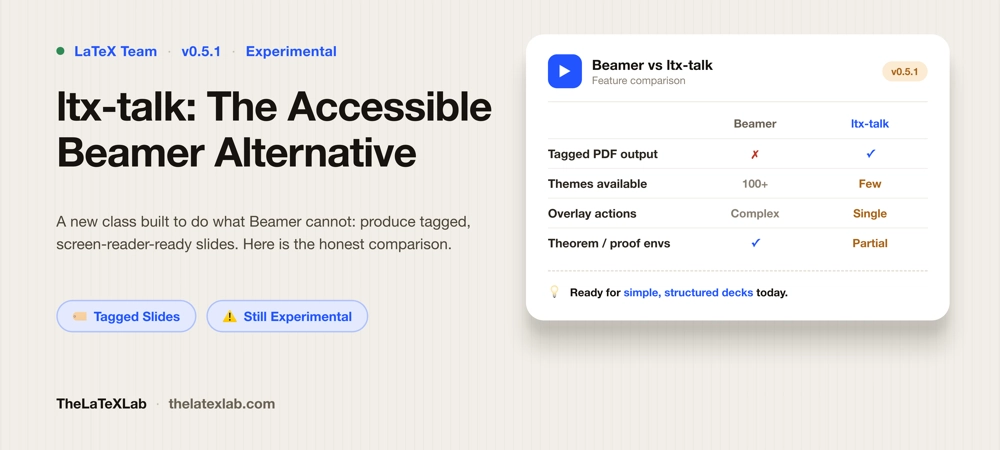
ltx-talk is a new LaTeX presentation class built to do the one thing Beamer cannot: produce a tagged, accessible PDF. It comes from Joseph Wright, part of the LaTeX team, and it treats accessibility as a design goal from the start rather than a bolt-on. If you have to hand in slides that pass an accessibility check, and a Beamer deck will not, ltx-talk is the native answer. The catch is that it is still early. This is an honest look at what it is, how it compares to Beamer, whether it is ready for your next talk, and what to do in the meantime if it is not.
Why ltx-talk exists
Beamer is excellent and mature, and it is not going anywhere. But it was designed years before tagged PDF mattered, and it does not produce tagged output. A Beamer PDF is, to a screen reader, a sequence of pictures. Read why Beamer slides fail accessibility. As accessibility rules tighten, most visibly ADA Title II for US public universities, that has become a real problem for anyone whose lecture slides or conference decks have to be accessible.
Retrofitting tagging onto Beamer is not on the table; the internals are not built for it. So the LaTeX team’s answer was a fresh class designed around tagging from the ground up. That is ltx-talk. Its whole reason to exist is that the compiled slides carry proper structure: headings, lists, reading order, and alt text that assistive technology can actually use. Practitioners are already reporting Beamer-style decks rebuilt in ltx-talk that hit a full pass on PDF accessibility verification, which is simply not achievable in Beamer today.
What ltx-talk is and how it works
If you know Beamer, the mental model is familiar. You write frames, frames break into slides, and you reveal content with overlay specifications. A minimal deck looks like this:
\DocumentMetadata{
  lang        = en-US,
  pdfstandard = ua-2,
  tagging     = on
}
\documentclass{ltx-talk}
\begin{document}
\begin{frame}
  \frametitle{A first slide}
  \begin{itemize}
    \item<1-> First point
    \item<2-> Second point
  \end{itemize}
\end{frame}
\end{document}
Two things are non-negotiable. The \DocumentMetadata declaration with tagging = on has to come first, before \documentclass, because that is what switches on the whole tagging machinery. And you must compile with LuaLaTeX on a current LaTeX release (2025-11-01 or newer). pdfLaTeX and XeLaTeX are not the path here. If tagged PDF is new to you, our guide on what a tagged PDF is and how to make one covers the underlying mechanism this all rests on.
ltx-talk vs Beamer: the real differences
The surface syntax is close enough that a simple deck ports with little friction. The differences are deliberate, and they are where migration gets interesting.
- Overlays are more restricted. Beamer lets you stack complex action specifications on a single overlay. ltx-talk currently allows a single action per overlay, so intricate reveal choreography has to be rethought rather than copied.
- Several Beamer environments are missing or partial. As of the current release,
theorem,definition,proof,exampleblock,beamercolorbox, andnoteare not supported, andalertblockis only partial. For a math or theory-heavy deck built on theorem and proof environments, that is a significant gap. - Themes do not transfer. Beamer themes and color themes do not carry over. ltx-talk has its own key-value template system, and design customization is deliberately a lower priority than getting the tagging right, so the theming ecosystem is thin. A few community theme layers exist, but you will not find the hundreds of Beamer themes replicated.
None of this is a criticism. It is the consequence of building for correct structure first. But it means ltx-talk is not a drop-in Beamer replacement, and treating it like one will frustrate you.
Is ltx-talk ready?
Here is the honest answer, because it is the question everyone actually has. ltx-talk is at version 0.5.1 (July 2026) and is explicitly experimental. The maintainer is clear that interfaces may still change and that structural and accessibility work is being prioritized over design features. So:
- It is ready if your deck is reasonably structured (sections, bullet lists, images with alt text, basic overlays, standard math), and you genuinely need an accessible, tagged slide PDF now. In that situation ltx-talk is the only native way to get there, and it works.
- It is not ready if you depend on rich Beamer features (theorem and proof environments, heavy theming, elaborate overlay sequences, a specific institutional Beamer theme) and you cannot absorb the churn of an experimental package that may change under you.
This will shift, probably quickly, because the class is under active development. But pin your decision to the version in front of you, not to where it might be in a year.
Migrating a Beamer deck to ltx-talk
You do not have to rebuild from scratch. A Python script exists for Beamer to ltx-talk conversion, and Org mode’s Beamer exporter can target ltx-talk as well. Both get you a running start.
Neither is a clean one-to-one conversion, and expecting that will disappoint you. The overlay and environment differences above mean anything using unsupported blocks, complex overlays, or custom themes needs manual work after the automated pass. Treat the tools as a first draft that removes the tedious structural rewriting, then plan for hands-on cleanup of the parts that do not have an ltx-talk equivalent yet. Before and after, run the output through a LaTeX accessibility checker so you can see exactly which slides tag cleanly and which still need attention.
Get your Beamer decks converted to ltx-talk
We convert Beamer decks to ltx-talk where it fits, and build a tagged, accessible companion document where it does not, verified with a validator and a screen reader. You get slides that pass the accessibility check without learning an experimental class under deadline.
See Our Accessible Beamer Service → Talk to us about Beamer to ltx-talk ↗
Using ltx-talk on Overleaf
ltx-talk works on Overleaf, with two settings that people miss. Under Menu, then Settings, set the Compiler to LuaLaTeX, and set the TeX Live version to a recent one (2025 or newer). Without both, tagging will not engage and you will get errors or an untagged PDF. Everything else is standard Overleaf. Equations on slides follow the same MathML path as any accessible LaTeX document, covered in how to make math accessible in PDFs.
Migrate now, or keep Beamer with an accessible companion?
For many people the practical decision is not “ltx-talk or Beamer forever.” It is “what do I ship this semester.” Two honest options:
Move to ltx-talk now if your slides are structurally simple and accessibility is a hard requirement. You accept some rough edges and thin theming in exchange for genuinely accessible output today.
Keep Beamer, add an accessible companion document if your deck leans on features ltx-talk does not have yet, but you still owe an accessible version. Here you present from Beamer as usual and deliver a separate tagged, accessible PDF, a long-form handout or notes version, as the accessible record. It is the pragmatic bridge until ltx-talk covers your feature set, and it is often the better student experience anyway, since a linear document reads far better in a screen reader than any slide deck.
Both routes are legitimate. The wrong move is shipping an untagged Beamer PDF and hoping no one checks.
FAQ
Is ltx-talk ready to replace Beamer?
Not as a full replacement yet. As of version 0.5.1 (July 2026) it is experimental, and several Beamer features (theorem, proof, and example blocks, rich theming, complex overlays) are missing or partial. It is ready and worth using when you need an accessible, tagged slide PDF and your deck is structurally straightforward. For feature-heavy decks, Beamer with an accessible companion document is often the better choice for now.
What is the difference between ltx-talk and Beamer?
Beamer is mature and feature-rich but produces untagged, inaccessible PDFs. ltx-talk is a newer class built around tagged PDF and accessibility from the start, with syntax similar to Beamer (frames, overlays) but deliberate differences: a single action per overlay, several unsupported environments, and a much smaller theming system. Beamer themes do not transfer to ltx-talk.
Can I convert my Beamer presentation to ltx-talk?
Partly automatically. A Python conversion script and Org mode’s Beamer exporter can both target ltx-talk, giving you a working first draft. Because some Beamer environments and overlay patterns have no ltx-talk equivalent yet, expect manual cleanup afterward rather than a perfect one-to-one conversion.
Does ltx-talk work on Overleaf?
Yes. Set the compiler to LuaLaTeX and the TeX Live version to a recent release (2025 or newer) in Overleaf’s settings. Both are required for tagging to work. With those in place, ltx-talk compiles on Overleaf like any other class.
Does ltx-talk need LuaLaTeX?
Yes. Tagged PDF output depends on LuaLaTeX and a \DocumentMetadata declaration with tagging enabled, on a current LaTeX release. pdfLaTeX and XeLaTeX are not supported paths for accessible ltx-talk output.
