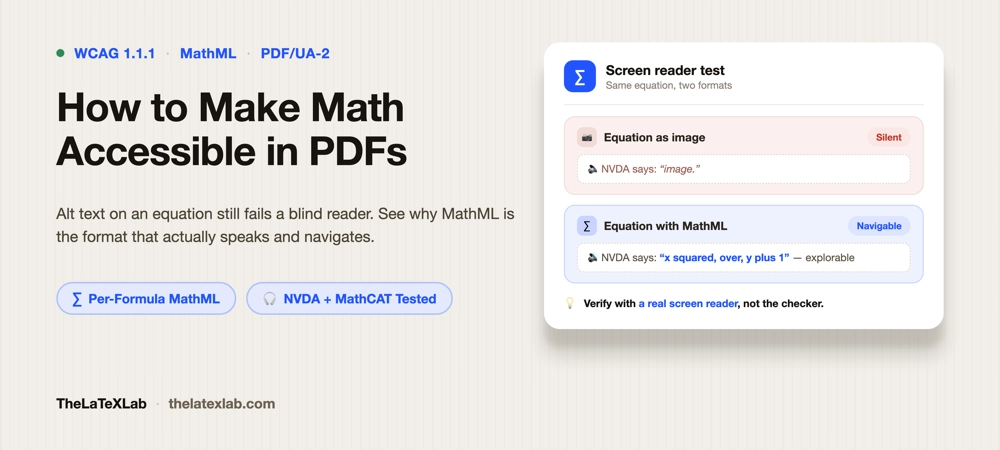
Math accessibility comes down to one question: when a screen reader reaches an equation, does it read the math, or does it say “image” and move on? In most PDFs it says “image,” because the equation was baked in as a picture with no underlying structure. This guide covers what actually makes equations screen-reader accessible in 2026, why MathML is the real answer to make math accessible.
The short version: an accessible equation carries MathML, a structured representation a screen reader can speak and navigate. A flat image of an equation, even with alt text, is a distant second. And no matter which route you take, you have to verify the result with an actual screen reader, because “the file says it has MathML” and “a blind reader can actually use it” are still two different claims in 2026.
Why math breaks in a PDF
A sighted reader sees an equation as a single visual object. A screen reader needs structure: which part is a numerator, which is a subscript, where a square root starts and ends. A PDF gives it that structure only if the math was tagged with it. Three things commonly go wrong:
- The equation is an image. Exported from Word, a plotting tool, or an old LaTeX workflow, it is just pixels. A screen reader announces “image” or nothing at all.
- The equation is text, but unstructured. Some PDFs render math as a run of characters with no math structure. The reader may voice stray symbols (“x, slash, 2, plus”) in an order that means nothing.
- The equation has alt text, but only linear alt text. Better, but a screen reader reads it start to finish with no way to explore it. For a long expression that is a wall of speech the reader cannot pause inside or re-navigate.
WCAG covers this under 1.1.1 (text alternatives): every non-text element, equations included, needs an accessible alternative. But “an alternative” is a floor. Real math accessibility means the reader can explore the expression, not just hear it recited.
The three ways to handle math, ranked
| Approach | What the reader gets | Verdict |
|---|---|---|
| Image with no alt text | “image” or silence | Fails. Never ship this. |
| Image or text with linear alt text | The expression read start to finish, no navigation | A fallback. Acceptable for short, simple math; painful for long expressions. |
| MathML in a tagged PDF | Structured math the reader can speak and navigate piece by piece | The target. This is what “accessible math” means in 2026. |
What MathML actually gives a reader
MathML encodes the structure and meaning of an expression, not just its appearance. With a screen reader that understands it, a reader can hear the whole equation, then step into it: read just the numerator, expand a subscript, walk a matrix cell by cell, or ask for a fraction to be re-read. For anything beyond a trivial expression, that navigation is the difference between usable and not. Alt text recites; MathML lets the reader explore.
This is not theoretical anymore. PDF 2.0 and PDF/UA-2 added direct support for MathML inside the PDF, so a properly tagged file can carry real, navigable math. The catch, as always, is which readers can actually use it. More on that below, because it is the part most guides skip.
How to make math accessible using LaTeX
If your source is LaTeX, you are in the best position of anyone: the current LaTeX tagging workflow can emit MathML for every equation automatically, with no per-equation manual work. The pieces you need, as of 2026:
- A
\DocumentMetadata{...}declaration as the very first line, before\documentclass, with tagging enabled and the math setup told to produce MathML (the current key ismath/setup=mathml-SE). - Compile with LuaLaTeX, using
unicode-mathfor the math fonts. - A recent TeX Live 2025 (or the rolling release), which is where automated tagging and MathML output are properly supported.
What that produces is worth understanding, because it is more robust than people expect. Each formula ends up with two associated files embedded alongside it: the original LaTeX source of the equation, and a MathML representation. A reader or tool that understands MathML gets the navigable version; anything that falls back still has the LaTeX source as a text alternative. That dual-alternative design is the practical fallback that makes the approach safe to adopt now.
The exact keys in the tagging setup are still evolving release to release, so rather than pin a snippet that may drift, use the LaTeX Project’s official tagging usage instructions for the current invocation, and check your specific document with a math accessibility checker for LaTeX that confirms your equations are actually emitting MathML rather than assuming they are. On the finished PDF, our PDF accessibility checker reports MathML coverage formula by formula, so you can see “all 51 formulas carry MathML” instead of guessing.
Math-heavy thesis or paper that has to be accessible?
We set up LaTeX Template so every compile produces a tagged, WCAG 2.1 AA PDF with MathML on every equation, verified with a screen reader. For a document with hundreds of formulas, fixing the template once beats remediating each equation by hand.
What works for math accessibility in 2026
This is where most articles stop being useful, because MathML in a PDF is only as accessible as the reader opening it. The real support picture right now:
- NVDA plus the MathCAT add-on reads MathML in PDFs. This is the working stack. In a viewer that exposes the MathML, NVDA with MathCAT speaks and navigates the math. This is what makes PDF 2.0 math genuinely usable today.
- JAWS reads math in HTML and in Word, but not yet MathML inside PDFs. JAWS handles math well in a browser or a Word document; PDF MathML support is still catching up as of 2026. So a file that works perfectly in NVDA may still not read in JAWS-in-a-PDF.
- The viewer matters. The MathML has to be exposed by the PDF viewer for the screen reader to reach it. Support is uneven across Acrobat, Foxit, and browser-based viewers, and it is improving release to release.
The practical read: MathML in a tagged PDF is the correct target and it works today with the NVDA plus MathCAT stack, but coverage across all readers is not universal yet. If your audience is fixed on a reader that cannot handle PDF MathML, an HTML version of the document, where MathML plus MathJax has the broadest and most mature screen-reader support, is often the more reliable accessible format. Producing both a tagged PDF and an HTML version is the belt-and-suspenders answer for a high-stakes document.
If your math is in Word Document
Equations authored with Word’s equation editor are OMML (Office Math Markup Language), not MathML. Inside Word, that math is accessible: JAWS and NVDA read OMML equations in the document. The trouble is the export. Saving to PDF does not reliably carry that math through as tagged MathML, and many people paste equations in as images, which strips the accessibility entirely.
If you must deliver a PDF from Word, keep every equation as a real Word equation object (never an image), use Save As PDF rather than Print to PDF, and then verify the output, because the result is inconsistent. For math-heavy work, this is the point where moving the source to LaTeX, or publishing to HTML, pays off: both give you a more dependable path to navigable math than Word-to-PDF does.
Chemistry and other hard cases
Standard MathML handles algebra, calculus, and most notation well. It struggles at the edges: complex chemical structures, long reaction schemes, and diagrams that are visual by nature. A benzene ring or a 3D protein structure is not an equation, and no markup reads it meaningfully on its own. For those, the accessible answer is usually a carefully written text description of what the structure conveys, authored by someone who understands the content, plus the structured data where a standard exists. This is genuinely hard, it is an area where automated tools cannot help much, and it is worth budgeting real human time for rather than expecting a checker to solve it.
How to verify math accessibility
You cannot confirm math accessibility from a checker alone. A checker tells you MathML is present; only a screen reader tells you it reads correctly. The verification that matters:
- Confirm the MathML exists. Check the LaTeX Templaet or the compiled PDF for per-formula MathML coverage. Every equation should carry it, not most.
- Listen to it. Open the PDF in a viewer that exposes MathML and read the equations with NVDA plus MathCAT. Confirm the math is spoken sensibly and that you can navigate into it, not just hear a flat recitation.
That second step is the same manual pass every accessible document needs, covered in our guide on how to check if a PDF is accessible. Math is simply the part most likely to look fine on a report and fail in a reader.
FAQ
What is the best format for accessible math?
MathML, because it encodes the structure of an equation so a screen reader can navigate it, not just recite it. In a PDF that means a tagged PDF (PDF/UA-2) that carries MathML per formula. In a browser it means MathML rendered by MathJax, which currently has the broadest screen-reader support. A flat image of an equation, even with alt text, is a fallback, not accessible math.
Can screen readers read math in a PDF in 2026?
Yes, with the right stack. NVDA plus the MathCAT add-on reads and navigates MathML in a tagged PDF, in a viewer that exposes it. JAWS reads math well in HTML and Word but does not yet read MathML inside PDFs. So the same accessible PDF can work in NVDA and still not read in JAWS, which is why you verify with the reader your audience uses.
Is alt text on an equation image enough?
It is a fallback, not a full solution. Alt text is read start to finish with no way to navigate inside the expression, which is fine for a short, simple equation but poor for anything long. Real math accessibility means structured MathML the reader can explore. Use alt text only when you genuinely cannot produce MathML.
How do I make LaTeX equations accessible?
Use the current LaTeX tagging workflow: a \DocumentMetadata declaration before \documentclass with tagging on and the math setup producing MathML, compiled with LuaLaTeX on TeX Live 2025. Each formula is then tagged with both its LaTeX source and a MathML version. Confirm the output with a math accessibility checker and a screen reader, since the exact setup keys change between releases.
Does converting math to HTML make it more accessible than a PDF?
Often, yes, today. MathML in HTML, rendered with MathJax, has the most mature and widely supported screen-reader behavior right now, across NVDA, JAWS, and VoiceOver. PDF MathML is real and improving but not yet universal across readers. For a high-stakes math document, producing both a tagged PDF and an HTML version gives the widest reach.
