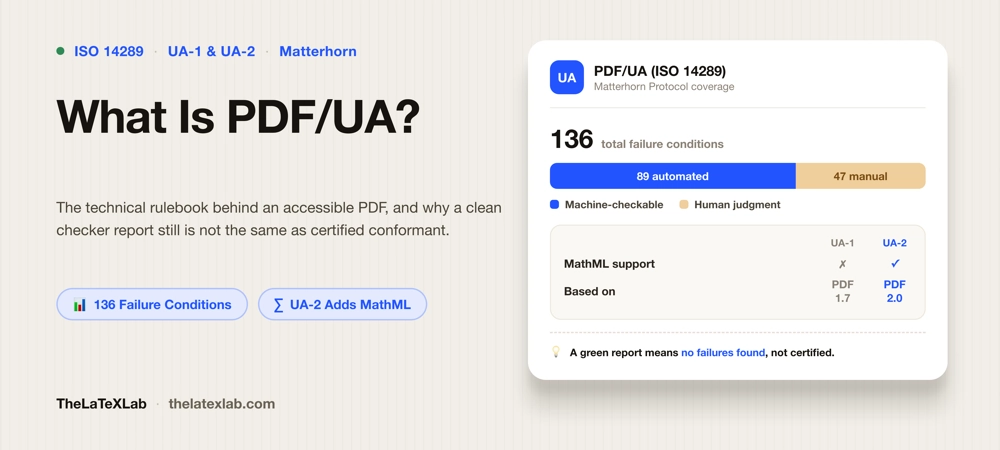
PDF/UA is the ISO standard that defines how an accessible PDF has to be built. UA stands for Universal Accessibility, and where WCAG describes the outcome a user should get, PDF/UA is the technical rulebook that says exactly how the tags, structure, and metadata inside a PDF must be constructed to deliver it. If you have been told your documents need to be “PDF/UA compliant” and want to know what that actually means, and how it differs from a merely tagged PDF or from WCAG, this is the short version worth reading.
What is PDF/UA
PDF/UA is published as ISO 14289. It does not tell you what a document should look like or which content to include. It specifies how the machine-readable structure of the file has to be assembled: every heading tagged as a heading, tables built with real header cells, figures carrying alternative text, a defined reading order, correct language and title metadata, and a long list of technical rules about how those tags may and may not be nested.
The key distinction: a tagged PDF is the raw material, and PDF/UA is the specification for doing the tagging correctly. Any PDF can carry a tag tree. PDF/UA defines whether that tag tree is actually built to a standard a screen reader can rely on. Tagged is the ingredient; PDF/UA is the recipe.
PDF/UA-1 vs PDF/UA-2
There are two versions, and the difference matters if you work with technical or academic documents.
PDF/UA-1 (ISO 14289-1) is the original, published in 2014 and built on PDF 1.7. It is what most existing tools, validators, and remediation workflows still target, and for ordinary text documents it remains perfectly current.
PDF/UA-2 (ISO 14289-2) arrived in 2024, built on PDF 2.0. It is not a minor revision and it is not backward compatible with PDF/UA-1. The changes that matter most:
- Native MathML support. PDF/UA-2 defines how mathematical notation is represented through MathML inside the PDF, so equations can be read and navigated by assistive technology rather than skipped as images. For STEM and academic publishing this is the single biggest improvement, and it is why the current LaTeX workflow targets UA-2. The practical side of this is covered in how to make math accessible in PDFs.
- Comprehensive structure and attribute rules. UA-2 adds detailed requirements for structure element attributes, annotations, and intra-document links using PDF 2.0 features that did not exist when UA-1 was written.
- Fewer ambiguities. Vague spots in UA-1 that caused different validators to return different pass or fail verdicts on the same file were tightened in UA-2, so conformance is more consistent.
For a plain report, PDF/UA-1 is fine. For anything with heavy mathematics, PDF/UA-2 is the version to aim for, because it is the first PDF accessibility standard that treats math as first-class content.
PDF/UA vs WCAG: It is not same
This trips up almost everyone. WCAG 2.1 AA and PDF/UA are not competing standards and passing one does not automatically satisfy the other.
WCAG is outcome-based and format-neutral: it says a user must be able to perceive text alternatives, follow a sensible reading order, and read text against its background, without specifying PDF mechanics. PDF/UA is PDF-specific and mechanical: it says exactly how to build the file so those outcomes are possible. PDF/UA covers the structural machinery. It does not judge color contrast, whether alt text is meaningful, or whether a heading is descriptive, all of which WCAG’s AA level requires. The defensible target is both: build to PDF/UA and review against WCAG. We break down that split in our guide on what WCAG 2.1 AA requires of a PDF.
Why “tagged” does not mean “PDF/UA compliant”
A file can report “Tagged: yes” and still fail PDF/UA badly. Conformance is not a single flag; it is a long list of conditions, and this is where the standard gets concrete.
The PDF Association maintains the Matterhorn Protocol, the reference model for testing PDF/UA-1 conformance. It breaks the standard into 31 checkpoints and 136 individual failure conditions. The number worth remembering is how they split: only about 89 of those 136 conditions can be checked by software. Roughly 45 require a human to judge, and a couple have no defined automated test at all.
That split is the whole point. An automated PDF/UA checker can confirm the machine-checkable conditions quickly, which is genuinely useful and the right first step. But it cannot confirm that alt text is meaningful, that the reading order makes sense, or that a heading describes its section. A green result from a validator means “no machine-detectable failures found,” not “certified PDF/UA conformant.” Anyone selling a one-click PDF/UA certification is overstating what any tool can do.
How to tell if a PDF targets PDF/UA
Two quick checks, then the real one:
- The claim. A file built to the standard declares it in its metadata (an XMP entry stating PDF/UA-1 or PDF/UA-2). That claim is easy to read but easy to fake; it means the author asserted conformance, not that the file achieves it.
- The validation. Run the file through a PDF/UA checker to test it against the machine-checkable Matterhorn conditions and see whether the structure actually holds up, not just whether the flag is set.
- The human pass. For the conditions no tool can score, read the document with a screen reader. The full method is in our guide on how to check if a PDF is accessible.
Who needs PDF/UA
PDF/UA is rarely named in law by itself, but it is the technical route regulators and standards point to. Section 508 in the US references PDF/UA as best practice for federal documents. In Europe, the standard behind the European Accessibility Act (EN 301 549) requires WCAG 2.1 AA plus structured tagging for documents, and PDF/UA is the established way to deliver that tagging. Academic publishers and universities, under the same accessibility pressure, increasingly ask for PDF/UA conformant output. If you produce documents from LaTeX, this is why the modern workflow sets `pdfstandard = ua-2` in its `\DocumentMetadata` declaration: it tells the compiler to build toward the standard from the start rather than remediating a flat PDF afterward.
Need PDF/UA compliant Journal Template
We set up LaTeX document classes and templates so they compile following PDF/UA guidelines, tagged PDFs with correct structure, MathML on equations, and proper metadata, verified with a validator and a screen reader.
FAQ
Is PDF/UA the same as WCAG?
No. WCAG 2.1 AA is an outcome-based, format-neutral standard; PDF/UA (ISO 14289) is a PDF-specific technical specification for how the tags and structure must be built. PDF/UA covers the structural requirements a PDF needs, but not WCAG’s visual and editorial criteria like color contrast or whether alt text is meaningful. Best practice is to conform to PDF/UA and review against WCAG, since neither fully replaces the other.
Should I target PDF/UA-1 or PDF/UA-2?
For ordinary text documents, PDF/UA-1 (ISO 14289-1, based on PDF 1.7) is still current and the most widely supported by existing tools. For documents with significant mathematics, target PDF/UA-2 (ISO 14289-2, published 2024, based on PDF 2.0), because it is the first version with native MathML support, which makes equations accessible rather than skipped. PDF/UA-2 is not backward compatible with UA-1.
Does a tagged PDF automatically meet PDF/UA requirements?
No. Tagging is necessary but not sufficient. PDF/UA defines a long list of conditions for how tags must be built and nested, and a file can be tagged while still failing many of them. The Matterhorn Protocol breaks PDF/UA-1 into 136 failure conditions; a tagged file that has never been validated against them is very unlikely to conform.
Can a checker fully certify PDF/UA?
No tool can. Of the 136 Matterhorn failure conditions, only about 89 are machine-checkable; the rest need human judgment, such as whether alt text is meaningful or the reading order makes sense. A clean automated report means no machine-detectable failures were found, not that the file is certified conformant. Real conformance needs an automated pass plus a human review. Real conformance needs an automated pass plus a human review. Use our PDF/UA checker
Does LaTeX produce PDF/UA PDFs?
Yes, as of recent releases. A `\DocumentMetadata` declaration with `pdfstandard = ua-2` and `tagging = on`, compiled with LuaLaTeX on a current TeX Live, produces a tagged PDF built toward PDF/UA-2 at compile time, including MathML for equations. You still add alt text and table headers by hand, and you should still validate the output, but the structural work is done at the source rather than in Acrobat afterward.
