To make a PDF WCAG 2.1 AA compliant, you have to satisfy two very different kinds of requirement: the structural ones a tagged PDF handles for you, and the visual and editorial ones that no software can judge and that you have to check by eye. Most guides list the success criteria and stop. This one explains, in plain English, what AA actually asks of a PDF, which half is automatic and which half is on you, and how to verify the whole thing. Making a PDF WCAG compliant means meeting WCAG 2.1 AA, the bar nearly every accessibility law now points to, so it is worth getting right rather than guessing.
What WCAG 2.1 AA means for a PDF
WCAG is outcome-based. It says what a user must be able to do, perceive a text alternative, read content in a sensible order, make out text against its background, without dictating the file-format mechanics. It was written for the web, so only about 20 of its roughly 50 A and AA success criteria actually bite on a document. The rest are about things a static PDF does not have, like audio players and time limits.
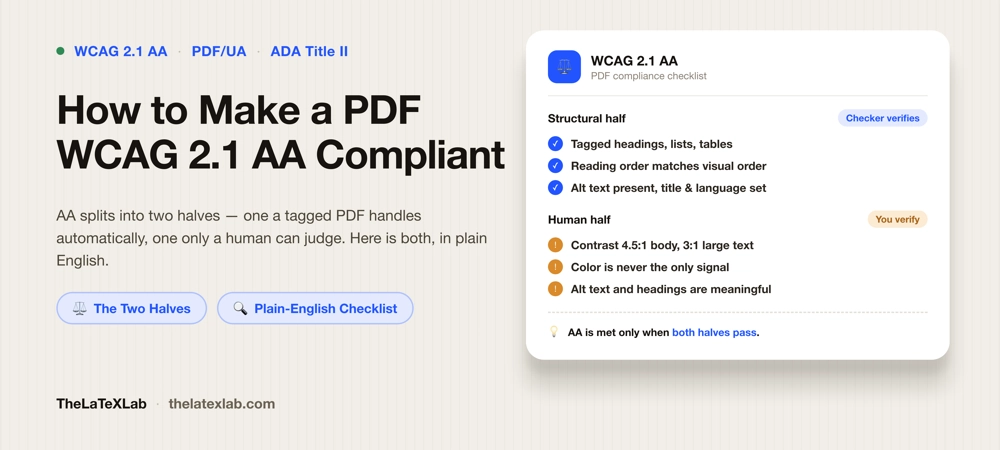
Those 20 or so split cleanly into two groups, and keeping them separate is the whole trick:
- The structural half. Tags, headings, reading order, alt text presence, language, a title. These are mechanical. A properly tagged PDF satisfies almost all of them, and a checker can verify them.
- The human half. Contrast, use of color, whether alt text is meaningful, whether the reading order actually makes sense. No tool can score these. They need a person.
There is also a technical shortcut worth knowing: PDF/UA (ISO 14289) is the PDF-specific standard that translates WCAG’s structural goals into exact tagging rules. Building to PDF/UA-1 is the most established way to cover the structural half of WCAG for a PDF. It does not, however, cover the human half, which is why “we passed PDF/UA” and “we meet WCAG 2.1 AA” are not the same statement.
The structural half: what a tagged PDF gives you
These are mostly Level A criteria, the foundation. A correctly tagged PDF covers them, which is why making a tagged PDF is step one. Each maps to a specific WCAG success criterion:
- Tagged structure (1.3.1 Info and Relationships). Headings tagged as headings, lists as lists, tables as tables with header cells. This is the single biggest one.
- Reading order (1.3.2 Meaningful Sequence). The tag order matches the order a sighted reader would follow.
- Alt text present (1.1.1 Non-text Content). Every meaningful image carries a text alternative; decorative images are marked as artifacts so they are skipped.
- Document title (2.4.2 Page Titled). A real title is set in the metadata and the viewer is told to show it, not the filename.
- Language (3.1.1 Language of Page). The primary language is declared so a screen reader uses the right pronunciation.
- Link text (2.4.4 Link Purpose). Links describe where they go, not “click here.”
- Form fields (4.1.2 Name, Role, Value; 3.3.2 Labels or Instructions). If the PDF has form fields, each has a label a screen reader can announce.
If your PDF is untagged, none of these are met, and that is the first thing to fix. The mechanics of getting there are covered in our guide on what a tagged PDF is and how to make one.
The AA layer: what Level AA adds
Everything above is largely Level A. Level AA adds a set of criteria that are mostly about visual design and readability, and this is the part that trips people who assume a clean tagging report means compliance. These are the AA-specific requirements:
- Contrast (1.4.3). Body text needs a contrast ratio of at least 4.5:1 against its background. Large text (roughly 18pt, or 14pt bold) needs at least 3:1. Light grey captions and colored links on colored backgrounds are the usual failures.
- Non-text contrast (1.4.11). Meaningful graphics and the parts of form controls need at least 3:1 as well, so a chart’s lines or a field’s border are distinguishable.
- Use of color (1.4.1, a Level A criterion but the same family). Color cannot be the only way you convey something. “The required fields are in red” fails; “required fields are marked with an asterisk and in red” passes.
- Resize and reflow (1.4.4, 1.4.10). Text has to stay usable when zoomed to 200%, and content should reflow without loss. PDFs are weak here, and good tagging is what makes the reflow view usable at all.
- Images of text (1.4.5). Use real, selectable text rather than a picture of text. A scanned page of type fails until it is OCR’d and tagged.
- Descriptive headings and labels (2.4.6). Headings and form labels have to actually describe what they introduce, not just exist.
- Language of parts (3.1.2). A passage in another language should be marked as such, so it is pronounced correctly.
Notice how many of these are judgment calls. A validator can confirm a heading tag exists (1.3.1); it cannot confirm the heading is descriptive (2.4.6). It can confirm an image has alt text (1.1.1); it cannot confirm the alt text is useful. It cannot see that your body text is 3.8:1 grey. That is the human half, and it is where real AA compliance is won or lost.
Need a PDF that actually meets WCAG 2.1 AA?
We set up LaTeX sources so the structural half is compliant on every compile, then check contrast, alt text, and reading order so the human half holds up too, verified with a validator and a screen reader. You get a document that passes the check and reads correctly.
The plain-English WCAG 2.1 AA PDF checklist
Put together, here is what you are actually checking. Run down it for any PDF that has to meet WCAG 2.1 AA:
- The document is tagged, and the tags are valid, not just present.
- Headings use real heading tags in a logical order (no skipped levels), and each describes its section.
- Reading order matches the visual order.
- Every meaningful image has genuine, descriptive alt text; decorative images are artifacts.
- Tables have header cells marked; complex tables have scope set correctly.
- A document title is set and shown; the primary language is declared.
- Body text meets 4.5:1 contrast; large text meets 3:1; meaningful graphics meet 3:1.
- Color is never the sole way information is conveyed.
- Text is real text, not an image of text; the file is not a flat scan.
- Links have descriptive text; any form fields have labels.
- Equations are exposed as accessible math, not flattened images.
The last point matters for anything technical: math is part of 1.1.1, and a flat equation image fails it. Getting equations right is its own task, covered in how to make math accessible in PDFs.
How to verify WCAG 2.1 AA on a PDF
You cannot certify AA from a single checker, and any tool that claims to is overstating. The honest verification is in two passes, matching the two halves:
- Automated pass for the structural half. Run the file through a PDF accessibility checker to confirm tagging, reading structure, metadata, title, and language, and to catch missing alt text. This clears most of the Level A criteria quickly.
- Human pass for the AA layer. Check contrast with a contrast tool against the 4.5:1 and 3:1 thresholds. Read the document with a screen reader to confirm the reading order and alt text make sense. Eyeball it for color-only cues and images of text.
The full two-pass method, including the screen-reader walkthrough, is in our guide on how to check if a PDF is accessible. Treat a clean automated report as necessary, not sufficient. AA is only met when both passes agree.
The efficient route if your PDF comes from LaTeX
If you generate the PDF from LaTeX, the structural half is almost free. A document set up with the current tagging workflow produces tagged headings, lists, structure, and MathML on every compile, so criteria like 1.3.1, 1.3.2, 2.4.2, and 3.1.1 are handled at the source rather than remediated afterward. You still own the human half: choose readable colors that clear 4.5:1, write real alt text on every figure, and avoid color-only cues. Fixing this once in a template is far cheaper than checking every output PDF by hand, especially for a university thesis or dissertation.
FAQ
Is a tagged PDF automatically WCAG 2.1 AA compliant?
No. Tagging covers the structural criteria (roughly the Level A set: correct tags, reading order, alt text presence, title, language). WCAG 2.1 AA also requires contrast of at least 4.5:1, no color-only cues, descriptive headings, meaningful alt text, and real text instead of images of text. Those are visual and editorial judgments a tag tree does not capture, so a tagged PDF is necessary but not sufficient for AA.
What contrast ratio does WCAG 2.1 AA require in a PDF?
Body text needs at least 4.5:1 against its background. Large text (about 18pt, or 14pt bold) needs at least 3:1. Meaningful non-text elements like chart lines and form field borders also need at least 3:1 under criterion 1.4.11. Check these with a contrast tool; no accessibility checker measures rendered contrast for you.
Is meeting PDF/UA the same as meeting WCAG 2.1 AA?
Not quite. PDF/UA-1 is the technical route that satisfies WCAG’s structural requirements for a PDF, and building to it is the best way to cover that half. But WCAG 2.1 AA adds requirements PDF/UA does not check, notably contrast, use of color, and whether alt text and headings are actually meaningful. Aim for PDF/UA plus a human review of the visual and editorial criteria.
Which WCAG 2.1 AA criteria apply to a PDF?
About 20 of the roughly 50 A and AA criteria. The ones that matter most for documents are 1.1.1 (alt text), 1.3.1 (tags), 1.3.2 (reading order), 1.4.1 (use of color), 1.4.3 (contrast), 1.4.4 (resize), 1.4.5 (images of text), 1.4.10 and 1.4.11 (reflow and non-text contrast), 2.4.2 (title), 2.4.4 (link purpose), 2.4.6 (descriptive headings), 3.1.1 (language), 3.1.2 (language of parts), and 4.1.2 (name, role, value) for any form fields.
Do I need WCAG 2.1 AA or the newer WCAG 2.2?
For most legal requirements today, including ADA Title II, Section 508, and the European Accessibility Act, WCAG 2.1 AA is the referenced bar. WCAG 2.2 adds a few more AA criteria, mostly about focus and input, that are largely about interactive interfaces rather than static documents. Meeting 2.1 AA is the priority for a PDF; check whether your specific obligation names 2.2.
