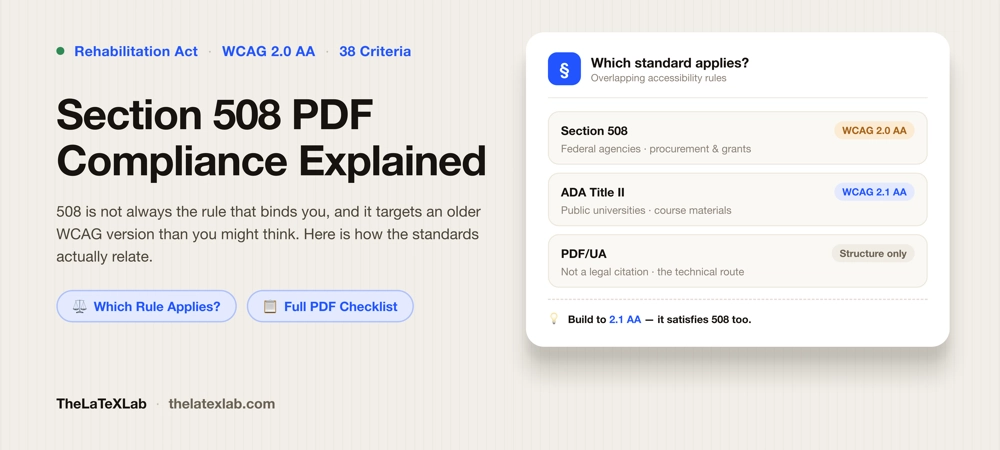
Section 508 PDF compliance means one specific thing: the PDF meets WCAG 2.0 Level AA, which is the technical standard Section 508 adopted. Two things about that surprise people. The standard is WCAG 2.0, not the newer 2.1 that ADA Title II uses. And Section 508 may not be the rule that actually binds you, even if someone told you your document has to be “508 compliant.” This guide covers who Section 508 applies to, what it requires of a PDF, how it lines up with WCAG and PDF/UA, and how to check a file.
Does Section 508 apply to you?
Section 508 is part of the Rehabilitation Act. It covers information and communication technology that federal agencies develop, procure, maintain, or use. That is the scope. It is a rule about what the federal government builds and buys.
It does not directly bind universities, colleges, or private companies by statute. It reaches other parties two ways:
- Procurement. If you sell or deliver ICT to a federal agency, your contract will require it to meet the 508 standards. That is how vendors and contractors get pulled in.
- Grant and contract terms. Federal grants often require deliverables produced with the funding to meet 508 standards. If your grant says so, it applies to that deliverable, by contract rather than by statute.
So if you are a researcher writing a report for a federal agency, or delivering documents under a grant whose terms name Section 508, then yes, 508 is your standard for that document.
If you are at a university and nobody has pointed you at a specific contract, your real obligation is probably a different rule:
- Section 504 covers recipients of federal financial assistance. Nearly every college receives it through student aid or research grants, so 504 applies to the institution broadly.
- ADA Title II covers public universities and requires WCAG 2.1 Level AA. This is the rule behind the current push on course materials and theses. We cover what that means day to day in our guide on ADA Title II and accessible course materials.
This distinction is worth pinning down, because “make it 508 compliant” is often used loosely to mean “make it accessible.” The versions of WCAG behind these rules are not the same, so it is worth knowing which one you are being held to.
What Section 508 requires of a PDF
The Revised 508 Standards were published in January 2017 and took effect in January 2018. They dropped the old product-specific checklist and instead incorporate WCAG 2.0 Level A and AA by reference, applying those success criteria to both web and non-web electronic content. A PDF is non-web electronic content, so the same criteria apply to it. The Access Board publishes guidance on applying WCAG to non-web content for exactly this reason.
Conformance is strict. There are 38 applicable success criteria, and a document that fails even one does not conform.
For a PDF, those criteria resolve to a familiar list: the file is tagged, the reading order is correct, images have alt text, headings are real headings, tables have header cells, the title and language are set, links describe where they go, text has enough contrast, color is not the only cue, and the text is real text rather than a picture of text. Most of that is the structural work that tagging handles. The rest is judgment a person has to make. We break that split down in our guide on what WCAG 2.1 AA requires of a PDF, and it applies the same way at 2.0.
Section 508, WCAG 2.1, and PDF/UA
Three standards get mixed together here. They are related but not interchangeable.
Section 508 uses WCAG 2.0 AA. That is the version written into the regulation. ADA Title II uses WCAG 2.1 AA. So the two rules point at different versions of the same guidelines, and 508’s is the older one. The Access Board has been reviewing alignment with newer WCAG versions, and in practice many agencies now ask vendors for 2.1 anyway, but 2.0 AA is what the regulation says today.
The practical answer is to build to 2.1 AA. WCAG 2.1 added criteria on top of 2.0 without removing any, so a document that meets 2.1 AA also meets 2.0 AA. If you target 2.1, you satisfy Section 508’s content standard and ADA Title II at the same time, and you do not have to track which rule applies to which document.
PDF/UA is a different kind of thing. It is not what Section 508 names. It is the PDF-specific technical standard for how the tags and structure inside the file must be built, and it is the established route to the structural criteria that both WCAG versions require. Building to PDF/UA does not by itself prove 508 conformance, because it does not cover contrast, color use, or whether alt text is meaningful. It does cover the machinery. More on that in what PDF/UA is.
We can make your LaTeX documents 508 compliant.
We set up LaTeX sources and templates so the structural criteria pass on every compile, then check contrast, alt text, and reading order, with a validator and a screen reader. You get a document that conforms and reads correctly.
A Section 508 checklist for an academic PDF
Run down this list for any document that has to conform:
- The document is tagged, and the tags are valid, not just present.
- Headings use real heading tags, in order, with no skipped levels.
- Reading order matches the visual order.
- Every meaningful image has alt text. Decorative images are marked as artifacts.
- Tables have header cells marked for rows and columns.
- The document title and language are set in the metadata.
- Links have text that describes where they go.
- Body text meets 4.5:1 contrast; large text meets 3:1.
- Color is never the only way information is conveyed.
- The text is real text. A scanned page fails until it is OCR’d and tagged.
- Equations are real math, not flattened images.
- Any form fields have labels.
The last two are where academic documents fail most often. A scanned appendix and an equation saved as a picture both break conformance, and neither is obvious from looking at the file.
How to check a PDF for 508 compliance
Checking is two passes, and no tool does both.
Run the file through a PDF accessibility checker first. That confirms the mechanical criteria: tagging, structure, reading order, metadata, title, language, and missing alt text. It is fast and it catches most of what fails.
Then check the rest by hand, because software cannot score it. Measure contrast with a contrast tool. Read the document with a screen reader to confirm the reading order makes sense and the alt text is actually useful. Look for color-only cues and images of text. A clean automated report means no machine-detectable failures were found. It does not mean the document conforms, and any tool claiming to certify 508 compliance in one click is overstating what it can do.
If your PDF comes from LaTeX
The structural criteria are close to free if you generate the PDF from LaTeX. A current setup tags headings, lists, structure, and math on every compile, so tagging, reading order, title, and language are handled at the source instead of remediated afterward. The workflow is in our guide on tagged PDFs and how to create one.
You still own the judgment criteria. Pick colors that clear 4.5:1, write real alt text on every figure, and do not rely on color alone in a plot legend. For a report series or a grant deliverable that repeats, fixing the template once is cheaper than checking every output by hand.