Accessible course materials are now a legal requirement under ADA Title II for faculty at US public colleges. The rule sets WCAG 2.1 AA as the standard for everything you post to Canvas, Blackboard, or a course site. The deadline recently moved, so it is no longer April 2026, but the work is the same. It is harder if you teach a STEM or math-heavy course from LaTeX notes and slides. This guide covers what has to change: PDFs, math, figures, slides, and video.
What ADA Title II requires in Course Materials
In 2024 the Department of Justice finalized a rule requiring state and local government entities, which includes public universities, to make their web content and mobile apps accessible to WCAG 2.1 Level AA. That covers the material you deliver through a learning management system: lecture notes, slides, syllabi, problem sets, posted readings, and video.
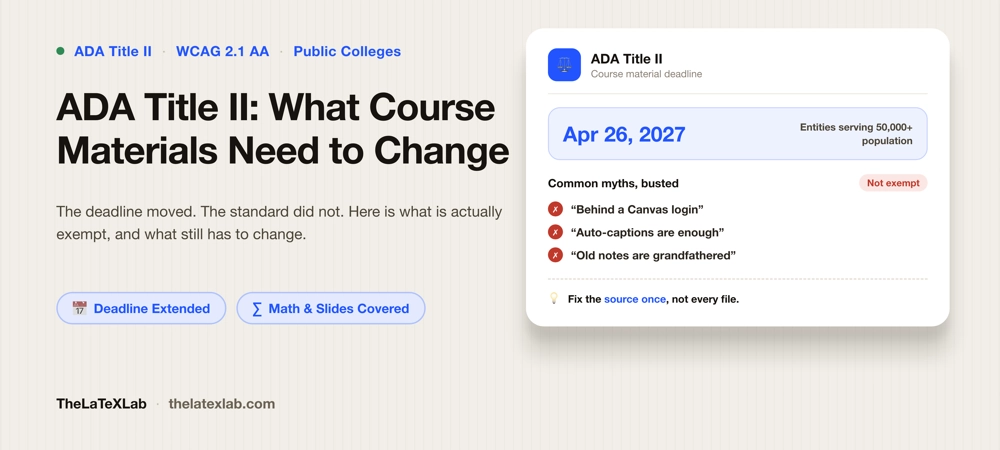
The dates changed in 2026. An interim final rule published in April 2026 extended compliance to April 26, 2027 for entities serving populations of 50,000 or more, which is most public universities, and April 26, 2028 for smaller entities. The DOJ cited resource constraints and the limits of current technology, including generative AI, to remediate accessibility at scale. So if your department told you everything had to be fixed by April 2026, that is out of date. The obligation and the standard have not changed. You have more time, not less work. Read more about Section 508.
What is not exempt
The rule has a few narrow exceptions, and they are narrower than most faculty assume.
- “It is behind a Canvas login, so it is private and exempt.” No. The password-protection exception is only for individualized documents about a specific person, such as a student’s graded work or account records. General course materials that your class uses are in scope, login or not.
- “My old lecture notes are grandfathered.” Only if they are genuinely not in use. The preexisting-document exception does not apply to anything you actually assign or teach from after the compliance date, even if you wrote it years ago. Use it this term and it is covered.
- “Auto-captions handle the video.” They do not. Unreviewed machine captions on Kaltura, Panopto, or YouTube routinely mangle terminology and are a well-known audit failure. Captions have to be accurate.
- “It looks fine, so it is accessible.” A PDF can look immaculate and be completely untagged, which means a screen reader gets nothing from it. Visual polish and accessibility are unrelated.
Even genuinely exempt content still has to be made accessible on request, under the older effective-communication rule. The exceptions cut down the bulk work. They do not remove your duty to a student who needs the material.
Documents and PDFs
Auditors consistently find the worst problems not on the public website but inside the LMS: untagged PDFs, and scanned PDFs, living in course shells. A scanned handout saved as a PDF is just images of pages. It has zero structure and zero accessibility until it is OCR’d and tagged, or replaced.
If your notes come from LaTeX, this is more fixable than it looks. Modern LaTeX produces a tagged, accessible PDF at compile time, so your headings, lists, and structure are handled at the source rather than remediated file by file. The mechanics are in our guide on what a tagged PDF is and how to make one, and you can check whether your source is emitting accessible output with a LaTeX accessibility checker before you ever hand a PDF to students. For anything scanned, plan to OCR and tag it or swap it for a real digital version. Either way, confirm the result rather than trusting it, using the method in how to check if a PDF is accessible.
Math and complex figures
This is the part STEM faculty struggle with most. There are two separate problems here.
Math is solvable. The mistake is shipping equations as images, which a screen reader skips entirely. The fix is MathML, the format that makes an equation readable and navigable. If you write in LaTeX, the current workflow emits MathML for your equations automatically, which is a large part of why LaTeX is a better starting point than Word for a math-heavy course. The full picture is in how to make math accessible in PDFs.
Complex figures are harder, but not impossible. A common worry is how to write alt text for something like a 3D protein structure or a fifteen-panel microscopy figure. You do not have to reproduce the figure in words. You have to convey what it shows and the point a student should take from it. Write alt text that says what the figure is and why it is there, add a longer description or a data table for the detail that matters, and link to an accessible source if one exists. Some figures cannot be reduced to text at all. For those, the individualized accommodation process, working with your disability services office for a specific student, is a normal part of the system. The standard is meaningful access, not a full text copy of every image.
Slides and lecture decks
Beamer produces untagged PDFs, and unlike a normal article you cannot fix that by turning tagging on. This catches a lot of LaTeX users out. A Beamer deck cannot be read by a screen reader. The full explanation and your options are in why Beamer slides fail accessibility. There are two routes: rebuild the deck in the accessible presentation class ltx-talk, or keep presenting from Beamer and deliver a separate tagged, accessible companion document as the accessible record. Slides are the piece faculty most often hand off, because doing it well takes time.
We can make your course materials accessible for you.
We handle lecture slides and course documents: tagged PDFs, MathML on your equations, alt text, and an accessible slide deck or companion document, checked with a validator and a screen reader. The work is done at the source, so next semester’s output is accessible too.
Video and external links
Two more areas:
Video needs accurate captions, which means reviewing the auto-generated ones rather than trusting them. Any content that is only shown visually needs a spoken or text description too. If you reuse a large back catalog of recorded lectures, this is often the biggest time sink, so scope it early.
External links come up a lot. If you link students to the Protein Data Bank, NCBI, or a publisher’s paper and that site is not accessible, are you liable? Your obligation is your own content. You cannot fix someone else’s site. What you can do is not make an inaccessible external site the only way to get required information. Give an accessible path to the same thing: a summary, a data table, or another source. Then a student is not blocked by a site you do not control.
How to prioritize
You do not have to fix everything at once. The extended deadline is time to do this properly, not time to postpone. A sensible order:
- Current, high-enrollment, student-facing material first. This term’s active accessible lecture notes, slides, and readings matter more than an archive nobody opens.
- Fix the source, not the output. Setting up your LaTeX notes and slide template to produce accessible output by default is far cheaper than remediating each PDF forever. Do it once and next semester is mostly free.
- Handle the genuinely hard cases through process. Irreducible figures and one-off legacy files can go through the accommodation route or the make-accessible-on-request path while you fix the bulk.
Some faculty have considered a different response: drop their own notes and adopt a publisher’s packaged materials to make it someone else’s problem. You built those materials for a reason. Making them accessible is usually less work than abandoning them, especially if they already come from LaTeX.