Converting LaTeX to Accessible HTML with Pandoc is one of the better ways to make math-heavy content accessible, because HTML with real MathML is read more reliably by screen readers than math in any PDF. Pandoc is the usual tool for the job. The catch is that Pandoc parses LaTeX itself instead of running a TeX engine, so it converts clean, standard documents well and struggles with custom macros, TikZ, and homegrown class files. This covers the flags that produce accessible HTML, where Pandoc breaks, and what to reach for when it does.
HTML is more accessible compared to PDF
For math especially, HTML is the stronger accessible format. Math encoded as MathML in an HTML page is read by NVDA with MathCAT, JAWS, and others more consistently than math in a PDF, which is newer and depends on the reader’s PDF viewer, as covered in which screen readers read math in PDFs. HTML also reflows and resizes on any screen, which clears WCAG criteria that PDFs tend to fail.
This is why arXiv now offers papers in HTML and why accessibility offices often prefer HTML for math over a tagged PDF. If you have the choice, an accessible HTML version can be less work and reach more readers than fighting a math PDF into shape. Pandoc is the common path from LaTeX to that HTML.
The Pandoc command to make LaTeX to accessible HTML
A workable starting command:
pandoc paper.tex -s --mathml --section-divs --toc -o paper.htmlThe flags that matter for accessibility:
-s(or--standalone): produces a complete HTML document with proper structure, not a bare fragment.--mathml: outputs math as MathML. This is the important one, covered next.--section-divs: wraps sections in semantic<section>elements.--toc: adds a navigable table of contents.--citeproc: resolves citations and the bibliography, if you use them.
The good news is that Pandoc’s HTML is already semantic. Real LaTeX sectioning becomes <h1> through <h6>, lists become <ul> and <ol>, so the structural side of accessibility is mostly handled, as long as your source uses real sectioning commands rather than hand-formatted headings.
Rendering math as MathML or MathJax in LaTeX
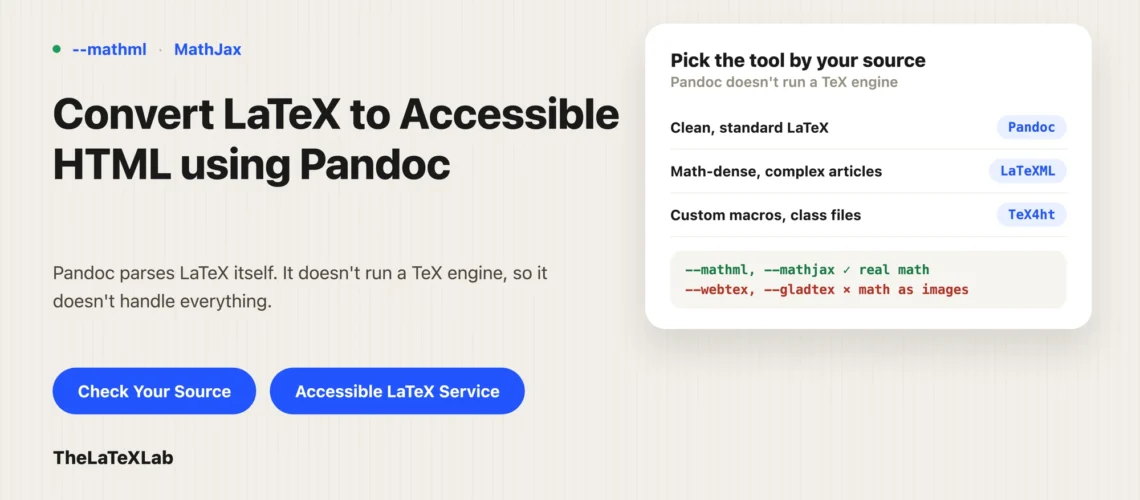
The math flag is the single most important accessibility choice, because it decides whether equations become something a screen reader can read or just a picture. Your options in Pandoc:
--mathml: converts TeX math to MathML, which browsers support natively and screen readers can read. This is the best default for accessibility.--mathjax: renders with MathJax, which also exposes MathML to assistive technology. A good choice; it needs the MathJax script to load in the page.- Avoid
--webtexand--gladtex: both turn math into images, which is exactly the inaccessible result you are trying to get away from.
Whether a given reader actually voices the math still depends on their screen reader, but MathML or MathJax HTML is the broadest-support path, and the mechanics are the same as for a PDF, covered in how to make math accessible in PDFs.
Get Your LaTeX converted to accessible HTML
We convert your document to semantic HTML with real MathML math, sort out the macros and TikZ figures Pandoc drops, and check the result with a screen reader. When Pandoc is the wrong tool for your source, we tell you and use one that fits.
Custom macros often do not convert
Because Pandoc reads LaTeX itself and does not run a TeX engine, it handles many \newcommand definitions and expands them, but complex macros, especially ones built on deeper TeX programming, get ignored or mangled. This is the most common real complaint: people find Pandoc handles only a fraction of the macros they have accumulated over years.
What helps: keep macros as simple \newcommand definitions Pandoc can expand, put them where it can see them, and simplify or inline the exotic ones before converting. There is no way around the underlying fact that Pandoc is not a TeX engine, so a document that leans heavily on custom TeX will not round-trip cleanly.
TikZ and drawn graphics do not convert
TikZ, pgfplots, and other code-drawn graphics need a TeX engine to render, which Pandoc does not have. A tikzpicture is dropped or passed through as raw LaTeX the browser cannot display.
The fix is to pre-render each TikZ figure to an image (SVG or PNG) as part of your build, so Pandoc includes the finished image instead of the drawing code. At that point the diagram is an image like any other and needs a text alternative, which is the same job as alt text in LaTeX, applied to the HTML.
Images and alt text after conversion
Pandoc turns \includegraphics into an <img>, and a figure with a \caption into a <figure> with a <figcaption>. But a caption is not alt text, and Pandoc does not reliably carry a LaTeX alt value into the HTML alt attribute. So after conversion, go through the images and confirm each has a meaningful alt, and add it where it is missing. Decorative images should get an empty alt="" so a screen reader skips them. It is the same judgment as PDF alt text, just applied to the output HTML.
LaTeXML and TeX4ht handle documents Pandoc cannot
For heavily custom or math-dense documents, Pandoc’s LaTeX parsing hits a wall. Two alternatives run closer to real TeX:
- LaTeXML is what arXiv uses to generate its HTML papers. It understands far more LaTeX than Pandoc and produces MathML, which makes it better for complex articles.
- TeX4ht (via
make4ht) runs the actual TeX engine, so it handles macros and class files Pandoc cannot, and outputs HTML with MathML. It takes more setup and is more finicky, but it is more faithful to the source.
Quarto is worth a mention too, but it wraps Pandoc, so it is good for new documents and inherits the same LaTeX-parsing limits on existing ones. Pick the tool by how custom your source is: Pandoc for clean and standard, LaTeXML or TeX4ht for complex or legacy documents.
Checking the HTML is accessible or not
Run your LaTeX source through our LaTeX accessibility checker first to catch structural gaps at the source. After conversion, check the HTML itself: headings in order, every image with a real alt, math as MathML (view source and you should see <math> or MathJax markup, not <img>), and tables with proper headers. Then listen to a math passage with NVDA and MathCAT. Producing the HTML is the easy half; confirming a reader can actually navigate it is the half that counts.