Screen reader can now read math in PDFs in 2026, but only in specific combinations of screen reader, PDF viewer, and platform. Get one of those three wrong and a blind reader hears nothing where an equation should be, even when the PDF is correctly tagged. This is the reader-by-reader breakdown: which screen readers actually read math in a PDF today, which ones only read it on the web or in Word, and how to test your own file before you trust the result.
If you still need to make the math accessible in the first place (image vs alt text vs MathML, the LaTeX workflow), that is a separate job covered in how to make math accessible in PDFs. This post assumes the math is already encoded as MathML in a tagged PDF and asks the next question: will a screen reader read it?
TL;DR
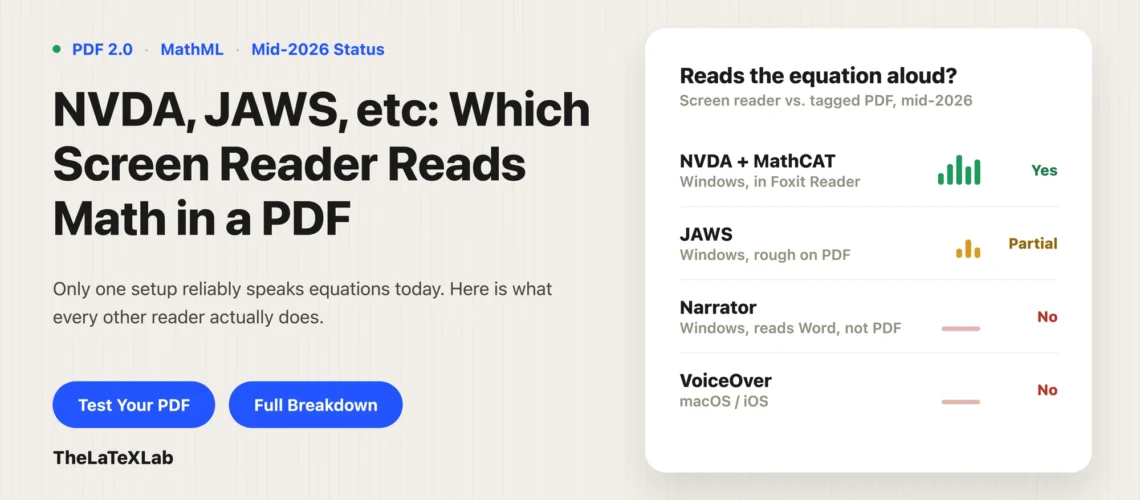
Math in a PDF can be read by a screen reader in 2026, but only on Windows, only in the right viewer, and best with NVDA plus the free MathCAT add-on opening the file in Foxit Reader. JAWS is getting there but is still rough on PDFs. Narrator reads math in Word and PowerPoint but not in a PDF. VoiceOver does not read math in a PDF at all. For Mac readers, and for the widest reach generally, HTML with MathML is still the format that works. The rest of this post is the detail behind each of those.
What changed in 2026
For years the honest answer to “can a screen reader read math in a PDF” was no. Math got baked in as a picture, and a screen reader either skipped it or read the alt text as one flat string with no way to navigate inside the equation.
That changed in March 2026, when the PDF Association announced that accessible math in PDF was real. The mechanism is MathML embedded in a PDF 2.0 file (the same markup web browsers use for math), carried inside the PDF/UA-2 structure. A screen reader that understands MathML can now speak an equation the way a person would (“start fraction, x plus 1, over 2, end fraction”) and let the reader step through it piece by piece instead of hearing it all at once.
Two things have to be true for any of this to work:
- The PDF has to actually contain MathML, in a PDF 2.0 / PDF/UA-2 file. A tagged PDF with equations as images does not qualify. LaTeX produces this with LuaLaTeX and the modern
\DocumentMetadatasetup; Word can produce a version of it too (more on the difference below). - The reader has to open it in software that exposes that MathML. This is the part almost everyone misses, and it is why the same PDF reads perfectly for one person and silently for another.
What each screen reader does with math in a PDF
Here is the state of things as of mid-2026 for math sitting inside a tagged PDF (not on a web page, not in Word):
| Screen reader | Platform | Reads math in a PDF? | What it takes |
|---|---|---|---|
| NVDA + MathCAT | Windows | Yes, best supported | NVDA 2025.1 or later, plus the free MathCAT add-on, opening the PDF in Foxit Reader or Adobe Acrobat Reader |
| JAWS | Windows | Emerging / partial | JAWS 2026 or later; strongest on the web, still rough on PDF matrices; needs Foxit for full exposure |
| Narrator | Windows | Not in PDF (yes in Word/PowerPoint) | Reads native Office math, not documented for MathML in PDF |
| VoiceOver | macOS / iOS | No | No known Mac PDF viewer exposes accessible math to VoiceOver |
NVDA with the MathCAT add-on (Windows)
This is the combination that actually works, and it is the one the LaTeX Project uses in its own demonstrations. NVDA on its own does not read math. You need the free MathCAT add-on, which turns the MathML into speech and braille. MathCAT (by Neil Soiffer, hosted by DAISY) replaced the old MathPlayer that Windows screen readers used to rely on, so if you are following a guide that mentions MathPlayer, it is out of date.
With NVDA 2025.1 or later and the MathCAT add-on installed, open a properly tagged PDF 2.0 in Foxit Reader or Adobe Acrobat Reader, arrow onto an equation, and MathCAT reads it with structure and lets you drill into subexpressions. It also drives a braille display, producing Nemeth or UEB math braille from the same MathML. The LaTeX Project’s own test recordings of tagged vs untagged math PDFs, made with NVDA 2025.1.2 and MathCAT 0.6.10, confirm that mathematics in a tagged LuaLaTeX PDF is read correctly, where the same content in an untagged PDF comes out garbled with sub- and superscripts dropped.
One thing to watch: nothing here is bundled. A blind reader who just installed NVDA will not have MathCAT, and without it your carefully tagged math is silent. If you are testing on someone else’s behalf, install the add-on first.
JAWS (Windows)
JAWS added accessible math support starting with its 2026 releases. The strongest case is on the web, reading MathML in Firefox, Chrome, and Edge. For PDF specifically the support is newer and rougher: the LaTeX Project’s testing noted JAWS pausing in places that make matrices hard to follow, and JAWS still depends on opening the file in a viewer that exposes the math (Foxit). So JAWS can read math in a PDF in 2026, but not yet as cleanly as NVDA plus MathCAT. If your audience is JAWS-first and heavy on matrices, verify with an actual JAWS user rather than assuming.
We set up the LaTeX so every equation carries MathML in a tagged PDF 2.0, and we test it with a real screen reader instead of trusting a score. If PDF is the wrong format for your audience, we will tell you and build the HTML version instead.
Narrator (Windows)
Narrator reads math well, but in Microsoft Office, not in PDF. Recent Windows 11 builds (25H2 and later) improved Narrator’s reading of native Office math in Word and in PowerPoint Slide Show using MathCAT under the hood. There is no documented support for Narrator reading MathML inside a PDF. If your reader uses Narrator and you need them to read equations, hand them the Word file or an HTML page, not the PDF.
VoiceOver (macOS and iOS)
There is no known Mac PDF viewer that exposes accessible math to VoiceOver today. VoiceOver can read MathML in some web and Office contexts, though even there users report navigation bugs, but for math in a PDF on a Mac the answer in 2026 is still no. If any of your readers are on macOS or iOS, a tagged math PDF does not solve the problem for them. Ship HTML.
The PDF viewer matters as much as the screen reader
You can have a perfectly tagged PDF and a screen reader that fully supports math, and still hear nothing, because the PDF viewer in between did not hand the MathML to the screen reader.
There are two ISO-standard ways to put MathML in a PDF 2.0 file: Structure Elements (SE), where the MathML lives in the tag tree, and Associated Files (AF), where it rides along as an attached file. LaTeX’s default (math/setup=mathml-SE) uses the SE method. Support splits along those lines:
- Foxit Reader supports both the SE and AF methods and is currently the most complete PDF viewer for exposing math to a screen reader. Foxit did much of the early implementation work here.
- Firefox (which has a built-in PDF viewer) also supports both methods, but ignores the
/ActualTextattribute and can duplicate some content, so it is workable but not flawless. - Adobe Acrobat Reader supports the SE method (which is what the LaTeX default emits) but not the Associated Files method, and its overall math support is partial. It works for a standard LaTeX-tagged file; do not assume it covers every case.
- Chrome and Edge built-in PDF viewers generally expose no math at all. This matters because these are what most people open a PDF in by default.
So the working recipe on Windows in 2026 is: PDF 2.0 with MathML (SE), opened in Foxit Reader, read with NVDA plus the MathCAT add-on. Change any one of those and results degrade or disappear.
The same equation in PDF, HTML, and Word
PDF is the newest and least settled place to read math. The same equation is far better supported in other formats:
| Format | Support for math today | Notes |
|---|---|---|
| HTML with MathML (and MathJax) | Broadest and most reliable | NVDA + MathCAT, JAWS in Firefox/Chrome/Edge. What universities and arXiv now prefer. |
| Word (native Office math) | Reliable inside the Word app | Narrator and JAWS read it via MathML in the accessibility tree. Reading it in the Word app is solid; exporting to PDF is the weak link. |
| PDF 2.0 with MathML | Works in specific combinations only | Depends on viewer + screen reader + platform, as above. Windows-only in practice. |
This is why accessibility offices, including University of Washington’s, still say delivering math as HTML web pages with MathML and MathJax is preferred over PDF, and why arXiv moved its papers from PDF to HTML. MathJax renders LaTeX or MathML on a page and exposes it to the screen reader (NVDA still needs the MathCAT add-on for the actual speech). If you have the choice between shipping a math-heavy PDF and shipping HTML from your LaTeX, HTML reaches more readers with less fragility.
Exporting math from Word to PDF
Word can now include math when you export to PDF: it writes a <Formula> tag with math speech text and embeds the MathML through a custom MSFT_MathML attribute in the tag tree. That is genuine progress, but it is Microsoft’s own attribute, and reader support for it is still catching up; earlier testers found the exported math came out jumbled or behaved like an ordinary tag. LaTeX’s LuaLaTeX path emits the ISO-standard SE/AF MathML that Foxit, Adobe, and Firefox are built to read, which is why it is the more predictable route for a math PDF right now. If you author in Word, the safer accessible-math delivery is still the Word file itself or an HTML export, not the PDF.
How to test your own file
Do not trust a checker score for math. Automated checkers can confirm a Formula tag exists; they cannot confirm a human hears the equation correctly. Test it by listening:
- Confirm the PDF is PDF 2.0, tagged, and actually contains MathML, not images of equations. Run the source through our LaTeX math accessibility checker to confirm every formula carries MathML before you compile, and check the output with a PDF accessibility check.
- On Windows, install NVDA 2025.1 or later and the free MathCAT add-on.
- Open the PDF in Foxit Reader (the reference viewer for this), arrow onto an equation, and listen. You should hear structured speech (“start fraction…”), and Shift plus arrow keys should let you navigate into the equation.
- Open the same file in Adobe Acrobat Reader to see how it degrades, and try your target reader’s real setup if you know it. If a matrix or a long expression sounds wrong, note it; that is exactly where current support is weakest.
- If any reader is on a Mac, accept that the PDF will not read math for them and provide an HTML or Word alternative.
If you would rather not manage the LaTeX setup and testing yourself, our accessible LaTeX service handles both, and will tell you when HTML is the better format for your audience.