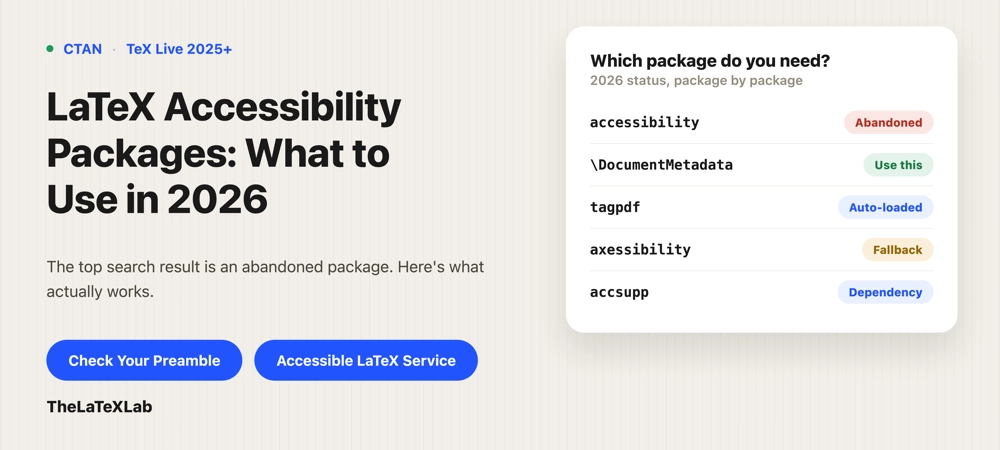
Read this post to know which LaTeX accessibility package to install. People usually install CTAN package literally called accessibility, and that package is abandoned. Its author told people to stop using it in 2020, but it still ships with TeX Live, so people keep finding it and wasting time on it. The modern way to make LaTeX accessible needs almost no package at all. This is what to actually use in 2026, and where the older packages still fit.
TL;DR
You do not install a package to tag a LaTeX document anymore. Put \DocumentMetadata{tagging=on} before \documentclass, compile with LuaLaTeX on TeX Live 2025 or later, and LaTeX loads the tagging engine (tagpdf) for you. Do not use the old accessibility package. For math, use the built-in MathML tagging rather than a separate package. The only packages you might still add by hand are niche: axessibility for a fallback way to voice formulas, and accsupp for low-level control of what a screen reader reads for a specific piece of content.
The abandoned CTAN accessibility package
The CTAN package named accessibility was an early attempt to produce tagged, structured PDFs from LaTeX, targeting Adobe’s PDF 1.5 and 1.6 tagging. The author stopped maintaining it and, as of June 2020, openly discouraged people from using it, saying it would not work in its current form.
It is still distributed in TeX Live, which is the whole problem: it looks like the obvious answer when you search, and its name is exactly what you typed. Loading it today does not get you a compliant PDF and can conflict with the current tagging code. If a guide or template tells you to \usepackage{accessibility}, the guide is out of date.
Tagging is built in, not a package you install
Tagging structure (headings, lists, reading order, tables, links) is now built into LaTeX itself. You turn it on with a metadata declaration, not a package:
\DocumentMetadata{
  tagging = on,
  tagging-setup = {math/setup=mathml-SE},
  pdfstandard = ua-2,
  lang = en-US
}
\documentclass{article}
That block has to be the first line in the file, before \documentclass. It needs TeX Live 2025 or later, and LuaLaTeX for the math part. The full walkthrough of what each key does is in tagged PDFs and how to create one. The point for this post: there is no “accessibility package” to add. The declaration loads what it needs.
tagpdf is loaded automatically now
tagpdf (maintained by Ulrike Fischer, part of the LaTeX kernel effort) is the actual engine that writes the tags. It is real, current, and doing the work, but you no longer load it yourself. When you set tagging=on, \DocumentMetadata loads and activates tagpdf automatically.
You can still write \usepackage{tagpdf} manually, and its documentation describes low-level commands for tagging content the automatic system does not reach yet. But loading it by hand is explicitly not recommended for normal documents anymore. If you are reaching for tagpdf directly, it should be to solve a specific gap, not as your starting point. Where you do need it is for things like table header rows, which you set with \tagpdfsetup{table/header-rows={1}}.
Hire TheLaTeXLab to setup LaTeX Accessibility.
We configure the tagging, math, and alt text correctly for your document or template, and check the output with a real screen reader. You get a file that compiles to an accessible PDF without chasing packages that no longer work.
Which package makes math accessible
Math is the one area where a separate package still comes up, so it is worth being clear about the two routes.
The modern route is MathML. The math/setup=mathml-SE option in the metadata block above tags each equation as MathML under LuaLaTeX, which a screen reader can read and navigate. This is the approach to prefer, and it is covered in how to make math accessible in PDFs.
The older route is axessibility. It takes a different approach: instead of MathML, it hides the original LaTeX source of each formula in the PDF as /ActualText, so a screen reader reads the LaTeX commands. It ships dictionaries that convert common LaTeX commands into spoken words for JAWS and NVDA, and it depends on accsupp, amsmath, amssymb, tagpdf, and xstring. It predates reliable MathML-in-PDF support and still works, which makes it a reasonable fallback where MathML is not an option. But for a new document, MathML tagging is the better target.
accsupp and hidden text (ActualText)
accsupp is a small, low-level package that provides the \BeginAccSupp command, which sets the /ActualText a screen reader reads for a specific piece of content instead of what is visually there. It is what axessibility builds on. You use it directly only in narrow cases, for example a custom glyph, a ligature, or a symbol that would otherwise be read wrong.
For ordinary images this is not the tool you want. Alt text on figures goes through the alt= key on \includegraphics, and images that are actually text use the actualtext key, both of which are covered in how to add alt text in LaTeX. There is also glossaries-accsupp if you use the glossaries package and want accessibility support for entries.
What each package is for
| Package | What it does | Use it in 2026? |
|---|---|---|
accessibility | Old structure-tagging package | No. Abandoned since 2020, still in TeX Live. Avoid. |
\DocumentMetadata (built in) | Turns on structure tagging and MathML | Yes. This is the modern way; not a package you install. |
tagpdf | The tagging engine | Yes, but loaded automatically. Only touch it directly for gaps. |
axessibility | Hides LaTeX source of formulas as ActualText | Fallback for math where MathML is not an option; otherwise prefer MathML. |
accsupp | Low-level ActualText for specific content | Rarely by hand; mostly a dependency. |
glossaries-accsupp | Accessibility for glossary entries | Only if you use glossaries. |
How to check what your document needs
The fastest way to know which of these you actually need is to run your source through our LaTeX accessibility checker. It flags missing tagging, missing alt text, and packages in your preamble that break the tagging code, so you find out whether you are missing a setting or fighting an incompatible package before you start adding things. In most current documents the answer is that you need the metadata declaration and nothing else, and the packages people go looking for are either obsolete or already loaded for them.