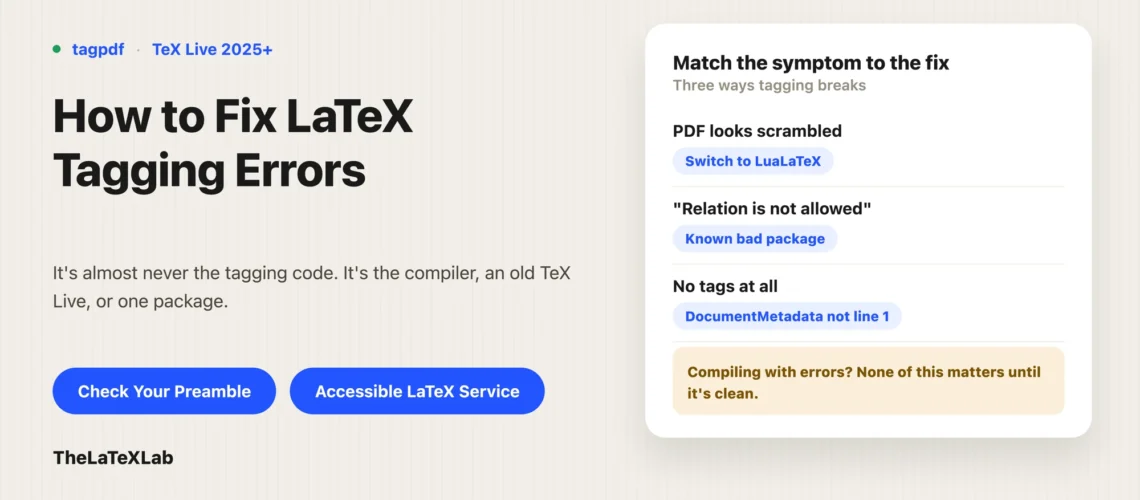
You turned on tagging, and now tagpdf is not working: the PDF comes out scrambled, the log is full of warnings, or nothing seems tagged at all, read this post to Fix LaTeX Tagging Errors. This is almost never a bug in the tagging code itself. It is usually the compiler, an out-of-date TeX Live, or one package in your preamble that does not get along with tagging yet. This walks through the three ways it breaks, the error strings people actually paste, and how to find the package causing it.
Most tagging problems are the compiler or an old TeX Live
Before debugging anything specific, get these two right, because they cause most of the reports:
- Compile with LuaLaTeX, not pdfLaTeX. pdfLaTeX can tag, but LuaLaTeX handles tagging (and MathML for math) far more cleanly, and switching engines resolves a surprising number of “it broke when I enabled tagging” cases on its own. On Overleaf this is Menu, then Settings, then Compiler.
- Use TeX Live 2025 or later. The tagging code is developing fast; an older release is missing features and fixes, and a project pinned to an old TeX Live version will misbehave no matter what your preamble says.
A common real example: a thesis template that loaded titlesec produced a completely scrambled PDF the moment tagging was switched on, and switching the compiler to LuaLaTeX fixed it. Try that before you start pulling packages out.
The PDF comes out scrambled when you enable tagging
If the output turns into garbled or overlapping text as soon as you add \DocumentMetadata{tagging=on}, the cause is almost always a single package interacting badly with the tagging code, not the tagging code failing globally.
Work in this order. First switch to LuaLaTeX (above), which clears many of these. If it still scrambles, the culprit is a package, and you find it by elimination (see “How to find the package” below). The usual offenders are packages that do unusual things with page layout, section titles, or boxes: old titlesec, custom class files, and heavy tikz use are the ones we see most.
“Relation is not allowed” and parent-child warnings
This is the error string people paste most. A warning like “Relation is not allowed” (or other “parent-child” structure warnings) means a package built a piece of PDF structure that the tag tree does not permit, so the tagging engine cannot place it correctly. The warning usually references a structure number and a line, which points you near the offending content.
These are known, documented incompatibilities, not something wrong with your document. Packages reported to trigger these warnings include tabularray, moreverb, unicodefonttable, expex, incgraph, marginalia, and notoccite, among others. If you use one of these, that is your cause. The fix is to swap it for a compatible alternative, or wait for a compatible version, rather than trying to force it. If the culprit is a table package like tabularray, making LaTeX tables accessible covers which table packages tag cleanly.
Packages that are known to break tagging
Not every package is tagging-ready, and the list changes constantly as fixes land. Before assuming your code is wrong, check your preamble against the LaTeX Tagging Project’s package status page, which tracks what works, what partly works, and what does not. Widely used packages that have caused trouble include titlesec, tabularray, and caption or captions-related code (a December 2025 update broke tagging for some users), plus the parent-child offenders above.
When a package you need is not compatible, your options are: switch to an alternative that is (for section formatting, for example, the standard classes or KOMA-Script are safer than titlesec), disable tagging around the problem content as a stopgap, or wait for an update. One catch worth knowing: on Overleaf you cannot run tlmgr update to pull a newer, fixed version of a package yourself, so your only levers there are the rolling TeX Live image or waiting, as covered in making an accessible PDF in Overleaf.
We fix LaTeX documents that won’t tag.
Send us the source that scrambles or refuses to tag. We track down the package or template causing it, get it compiling to a clean tagged PDF, and confirm the output with a real checker.
Tagging seems to do nothing
If there are no errors but the PDF has no tags, or a checker reports “no tags found,” it is usually one of these:
\DocumentMetadatais not the first line. It has to come before\documentclass. If anything precedes it, even a comment-free blank setup or another command, it is silently ignored and you get an untagged PDF with no warning.- Old TeX Live. Automatic tagging needs 2025 or later; on an older release the declaration does nothing.
- pdfLaTeX for a math document. Math tagging as MathML needs LuaLaTeX; on pdfLaTeX the structure may tag but the equations will not.
- The document compiled with errors. A run that ends in errors does not produce a complete tag structure.
One more case that looks like this but is not: a checker says “no tags” while pdfinfo says the file is tagged. That is often the checker not understanding a PDF 2.0 file, not a tagging failure. Confirm with a second tool before you trust it, which is covered in how to check if a PDF is accessible.
How to find the package that’s breaking it
When the cause is “some package,” find it methodically rather than guessing:
- Check your
\usepackagelist against the tagging status page first. Often the answer is right there. - If not, bisect. Comment out half your packages, compile, and see if the problem goes away. Keep halving until one package is left. This finds the culprit in a few compiles even in a large preamble.
- Reproduce it in a minimal document (the metadata block, the one package, a line of text). If that breaks, you have confirmed it.
- Check the LaTeX Tagging Project’s issue tracker for that package. If it is already reported you may find a workaround; if not, report it with your minimal example.
Our LaTeX accessibility checker shortcuts the first step: it flags packages in your preamble that are known to break the tagging code, so you often find out what to change before you start commenting things out.
A document that compiles with errors is never fully tagged
Last thing, because it catches people: clear all LaTeX errors before you decide tagging is broken. A document that “works” but still throws errors does not get a complete tag structure, so a warning-free, error-free compile is the baseline. Once it compiles clean on LuaLaTeX with a current TeX Live and a compatible package set, the tagging almost always does what it should, and what looked like a tagpdf failure turns out to have been one package all along. For the setup that should be producing those tags in the first place, see tagged PDFs and how to create one.